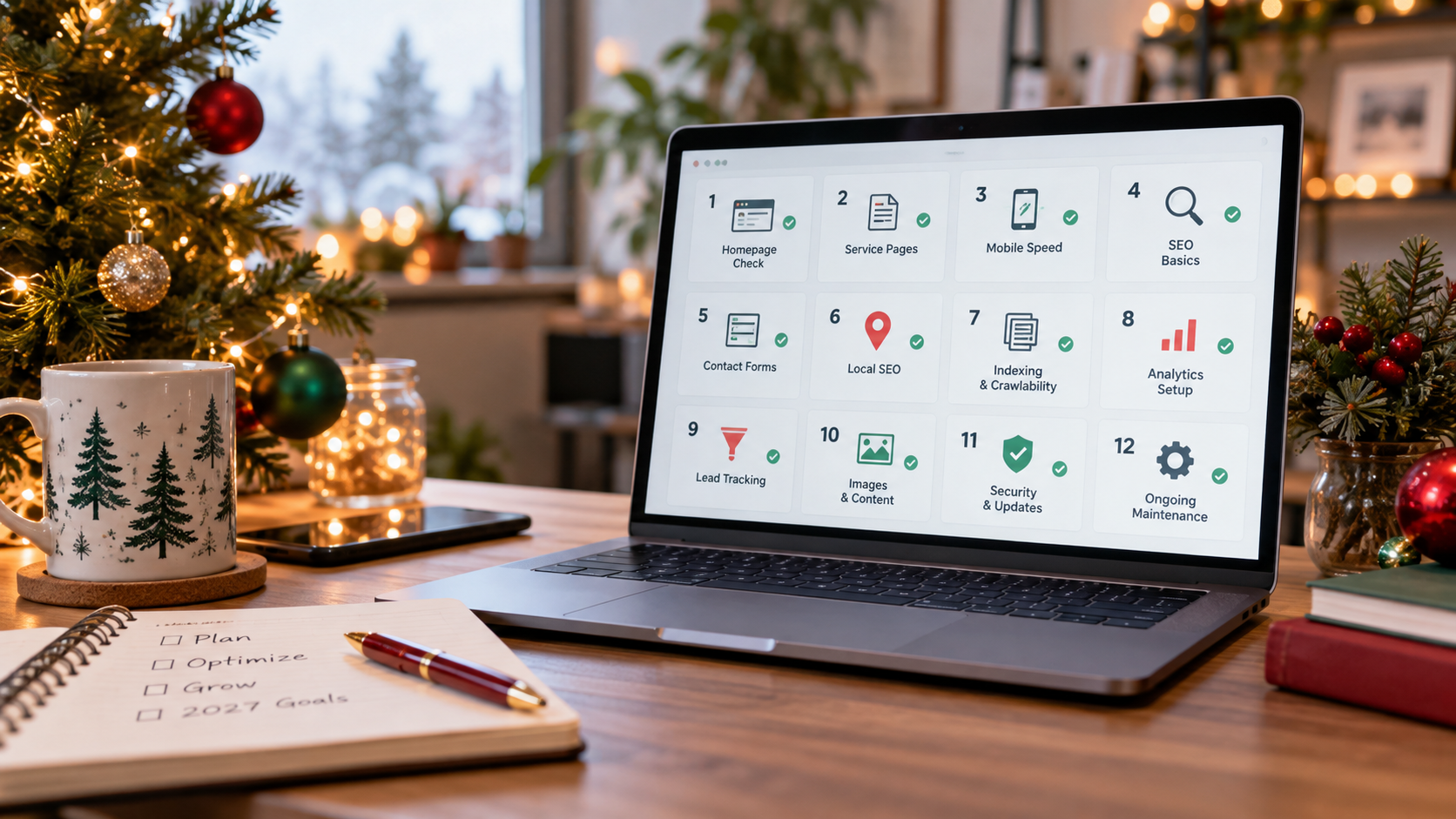
Your website doesn't need twelve new features, eleven fancy animations, or ten more blog posts just because a new year is coming. It needs to help the right customers find, understand, trust, and contact your business. Here's a practical 12-day holiday checklist to make that happen.
On the first day of Christmas, my website gave to me...
A contact form that actually worked.
Not exactly how the song goes.
But if you're a small business owner, that might sound like a pretty good Christmas present.
By the time December arrives, most businesses are thinking about wrapping up the year.
There are projects to finish.
Customers to follow up with.
Holiday schedules to coordinate.
Budgets to review.
And plans to make for January.
Your website probably isn't the first thing on your Christmas list.
Unless, of course, you've spent much of 2026 wondering why it hasn't generated the inquiries you expected.
Maybe your organic traffic increased, but your phone didn't ring any more often.
Maybe you hired someone to redesign the site, but customers still struggle to find the right service.
Perhaps you publish blog posts regularly without knowing whether anyone contacts your business afterward.
Or maybe your website has worked the same way for years, and you haven't tested whether all the forms, links, and contact information are still accurate.
Those are problems worth addressing before 2027.
But here's the good news.
You may not need a new website. You may need to give the one you already have twelve thoughtful improvements.
That's the idea behind this holiday checklist.
We're borrowing the spirit of the Twelve Days of Christmas and turning it into twelve practical website tasks.
One improvement at a time.
No complicated marketing jargon.
No promise that making twelve changes will magically double your revenue.
And no suggestion that every business needs an expensive redesign before the ball drops on New Year's Eve.
At Ritner Digital, we believe that SEO, website usability, content strategy, and customer inquiries should work together.
A business needs to be discoverable.
But it also needs to explain what it offers, demonstrate relevant expertise, and make it easy for prospective customers to get in touch.
That's what these twelve fixes are designed to support.
They can be used as a December website audit, a 2027 planning checklist, a series of LinkedIn posts, or a useful email resource for fellow business owners.
And while some tasks may take only a few minutes, others may require a developer, agency, or additional approvals.
The important part is identifying what needs attention—not rushing risky website changes just to finish a countdown.
So grab some coffee, put on your favorite holiday playlist, and let's see what your website really needs for Christmas.
Before Day One: Know What You're Trying to Improve
Before opening your website editor, answer one question.
What should your website help customers do?
For a South Jersey HVAC company, the answer might be scheduling heating service or requesting an installation estimate.
For a commercial construction company, it might be generating qualified project inquiries.
A professional services firm may want appropriate consultation requests.
A commercial vehicle dealership might want visitors to explore inventory and ask about availability.
A specialized B2B business may need to connect technical buyers with the correct sales or engineering contact.
These businesses don't need identical websites.
And they shouldn't be judged through the same conversion metrics.
A thousand informational visitors may be useful to one organization.
Ten carefully qualified project inquiries may be more meaningful to another.
Before starting the twelve fixes, identify the primary customer action your site is supposed to support.
Then ask whether each improvement makes that action easier, clearer, or more reliable.
The goal isn't to make your website busier. It's to make it more useful.
Day 1: Give Your Homepage a Clearer Headline
<text color="secondary" weight="medium">The Christmas gift: Clarity</text>
Let's start with something deceptively simple.
Your homepage headline.
If someone visits your website for the first time, can they tell what your business does?
Or does the page greet them with something like:
"Where Innovation Meets Excellence."
That sounds impressive.
But it could describe a software company, engineering firm, construction business, marketing agency, or consulting practice.
Your website shouldn't require people to guess.
The Fix
Read your main headline and supporting text as though you've never heard of the company.
Look for three pieces of information.
What do you provide?
Who do you serve?
And, where relevant, what geographic market or specialty defines your business?
Consider these hypothetical examples.
Before: "Building a Better Tomorrow."
After: "Commercial Renovations and Tenant Improvements for South Jersey Businesses."
Or:
Before: "Comfort Solutions You Can Trust."
After: "Heating and Air Conditioning Repair and Installation for Gloucester County Homeowners."
The revised versions are more specific.
They don't need to become the final wording for any real company.
They simply demonstrate how a headline can provide useful information.
Why It Matters
A referred customer may visit your website to verify the service a friend recommended.
A search visitor may be evaluating several providers.
If the homepage doesn't communicate what you offer, the visitor has to work harder to determine whether the business is relevant.
Google's SEO Starter Guide also encourages descriptive, useful page information that helps people understand website content.
Clarity serves both the visitor and the broader search experience.
Your Day 1 Check
Show your homepage to someone unfamiliar with your business.
Give them a brief opportunity to review it.
Then ask what the company does.
If their answer is substantially different from what you intended, the messaging deserves attention.
Shareable takeaway: If your homepage sounds like it could belong to any company, it may not be explaining yours.
Day 2: Put Your Most Important Service One Click Away
<text color="secondary" weight="medium">The Christmas gift: Easier navigation</text>
Your website might explain what your business does.
But can customers find the particular service they need?
Many business websites have confusing navigation.
Some use broad labels such as "Capabilities," "Solutions," or "Experience" without enough context.
Others hide important offerings several pages deep.
And some have expanded their service lists over the years without reorganizing the website.
The Fix
Choose one of your most important services.
Now open your homepage and pretend you're a new customer trying to find it.
How quickly can you locate the correct page?
Does the navigation label make sense?
Is the service grouped with related offerings?
Does the homepage include a useful link?
You don't need to place every service in the main menu.
But priority offerings should be reasonably easy to discover.
A construction company may benefit from clearly separating commercial renovations from residential remodeling.
An HVAC company might organize repair, replacement, maintenance, and commercial services in an understandable way.
A B2B supplier may need navigation that reflects relevant products or industry applications.
Why It Matters
Visitors shouldn't have to understand your company's internal organization to navigate the website.
Google's documentation on organizing websites also explains that a logical site structure and useful links can help visitors and search engines understand how pages relate.
That doesn't mean a complete navigation redesign automatically improves rankings.
It means clear navigation has a practical purpose.
It makes important information easier to find.
Your Day 2 Check
Ask someone to find your most important service without directing them.
Observe where they click.
If they get lost, review the labels and links.
Shareable takeaway: Your best service shouldn't be your website's best-kept secret.
Day 3: Fix Your Primary Call to Action
<text color="secondary" weight="medium">The Christmas gift: A clear next step</text>
A visitor understands what you offer.
They find the right service.
They like what they see.
Now what?
Some websites become strangely vague at this point.
Every button says "Learn More."
Or "Discover."
Or "Get Started."
But the visitor doesn't understand what happens after clicking.
The Fix
Review your homepage and one important service page.
Identify the main action you'd like a suitable prospective customer to take.
Then make the call to action match that action.
A residential service company might use:
"Schedule Heating Service."
A commercial contractor might use:
"Discuss Your Project."
A professional services firm could use:
"Request an Initial Consultation."
A dealership might use:
"Ask About This Vehicle."
The correct wording depends on what the business actually offers.
Don't promise instant pricing if your team must review the project first.
Don't use "Book Now" if the button simply opens a general contact form.
Make the Action Available at the Right Moment
Some visitors are ready to reach out immediately.
Others need to read about the service or evaluate your experience first.
A useful page gives visitors appropriate opportunities to act without covering every section in promotional buttons.
You might include a primary call to action near the beginning of the page and another after the service details.
Your Day 3 Check
Click your main button.
Does it lead where the label suggests?
Can the visitor complete the intended action?
If the button makes a promise the next page doesn't fulfill, fix the mismatch.
Shareable takeaway: A good call to action tells customers what happens next—not just where to click.
Day 4: Test Every Important Contact Form
<text color="secondary" weight="medium">The Christmas gift: Inquiries that actually arrive</text>
This may be the least glamorous fix on the list.
It's also one of the most important.
A business can attract relevant visitors, answer their questions, and convince them to make contact.
Then lose the opportunity because a form doesn't work.
Maybe the website shows a success message, but nothing reaches the inbox.
Perhaps the form was disconnected from the CRM during an update.
Or the visitor receives an unexplained error after entering their information.
The Fix
Open your website as a customer.
Complete your primary contact form using appropriate test information.
Submit it.
Then verify every part of the process.
Did the website confirm the submission?
Did the correct employee receive the inquiry?
Was the CRM entry created, if applicable?
Were any required notifications sent?
And did the system avoid counting a failed submission as a completed inquiry?
Don't Forget Form Usability
Forms should have clear field labels and understandable instructions.
The World Wide Web Consortium's guidance on form labels explains the importance of properly labeling controls so people, including users of assistive technologies, can understand them.
Its form notification guidance also emphasizes clear success and error messages.
If a required field is missing, explain what's needed.
If the form succeeds, confirm what happened.
Your Day 4 Check
Submit a real test inquiry and verify its delivery.
Repeat after major website or integration updates.
Shareable takeaway: A form-button click isn't a lead if the message never reaches your business.
Day 5: Make Your Phone Number and Booking Options Work on Mobile
<text color="secondary" weight="medium">The Christmas gift: Fewer obstacles for mobile visitors</text>
Someone receives a recommendation for your business.
They search your company name on their phone.
They find the website.
They want to call.
But your telephone number is buried at the bottom of a long page.
Or the number isn't clickable.
Or a large promotional banner covers the contact button.
These are small problems with a potentially frustrating customer experience.
The Fix
Open your site on an actual smartphone.
Don't rely entirely on a desktop preview.
Find your telephone number.
Tap it.
Check that the correct number appears in the calling interface.
Then test any appointment or booking options.
Make sure links don't lead to outdated scheduling pages.
Verify that users can complete the process without unnecessary zooming, sideways scrolling, or navigating around overlapping elements.
Mobile Usability Is About More Than Appearance
Google's page experience guidance recommends evaluating whether pages display well on mobile devices and whether visitors can access the main content without unnecessary obstacles.
It's possible for a site to look attractive on a phone while still being difficult to use.
A contact button might technically be visible but too close to another button.
A menu may cover important information.
Or a booking widget may fail on smaller screens.
Your Day 5 Check
Using a phone, try to find a service, contact the business, and schedule an appointment where applicable.
If any task is unnecessarily difficult, document it for improvement.
Shareable takeaway: If someone has to fight your mobile website to call you, your website isn't helping.
Day 6: Speed Up the Pages Customers Actually Use
<text color="secondary" weight="medium">The Christmas gift: Less waiting</text>
Christmas lights are great.
Spinning loading icons?
Not so much.
Website performance matters because slow or unstable pages can interfere with the experience.
Large images, unnecessary scripts, complicated animations, and poorly configured features can all contribute to problems.
But optimization should begin with the pages that matter most.
The Fix
Test your homepage and one or two important service pages using Google PageSpeed Insights.
Review both mobile and desktop information.
If field data is available, examine the real-world experience metrics.
Google's Core Web Vitals documentation identifies three major measures:
Largest Contentful Paint, with a good threshold of 2.5 seconds or less.
Interaction to Next Paint, with a good threshold below 200 milliseconds.
Cumulative Layout Shift, with a good threshold below 0.1.
These measures concern loading performance, responsiveness, and layout stability.
Fix Meaningful Problems First
A huge homepage image that delays important content may deserve attention.
So might a booking widget that takes too long to become interactive.
Or a page layout that shifts while someone is trying to tap a button.
However, a perfect performance score doesn't guarantee better rankings or more inquiries.
Don't spend the entire month chasing a small score improvement while your contact forms remain broken.
Your Day 6 Check
Identify the most significant performance problem affecting a priority page.
Document the recommended fix and assign it to the appropriate person.
Retest after implementation.
Shareable takeaway: Your website doesn't need to win a speed competition. It needs to let customers accomplish what they came to do.
Day 7: Replace Generic Claims With Real Proof
<text color="secondary" weight="medium">The Christmas gift: Credibility</text>
Your homepage probably says your business cares about quality.
It may say your team is experienced.
Perhaps it describes your service as exceptional.
That's understandable.
But prospective customers may want evidence.
After all, practically every company can claim to provide excellent service.
The Fix
Choose one important page and add or improve a relevant trust signal.
That might be a completed project example.
A verified professional credential.
A useful explanation of your experience.
An appropriately authorized testimonial.
Or genuine photographs of relevant work.
A commercial contractor might feature a completed renovation with a description of the project.
A professional services firm could clarify qualifications and areas of specialization.
An equipment supplier may demonstrate actual technical capabilities.
The correct proof depends on what customers need to evaluate.
Use Customer Feedback Responsibly
Don't invent testimonials.
Don't alter a customer's words to suggest outcomes they didn't experience.
And don't use identifiable client material without appropriate permission.
The FTC's Consumer Reviews and Testimonials Rule guidance addresses fake testimonials and other deceptive practices.
A company's website shouldn't attempt to manufacture the credibility it wants customers to perceive.
It should help visitors understand the credibility the business has legitimately earned.
Your Day 7 Check
Find one important claim on your website.
Ask what evidence supports it.
If the supporting proof exists, consider whether you can present it accurately and appropriately.
If the claim isn't defensible, revise it.
Shareable takeaway: "We do great work" is a claim. Showing real work helps people evaluate it.
Day 8: Refresh One Valuable Service Page or Older Article
<text color="secondary" weight="medium">The Christmas gift: More useful content</text>
You don't need to publish twelve new blog posts during December.
In fact, some of your best content opportunities may already exist.
Your website might have an older article that still answers a relevant customer question.
A service page may attract search impressions but contain outdated information.
Or a useful guide could be better connected to your current offerings.
The Fix
Choose one existing page worth improving.
Start with Google Search Console.
Its Performance report can help identify which pages and queries receive impressions and clicks from Google Search.
Look for a page relevant to your business with a clear opportunity.
Then read it carefully.
Is the information current?
Does it address the intended audience?
Are there unanswered questions?
Does the page use accurate examples?
Does it connect to an appropriate service or next step?
Don't Change the Date Just to Look New
Google's people-first content guidance emphasizes usefulness, original information, and real improvements.
Changing a publication date without making substantive updates doesn't automatically make content more helpful.
Likewise, deleting old pages simply because they're old can be counterproductive.
Some existing pages continue serving customers for years.
Others deserve consolidation or careful retirement.
Evaluate the content before making the decision.
Your Day 8 Check
Update one relevant page to make it more accurate, complete, or useful.
Document what changed and why.
Shareable takeaway: Before writing another article, ask whether something you've already published deserves a second life.
Day 9: Fix Your Most Important Search Titles and Internal Links
<text color="secondary" weight="medium">The Christmas gift: Better discovery</text>
A useful website needs to be understandable both on the page and in search results.
That doesn't require stuffing keywords into every heading.
It requires accurately describing your content and connecting related information.
The Fix
Choose your homepage and two important service pages.
Review each page's SEO title.
Does the title explain what the page is about?
Would it help someone distinguish the page from other search results?
Google's title link guidance recommends descriptive, concise titles and warns against vague labels such as "Home" or "Profile."
Google may generate a displayed search title from several sources, so your specified title is an influence rather than a guaranteed display.
Next, review the page's meta description.
Make sure it offers a useful, accurate summary.
Google may choose other on-page content for the search snippet, but a well-written description can still provide valuable context.
Improve Related Links
Now look at internal navigation.
If an older article discusses commercial roofing, does it link naturally to the company's actual roofing service page?
If a case study demonstrates a particular capability, can readers find the relevant service?
Google's SEO Starter Guide explains that useful links connect readers and help search engines discover related pages.
Use descriptive link text.
Avoid forcing irrelevant links into paragraphs.
And don't turn every sentence into an anchor.
Your Day 9 Check
Improve the titles or links on three important pages where the changes are justified.
Keep a record of the updates.
Shareable takeaway: Good SEO doesn't require hiding keywords everywhere. It requires making your pages easier to understand and find.
Day 10: Check Your Google Business Profile and Holiday Information
<text color="secondary" weight="medium">The Christmas gift: Accurate local information</text>
For eligible local businesses, your Google Business Profile can be one of the first places prospective customers encounter your information.
And December is a particularly important time to make sure the details are accurate.
Customers may want to know whether you're open during Christmas week.
They may check your address or service area.
They might call directly from Google Search or Maps.
If those details are wrong, even a strong website may not prevent confusion.
The Fix
Review your business name, category, telephone number, website link, address or service area where appropriate, and operating hours.
Then confirm any Christmas and New Year's schedule exceptions.
Christmas Day in 2026 falls on Friday, December 25.
New Year's Day 2027 falls on Friday, January 1.
Your business may also change hours on Christmas Eve or New Year's Eve.
Google's special-hours documentation explains how to set holiday schedules without permanently changing normal weekly hours.
For a short holiday closure, use special hours rather than incorrectly marking the business permanently closed.
Keep Your Website Consistent
If Google says your office is closed on Christmas Day, your website shouldn't encourage people to arrive for a walk-in appointment.
If emergency service remains available, explain the actual arrangements.
If booking requests will be answered after the holiday, communicate that expectation.
Your Day 10 Check
Confirm holiday hours and important contact details in Google, then compare them with the website and booking systems.
Shareable takeaway: Your customers don't need you to be open every holiday. They need accurate information about when you are.
Day 11: Make Sure Google Can Find Your Priority Pages
<text color="secondary" weight="medium">The Christmas gift: Fewer technical surprises</text>
Sometimes a business publishes a helpful service page and assumes it's available in Google Search.
But important pages can encounter technical problems.
An accidental noindex directive.
A redirect error.
A broken URL.
A page blocked from crawling.
Or a change that hasn't yet been processed by search engines.
These issues may not be obvious when you're simply clicking around the website.
The Fix
Open Google Search Console.
Use the URL Inspection tool to review a few important pages.
Start with your homepage and the services most closely connected to customer inquiries.
Look for actual problems preventing pages from being indexed or discovered.
Check that the correct canonical URL is identified where applicable.
If a priority page was recently changed, review whether Google has encountered the update.
Not Every Excluded Page Is a Problem
Some pages aren't intended for indexing.
Login screens, duplicate URLs, internal search pages, and other technical resources may have valid reasons to be excluded.
Don't assume every warning in a technical audit requires immediate action.
Focus on the pages that should be available to prospective customers.
Don't Expect Instant Indexing
Google's recrawling guidance notes that processing updates can take days or weeks.
Requesting indexing doesn't guarantee immediate inclusion or higher rankings.
Submitting the same URL repeatedly won't force faster results.
And if you discover an indexing issue, the appropriate solution depends on what's causing it.
Your Day 11 Check
Inspect your most important pages and document any genuine indexing or crawling issues.
Assign technical problems to someone qualified to address them.
Shareable takeaway: A great service page can't help organic discovery if a technical problem prevents Google from accessing it.
Day 12: Verify Lead Tracking and Decide What to Fix Next
<text color="secondary" weight="medium">The Christmas gift: A clearer picture of results</text>
We've reached the final day.
And this one brings the entire checklist together.
Your website should be clear.
Important services should be easy to find.
Contact options should work.
Relevant proof should be available.
But how will you know whether the improvements support the business?
You need reliable measurement.
The Fix
Review the website actions your analytics platform currently counts as conversions or key events.
Are you tracking successful form submissions?
Or simply button clicks?
Are telephone-number clicks being reported as completed calls?
Are spam inquiries included with genuine customer requests?
Can the business distinguish qualified leads from initial contact attempts?
Google Analytics 4 provides recommended lead-generation events, including generate_lead, qualify_lead, and close_convert_lead.
These represent different stages of the customer journey when properly implemented.
They don't automatically track every business outcome without appropriate configuration and data.
Start With a Reliable Baseline
Record the information you can verify.
Relevant website sessions.
Completed inquiries.
Qualified opportunities, where known.
And actual customer outcomes when the records support that connection.
Don't invent revenue attribution.
Don't assume every organic search click created a new prospect.
And don't count every form attempt as a completed lead.
Choose Your January Priorities
Review what you found during the twelve-day audit.
Which fixes are complete?
Which require development?
Which need additional approvals?
Which problems affect the most important customer journeys?
Use those findings to create a sensible first-quarter plan.
Your website doesn't need to be perfect before January 1.
It needs a clear understanding of what works, what doesn't, and what deserves attention next.
Your Day 12 Check
Confirm that important inquiries are being measured accurately.
Then choose the three highest-priority remaining improvements for 2027.
Shareable takeaway: The best marketing report isn't the one with the most numbers. It's the one that helps you understand what your website is actually doing for your business.
Your Shareable 12-Day Christmas Website Checklist
Here's the condensed version you can save, share with a fellow business owner, include in a client email, or use as the foundation for twelve LinkedIn posts.
Day 1: Make the homepage headline explain what the business does.
Day 2: Make the most important services easier to find.
Day 3: Give visitors a clear, relevant call to action.
Day 4: Test contact forms all the way through delivery.
Day 5: Check mobile phone links, buttons, and booking options.
Day 6: Investigate meaningful website speed and usability problems.
Day 7: Replace generic promises with credible evidence.
Day 8: Refresh one useful service page or older article.
Day 9: Improve important SEO titles and internal links.
Day 10: Confirm Google Business Profile details and holiday hours.
Day 11: Check that important pages are accessible to Google.
Day 12: Verify inquiry tracking and establish 2027 priorities.
That's twelve focused improvements.
Not twelve expensive tools.
Not twelve new marketing campaigns.
And not twelve promises about first-page rankings.
Just twelve useful checks that can help a business enter the new year with a stronger digital foundation.
Why This Makes a Good LinkedIn or Email Series
A practical checklist is easier to share when each part addresses a recognizable problem.
Most business owners don't need a detailed technical lecture about every SEO issue.
They need to understand what to look for, why it matters, and how to know whether a problem exists.
That's why these twelve fixes can work beyond the blog.
For LinkedIn
Each day can become a focused post.
Start with a relatable problem.
Explain one practical action.
End with a question that encourages useful discussion.
For example, Day 4 could become:
"Holiday website reminder: When was the last time you actually submitted your own contact form? Not just clicked the button—confirmed the inquiry reached the right inbox. That's a five-minute check worth doing before January."
That provides a useful action without turning the entire post into a sales pitch.
For an Email Newsletter
The twelve fixes can become a short series or a single end-of-year checklist.
A local business owner may not have time to complete everything during the holiday season.
But the email could help them identify the two or three issues most relevant to their business.
The goal should be usefulness.
Don't send daily messages simply because the theme has twelve parts.
Send them when the content matches your audience's interests and communication preferences.
For Internal Team Planning
A contractor, dealership, professional services firm, or manufacturer could use the checklist during a year-end marketing meeting.
The owner may identify messaging issues.
The office manager can test contact forms.
The web developer can investigate technical concerns.
The marketing team can review search data.
And the sales team can explain where incoming inquiries create friction.
The checklist is most useful when responsibility is clear.
A task doesn't become complete merely because someone discussed it.
You Don't Have to Complete Every Fix in Twelve Calendar Days
Here's an important qualification.
The Twelve Days of Christmas theme makes the process memorable.
It doesn't mean every business can safely complete every task in twelve consecutive days.
Some fixes are genuinely quick.
Correcting a telephone number.
Testing a form.
Updating holiday hours.
Improving an unclear headline.
Other tasks may involve development work, technical investigation, legal review, or coordination with outside providers.
Prioritize Problems That Directly Block Customer Contact
If your form is broken, that's usually more urgent than rewriting a low-traffic article.
If your listed telephone number is incorrect, fix it before adjusting button colors.
If your main service pages are inaccessible on mobile, that may deserve priority over publishing more blog posts.
A business should use judgment rather than follow the order mechanically.
The countdown is a planning tool.
Not a rule that forces low-priority changes ahead of serious problems.
Keep Risky Changes Out of Holiday Emergencies
December can be a difficult time to launch major website changes.
Employees may be away.
Developers may have limited availability.
Customers may be following different schedules.
A large website migration or redesign could create problems if it isn't planned and tested properly.
Google's site migration guidance recommends careful preparation, URL mapping, redirect planning, and monitoring when URLs change.
Don't rush a complicated migration simply because you're trying to launch something before January.
Sometimes the smartest December decision is to complete the audit and schedule a carefully managed implementation for 2027.
What Should a South Jersey Business Fix First?
The priority will depend on the type of business.
A small local service company may discover very different problems from a specialized B2B provider.
HVAC and Plumbing Companies
For businesses providing urgent or scheduled home services, contact accessibility can be especially important.
A homeowner whose heating system stops working may want to find a telephone number quickly.
A complicated navigation menu or inaccurate holiday availability message could create frustration.
Clear services, appropriate geographic information, and functioning mobile contact options deserve attention.
Construction and Remodeling Companies
A construction company may benefit from stronger project examples, clearer service categories, and a better process for requesting consultations.
The site should help customers understand the types of projects the company handles.
A general contractor specializing in commercial work may want to avoid attracting large numbers of unrelated residential inquiries.
Specificity can help.
Professional Services Firms
An accountant, consultant, attorney, or other specialized provider may need to emphasize qualifications, client fit, and what happens during an initial consultation.
The website should communicate expertise accurately without making unsupported guarantees.
Appropriate confidentiality and professional requirements may affect testimonials, case studies, and contact forms.
Community Banks and Credit Unions
Financial institutions may have more complex requirements involving account information, disclosures, branch locations, and privacy.
Clear navigation and accessibility remain important.
But changes to product descriptions or public claims may require internal compliance approval.
A year-end checklist can identify issues without bypassing those review processes.
Commercial Truck Dealerships
A commercial vehicle buyer may need to find relevant inventory quickly.
The dealership website should make vehicle categories, specifications, and inquiry options understandable.
An outdated inventory listing or a form that doesn't reach the sales team can create avoidable confusion.
Specialized B2B Companies
A technical manufacturer or service provider may have fewer but more specific inquiries.
These businesses may benefit from clear capability pages, relevant technical content, and an appropriate way to contact the correct department.
For a complex purchasing process, a longer form may be reasonable if it collects information genuinely needed to evaluate the inquiry.
The goal isn't to make every form identical.
It's to reduce unnecessary friction without sacrificing relevance.
Three Things Not to Do During Your Christmas Website Cleanup
Some actions can create more problems than they solve.
Don't Delete Old Content Just Because It's Old
An article published several years ago may still answer a useful customer question.
A project case study could remain relevant.
A service page may continue receiving qualified traffic.
Review content before removing it.
When consolidating or retiring pages, consider existing URLs, internal links, search performance, and appropriate redirects.
Don't Change Everything at Once
If you rewrite the homepage, replace the navigation, redesign the contact forms, restructure URLs, and change tracking on the same day, it may become difficult to determine which change caused a problem.
Where practical, document modifications and test them in manageable groups.
Major changes should be supported by an appropriate backup and rollback plan.
Don't Treat Twelve Completed Tasks as a Guaranteed Return
You can finish every item on this list and still need time to evaluate results.
Search engines may take days or weeks to process changes.
Customer demand may vary during the holidays.
Some industries have long purchasing cycles.
And some website improvements help visitors without producing an immediately measurable sales increase.
A useful audit improves the foundation.
It doesn't guarantee a particular number of customers.
What to Measure After the Holidays
Once your website changes are in place, don't judge everything by the first few days of January.
Start by verifying that the improvements work as intended.
Can visitors find important services?
Do forms deliver messages?
Are holiday hours correct?
Does the site function on mobile?
Are relevant pages crawlable?
These are direct checks.
Then review outcomes over an appropriate period.
Organic Search Visibility
Search Console can help you understand which pages and queries receive impressions and clicks.
It can also reveal important technical issues.
But a ranking improvement doesn't automatically represent new business.
Website Inquiries
Look at verified contact submissions, booking requests, and other meaningful interactions.
Separate spam and test messages from customer requests.
Qualified Leads
Where possible, identify whether inquiries match your services and intended customers.
A commercial-only provider may not benefit from a large increase in residential inquiries.
Customer Outcomes
If your business has reliable sales or CRM records, compare qualified opportunities with actual results.
Don't assign every sale to one channel when the customer journey involved referrals, advertising, search, and other interactions.
The purpose of measurement is to inform better decisions.
Not to make every report look impressive.
Frequently Asked Questions
1. What are the most important website improvements to make before 2027?
Start with issues that prevent customers from understanding or contacting your business.
That may include broken forms, inaccurate information, confusing service descriptions, mobile usability problems, or unreliable booking systems.
After addressing critical issues, review page performance, SEO titles, internal links, and lead tracking.
The right order depends on your website's actual condition.
2. Can I complete a website audit in twelve days?
You can conduct a useful initial review during that period, particularly for a smaller site.
But some technical fixes, content revisions, and larger structural changes may take additional time.
The checklist is intended to establish priorities rather than guarantee complete implementation in twelve calendar days.
3. Do I need a new website before January 2027?
Not necessarily.
If the existing website has a sound foundation, targeted improvements may be more appropriate than a complete redesign.
A rebuild may be justified by substantial technical limitations, accessibility problems, outdated systems, or significant changes to the business.
An audit should help determine what is actually needed.
4. Which website fix should a small business do first?
Test whether customers can successfully contact the business.
A broken contact form, incorrect telephone number, or unavailable booking process can interrupt an otherwise successful customer journey.
If those functions work, review whether your homepage and important service pages clearly communicate what you offer.
5. Will these twelve website fixes improve my Google rankings?
They may address issues relevant to usability, discoverability, or SEO.
However, Google rankings are influenced by multiple factors, and improvements aren't guaranteed.
Some changes may be reflected in search results within weeks, while others take longer.
Focus on useful changes and evaluate outcomes over time.
6. How can I tell if my website contact form is working?
Complete the form as a customer.
Verify that the website displays an appropriate confirmation.
Then check whether the inquiry reaches the intended inbox or system.
If your business uses a CRM, confirm that the record is created correctly.
Repeat these tests after relevant website updates.
7. Is mobile optimization important for local businesses?
Yes.
Customers may use mobile devices to find services, read information, call businesses, or schedule appointments.
A mobile website should provide readable content, understandable navigation, and functioning contact features.
Mobile usability also matters for Google's mobile-first indexing approach.
8. What are Core Web Vitals?
Core Web Vitals are Google-defined measures of real-world user experience involving loading performance, responsiveness, and visual stability.
They include Largest Contentful Paint, Interaction to Next Paint, and Cumulative Layout Shift.
They are useful diagnostics, not guarantees of rankings or conversions.
9. Should I update old blog posts or publish new ones?
Both can be valuable when they serve a real purpose.
An existing article may benefit from updated information, better examples, or improved links.
A new article may be appropriate when customers have relevant questions that your website doesn't answer.
Evaluate usefulness rather than relying solely on publication frequency.
10. What should I check in Google Search Console before 2027?
Review performance for important pages and relevant queries.
Inspect priority URLs for indexing problems.
Look for meaningful technical issues that may prevent discovery.
Not every excluded page is a problem, and requesting indexing doesn't guarantee immediate results.
11. Should I update my Google Business Profile for Christmas?
If your business has an eligible profile, review the accuracy of its information.
Confirm Christmas and New Year's hours, including any changes to normal schedules.
Use special hours for appropriate short-term exceptions rather than permanently changing the weekly schedule.
Make sure the website and booking systems communicate consistent availability.
12. Can customer reviews improve my website's credibility?
Genuine reviews and appropriately authorized testimonials may help visitors understand other customers' experiences.
They should be presented accurately and without misleading claims.
Google prohibits review incentives and selectively soliciting positive reviews.
A trustworthy website should reinforce a real business reputation.
13. How do I know whether my website is generating qualified leads?
Track successful inquiries and compare them with the business's actual qualification criteria.
A telephone-number click isn't necessarily a completed conversation.
A form submission isn't automatically a good-fit prospect.
Where possible, connect appropriate website events with reliable CRM or intake records.
14. Do I need paid software to complete this checklist?
Not necessarily.
Many basic checks can be completed by reviewing the website directly and using available tools such as Google Search Console and PageSpeed Insights.
More complex issues may require professional technical support.
Choose tools based on the problem they solve, not simply because an audit tool produces a long report.
15. Is accessibility part of website optimization?
Yes.
Accessible websites help people with disabilities navigate content and complete important tasks.
Clear labels, usable controls, understandable errors, keyboard accessibility, and readable information are important considerations.
A comprehensive accessibility assessment may require more than this twelve-day checklist.
16. How should I decide which fixes deserve my 2027 budget?
Prioritize problems according to their effect on important customer journeys, the quality of available evidence, implementation complexity, and business relevance.
Fix critical failures first.
Then evaluate improvements to messaging, content, technical performance, and measurement.
Avoid spending heavily on changes simply because they're visually impressive or currently fashionable.
Your Website Doesn't Need Twelve Christmas Miracles
There's something appealing about starting a new year with a completely fresh website.
A new design.
New photographs.
New content.
A new marketing strategy.
Everything wrapped in a shiny digital bow.
But sometimes the most useful improvements are much smaller.
A headline that finally explains what the business does.
A service page that answers the questions customers actually ask.
A contact form that works.
A mobile button that's easy to tap.
A genuine project example that helps someone understand your capabilities.
Accurate holiday hours.
A useful internal link.
A clearer way to measure inquiries.
None of these improvements sounds particularly glamorous.
But they all serve a purpose.
They help the right customers move from discovering your business to understanding it, evaluating it, and taking an appropriate next step.
And that's ultimately what a useful business website should do.
This Christmas, don't assume you need to throw away everything you've already built.
Your website may have valuable content, strong service information, and useful search visibility.
It may simply need focused attention.
So take the twelve-day challenge.
Find the problems.
Fix what you can.
Document what requires additional work.
And build a sensible plan for the improvements that will carry into 2027.
The best present your website can give your business isn't a promise of instant rankings or unlimited leads. It's a better experience for the people already trying to find and contact you.
That's a gift worth working toward.
And unlike Christmas decorations, those improvements can continue serving your business long after December is over.
Make Your Website Work Harder in 2027 With Ritner Digital
You don't need another complicated marketing wish list that never becomes an action plan.
You need to understand what your website is doing well, where prospective customers encounter problems, and which improvements deserve attention.
At Ritner Digital, we help local businesses and specialized service companies strengthen SEO, AI search visibility, website content, and the customer journey from online discovery to meaningful inquiries.
That may involve improving important service pages.
Clarifying homepage messaging.
Addressing technical SEO problems.
Strengthening content strategy.
Or helping a business understand whether its website is generating relevant opportunities rather than simply more traffic.
Every business has different needs.
A contractor doesn't need the same website strategy as a professional services firm.
A commercial equipment supplier may need different conversion paths from a local restaurant.
And a company with a strong existing website may need targeted improvements rather than an expensive redesign.
The goal is to identify what will make the digital experience more useful for the people your business wants to reach.
This Christmas, give your website something better than another decorative feature. Give it a plan to support your business in 2027.
Ready to review your website and build a stronger digital strategy? Contact Ritner Digital →