What Every Number on Your Accessibility Score Report Actually Means
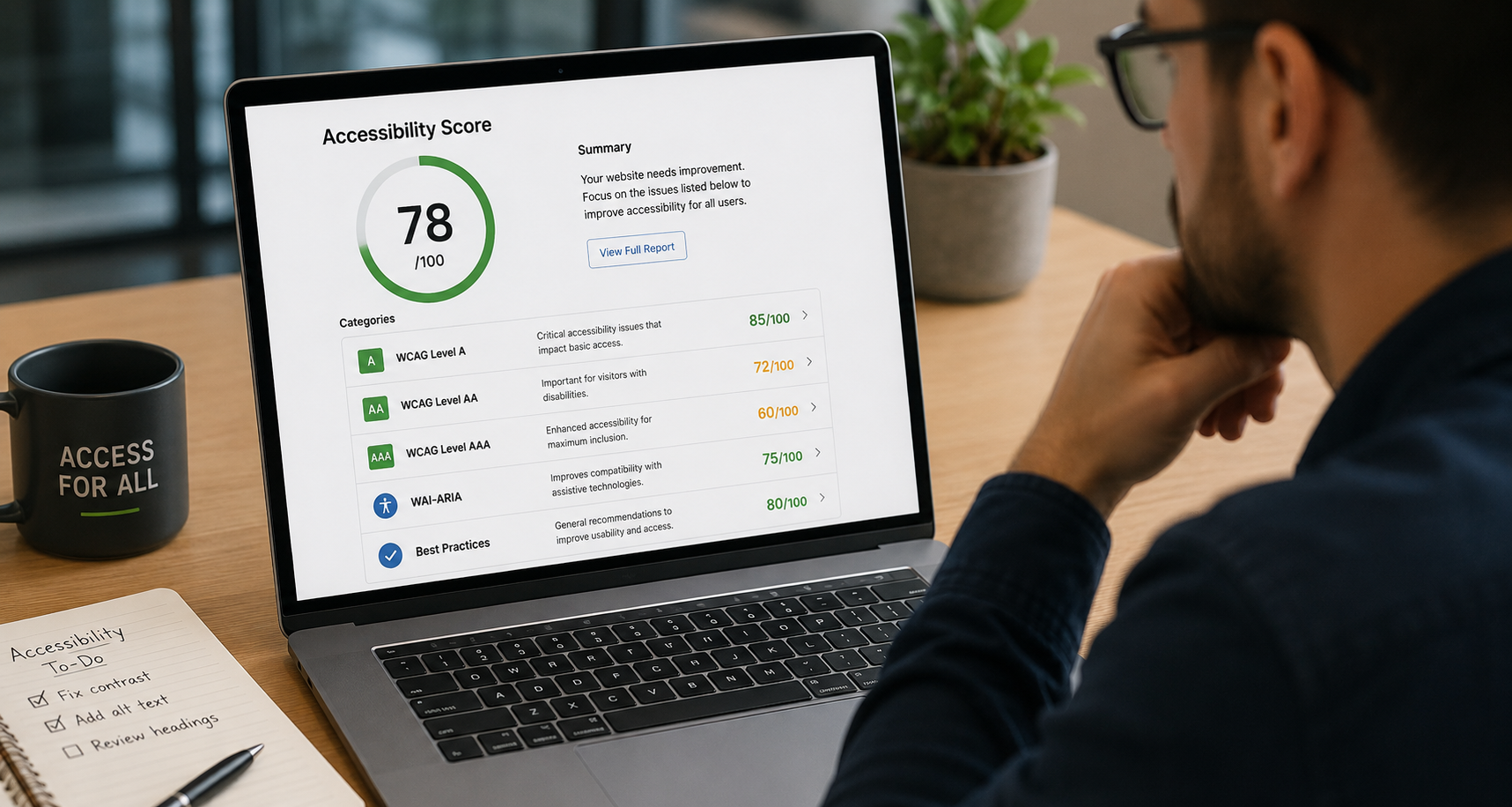
If you've ever run an accessibility scan on your website and received a report full of scores, levels, and acronyms, you're not alone in finding it confusing. A number like "87/100 for Level AA" or "63/100 for WAI-ARIA" doesn't mean much on its own — not without understanding what each category is actually measuring, why it exists, and what it takes to move the needle.
This post walks through every major component of a typical accessibility score report, in plain language, so you can read your results with confidence and know exactly where to focus your energy.
Why Accessibility Scores Are Broken Into Categories
A single overall accessibility score is useful as a headline, but it hides more than it reveals. A website could score well on basic structure while completely failing users who rely on screen readers. Another site might pass color contrast checks everywhere but have broken keyboard navigation throughout. Breaking the score into categories exposes where a site is actually strong and where users with specific disabilities are being left behind.
The categories you'll see on most professional accessibility reports map directly to the Web Content Accessibility Guidelines — commonly called WCAG — which is the internationally recognized technical standard for web accessibility. WCAG organizes its criteria into three conformance levels (A, AA, and AAA) plus supplementary areas like ARIA and general best practices. Each one tests a different layer of the user experience.
Level A: The Non-Negotiables
What it tests: The most fundamental accessibility requirements — the ones that, if missing, make a website completely unusable for certain groups of people.
What a good score looks like: High 80s to low 90s and above. These are the criteria with the clearest right and wrong answers, so strong sites tend to perform well here.
What it's actually checking:
Level A covers things like whether every image has descriptive alternative text so screen reader users know what's in the picture. It checks whether videos have captions. It verifies that the site can be navigated entirely by keyboard — critical for users who can't use a mouse due to motor disabilities. It flags "keyboard traps," where a user tabs into a component like a date picker and can't get back out. It also checks that page titles are descriptive, that form fields have proper labels, and that the language of the page is declared in the code.
These aren't edge cases or advanced considerations. They're the floor. A site that fails Level A criteria is, in a meaningful sense, broken for a significant portion of users with disabilities.
Why it matters legally: Level A failures are the easiest for plaintiffs to identify and document in ADA litigation. They're unambiguous, automatically detectable, and hard to explain away.
Level AA: The Legal Standard
What it tests: Everything in Level A, plus a second layer of requirements that address a broader range of real-world accessibility barriers.
What a good score looks like: This is where the gap between strong and average sites becomes most visible. The private sector median Level AA score is around 43 out of 100. Anything in the 80s is exceptional.
What it's actually checking:
Level AA is where color contrast enters the picture. WCAG requires a minimum contrast ratio of 4.5:1 between text and its background for standard-sized text — a threshold that more than 80% of websites currently fail to meet across at least some of their content. This matters enormously for users with low vision or color vision deficiencies, who may not be able to read text that appears perfectly legible to others.
Level AA also requires that text can be resized up to 200% without breaking the layout or hiding content. It checks that users aren't timed out of sessions without warning. It requires that errors in forms are clearly identified and described — not just highlighted in red, but explained in text. Navigation must be consistent across pages. Links and buttons must have descriptive names that make sense out of context, because screen reader users often navigate by jumping between links rather than reading linearly.
This is the standard that the Americans with Disabilities Act, the Department of Justice, and most international accessibility laws point to when evaluating compliance. It's what courts look at. It's what the European Accessibility Act requires. A strong Level AA score is the single most legally significant number on your report.
Level AAA: The Aspirational Standard
What it tests: The most stringent accessibility requirements, going well beyond what any law currently mandates.
What a good score looks like: Scores in this category tend to be lower even for highly accessible sites, and that's expected. Full AAA conformance is considered aspirational and is not required by any current regulation.
What it's actually checking:
Level AAA pushes requirements significantly further. Where Level AA requires a 4.5:1 contrast ratio, AAA demands 7:1 — a much stricter threshold. Where AA requires captions on pre-recorded video, AAA requires sign language interpretation. AAA also requires that abbreviations are always explained, that reading level doesn't exceed lower secondary education without an alternative being provided, and that no content flashes more than three times per second under any circumstances (AA only restricts content that flashes above certain thresholds).
Many of these criteria are genuinely difficult or impossible to meet for complex, content-rich websites — which is why AAA conformance is explicitly noted in the WCAG documentation as not being required as a blanket policy. A score of 40–50 in this category at a large organization is not a red flag. It's normal.
Where AAA scores are useful is as a roadmap for organizations that want to go beyond compliance and genuinely lead on inclusion. Improvements in this area often benefit the broadest range of users, including people with cognitive disabilities, who are underserved by the AA standard.
WAI-ARIA Authoring Practices: The Dynamic Layer
What it tests: How correctly and completely a site uses ARIA — a technical specification that bridges the gap between modern web interfaces and assistive technologies.
What a good score looks like: Scores in the 60s and 70s are common even on well-optimized sites. This is one of the harder categories to master.
What it's actually checking:
ARIA stands for Accessible Rich Internet Applications. It's a set of attributes that developers add to HTML elements to tell assistive technologies — primarily screen readers — what those elements are and what's happening with them.
Without ARIA, a screen reader user lands on a custom dropdown menu built in JavaScript and hears nothing useful. With correct ARIA, they hear "menu, collapsed, press Enter to expand" and can interact with it meaningfully. The same applies to modal dialogs, tab panels, sliders, live-updating content, autocomplete fields, and countless other interactive elements that are ubiquitous on modern websites.
The challenge is that ARIA is easy to implement incorrectly. A developer might add an ARIA role that conflicts with the element's native behavior, or forget to update ARIA attributes when the interface state changes, or use ARIA to label an element in a way that makes sense visually but is confusing when read aloud. The WAI-ARIA authoring practices score penalizes these errors.
A lower score here doesn't necessarily mean a site is unusable — it often means there are specific interactive components that need attention. A higher score means the dynamic parts of the site work as well for screen reader users as they do for everyone else.
Accessibility Best Practices: The Holistic Layer
What it tests: A broader set of recommendations that go beyond strict WCAG criteria but contribute meaningfully to the real-world accessibility of a site.
What a good score looks like: Mid-to-high 70s and above reflects a site actively applying best practice thinking, not just checking boxes.
What it's actually checking:
Best practices in accessibility include things like: whether focus indicators are visible enough to be useful (WCAG requires them to exist; best practices require them to actually be easy to see). Whether skip navigation links are present so keyboard users can jump past repetitive menus. Whether PDFs linked from the site are themselves accessible. Whether touch targets on mobile are large enough for users with motor impairments. Whether animations can be disabled for users who experience motion sickness or seizure risk.
These criteria are important because they address the gap between technical compliance and practical usability. A site can technically pass every WCAG Level AA criterion and still be genuinely difficult to use for someone relying on a keyboard or screen reader, if these best practices haven't been considered.
A strong best practices score signals that a site has been built with real users in mind, not just automated test results.
How the Overall Score Is Calculated
The overall accessibility score on most platforms is a weighted combination of the categories above. Critical issues — those that completely block a user from accessing content — are weighted more heavily than minor issues that create friction but don't prevent access entirely. This is by design: a single broken form submission button matters more than ten minor contrast issues on decorative elements.
This weighting is also why two sites can have similar overall scores for different reasons. One site might have near-perfect Level A and AA scores but drag its overall number down with WAI-ARIA issues. Another might have stronger ARIA implementation but more Level AA contrast failures. Reading the category breakdown tells you far more than the headline number.
What to Do With This Information
Understanding what each category measures is the first step. The second is knowing where to prioritize your remediation effort.
As a general rule:
Fix Level A issues first. They represent complete barriers for some users and are the highest legal risk. They're also often the fastest to fix — missing alt text, unlabeled form fields, and missing page titles are typically straightforward corrections.
Invest heavily in Level AA. This is where legal compliance lives. Color contrast fixes, consistent navigation, descriptive error messages, and proper link text together make up the bulk of AA requirements and the bulk of litigation risk.
Treat WAI-ARIA as an ongoing effort. ARIA issues are tied to specific components and often resurface as sites are updated. Build ARIA review into your development process rather than treating it as a one-time fix.
Use best practices as your long-term roadmap. These improvements often have the highest impact on real user experience, even if they're not the most urgent from a compliance standpoint.
Approach AAA improvements selectively. Focus on AAA criteria that are genuinely achievable for your content type — enhanced contrast, sign language for key videos, simplified reading level for important communications — and document your intent to improve over time.
The Bottom Line
An accessibility score report isn't just a number — it's a map. Each category points to a specific layer of the user experience, a specific group of users who may be affected, and a specific set of improvements that would help. Reading that map correctly means you can stop guessing about where to spend time and money, and start making changes that actually move the needle for real people.
If you've received an accessibility report and aren't sure what it's telling you — or if you haven't had one done yet — Ritner Digital can help you make sense of it and build a remediation plan that fits your organization.
Talk to the Ritner Digital team →
Sources: Web Content Accessibility Guidelines (WCAG) 2.1 and 2.2, W3C; WAI-ARIA Authoring Practices Guide, W3C; WebAIM Million Report (2026); Silktide Website Accessibility Analysis; AudioEye Web Accessibility Statistics (2026); accessibility.build State of Web Accessibility (2026).
Frequently Asked Questions
What is an accessibility score?
An accessibility score is a numerical rating — typically out of 100 — that reflects how well a website meets established accessibility guidelines. It's generated by automated scanning tools that test your site against the Web Content Accessibility Guidelines (WCAG) and related standards. The score is usually broken into categories like Level A, Level AA, Level AAA, WAI-ARIA, and best practices, each measuring a different layer of the user experience.
What is WCAG and who created it?
WCAG stands for Web Content Accessibility Guidelines. It's the internationally recognized technical standard for web accessibility, developed and maintained by the World Wide Web Consortium (W3C). WCAG organizes accessibility requirements into three conformance levels — A, AA, and AAA — ranging from the most critical baseline requirements to the most stringent. It's the standard referenced by the ADA, the DOJ, the European Accessibility Act, and most other accessibility laws worldwide.
Which WCAG level does my business legally need to meet?
For most private businesses in the United States, Level AA is the de facto legal standard under the ADA. The Department of Justice references WCAG 2.1 Level AA in its guidance and enforcement actions. If your organization serves EU customers, the European Accessibility Act — which took effect June 28, 2025 — also requires WCAG 2.1 AA conformance.
Why is my Level AAA score so much lower than my Level A and AA scores?
That's expected and normal. AAA criteria are significantly more stringent — demanding a 7:1 color contrast ratio instead of AA's 4.5:1, sign language interpretation for video content, and reading level requirements, among other things. Full AAA conformance is explicitly noted by W3C as not being required as a blanket policy, even for organizations committed to accessibility. A lower AAA score doesn't indicate a problem — it indicates that your site is being held to a standard most of the web isn't even attempting.
What is WAI-ARIA and why does my score in that category matter?
WAI-ARIA (Accessible Rich Internet Applications) is a technical specification that helps assistive technologies like screen readers understand dynamic, interactive web content — things like dropdown menus, modal dialogs, tab panels, and live-updating feeds. Without correct ARIA implementation, these elements can be completely invisible or confusing to screen reader users. Your WAI-ARIA score reflects how accurately and completely your site uses this specification across its interactive components.
Can I be fully WCAG compliant but still have accessibility problems?
Yes. Automated scanning tools — which generate most accessibility scores — can only detect a portion of real-world accessibility issues. Manual testing by users who rely on assistive technologies often uncovers problems that automated tools miss entirely. A strong score is a very good indicator of accessibility, but it isn't a guarantee of a fully inclusive experience for every user in every situation.
What should I fix first on my accessibility report?
Start with Level A issues — these represent complete barriers for some users and carry the highest legal risk. Then move to Level AA, where the legal compliance standard lives and where most litigation focuses. WAI-ARIA issues are best treated as ongoing work tied to your development process rather than a one-time fix, since they resurface whenever interactive components are updated or added.
How often should I audit my website's accessibility?
Accessibility isn't a one-time project. Every time new content is added, a design is updated, or a new feature is built, new issues can be introduced. A best practice is to run automated scans continuously or monthly, conduct a thorough manual audit at least annually, and include accessibility review as part of your standard development and content workflow.
Does a higher accessibility score improve my SEO?
Indirectly, yes. Many accessibility improvements — descriptive alt text on images, clear heading structure, descriptive link text, fast-loading pages, mobile-friendly layouts — overlap with what search engines reward. A more accessible site tends to be a better-structured, more crawlable site. It's not a one-to-one relationship, but investing in accessibility and investing in SEO often point in the same direction.
How do I get a full accessibility report for my website?
The best approach combines automated scanning with manual expert review. Automated tools catch a significant portion of detectable issues quickly; manual testing catches the rest. Ritner Digital offers professional accessibility audits that give you a clear, category-by-category breakdown of where your site stands and a prioritized roadmap for remediation. Get in touch here.