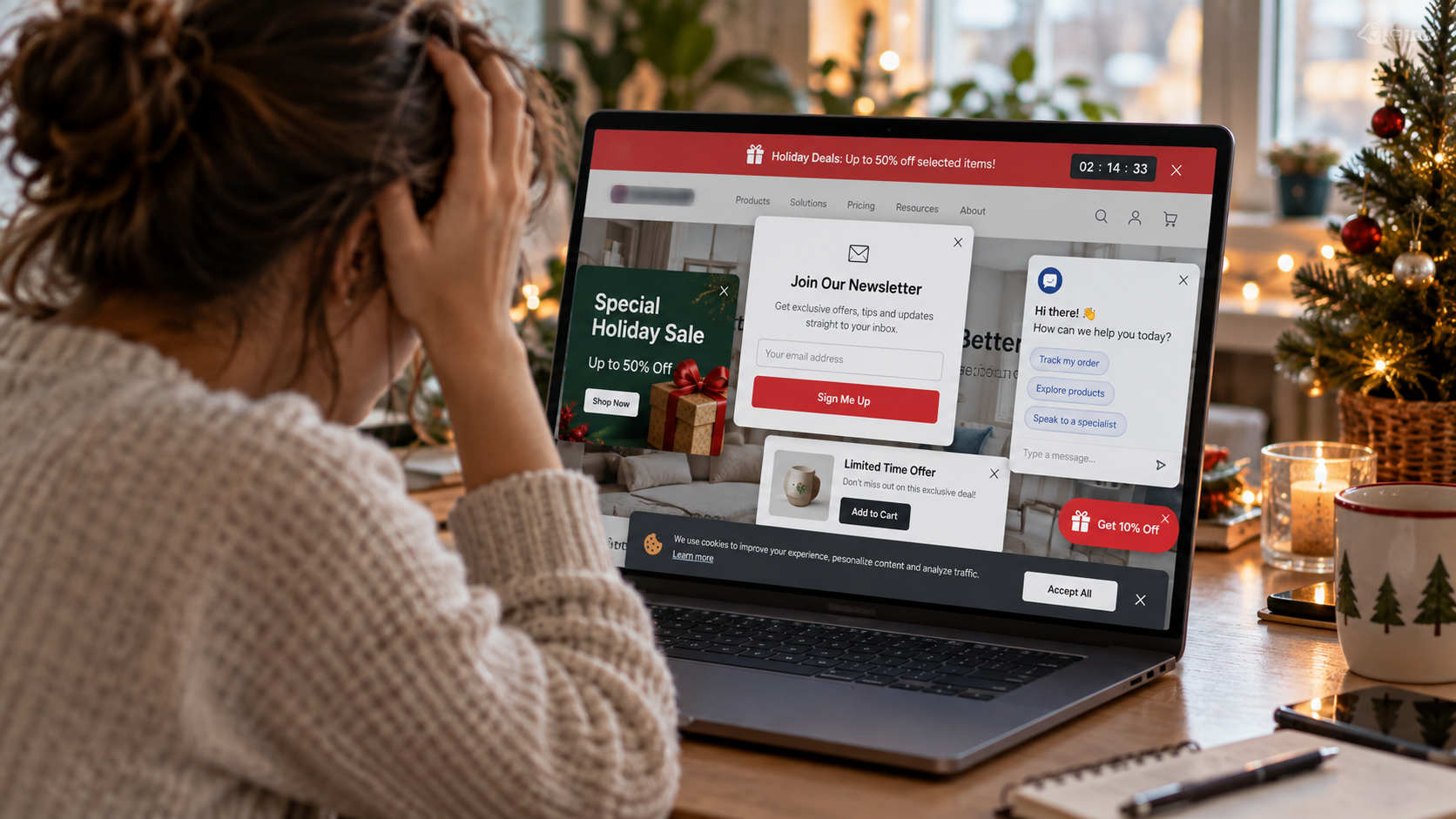
Christmas lights belong on your tree. They don't necessarily belong on every inch of your website. Here's how businesses can reduce digital clutter, improve the customer experience, and make it easier for the right visitors to get in touch before 2027.
There's something wonderful about a beautifully decorated Christmas tree.
The lights.
The ornaments.
The ribbon.
The decorations your children made years ago that somehow still find their way onto the branches.
Maybe there's an angel on top.
Maybe a star.
Maybe the tree is covered in so many decorations that you can't see the branches anymore.
And that's fine.
It's Christmas.
A little excess is part of the fun.
But imagine visiting a business website that looks and behaves like the most aggressively decorated Christmas tree you've ever seen.
You arrive on the homepage.
Immediately, a banner announces a holiday promotion.
Before you can read the headline, a popup asks you to subscribe to the company's newsletter.
You close it.
A chatbot opens in the bottom corner.
Another banner tells you about a limited-time offer.
There's a floating button asking you to schedule a consultation.
A sticky bar asks you to call now.
A spinning graphic encourages you to download a free guide.
And somewhere behind all those decorations, the company is apparently trying to explain what it actually does.
You came looking for a service.
Instead, you're playing a game of digital whack-a-mole.
Welcome to one of the most common problems in modern website design.
Businesses keep adding features intended to generate more conversions, but sometimes those additions make it harder for visitors to accomplish anything.
Every popup has a reason.
Every banner has an objective.
Every button represents something the company wants people to do.
The marketing team wants newsletter subscribers.
The sales team wants consultation requests.
Customer service wants visitors to use the chatbot.
The holiday campaign needs a promotional announcement.
And the website designer wants the primary call to action visible at all times.
Individually, these decisions may sound reasonable.
Together, they can produce an experience that's confusing, distracting, and frustrating.
At Ritner Digital, we believe websites should do more than attract traffic.
They should help the right people understand your services, evaluate your business, and take an appropriate next step.
That requires thoughtful design, clear content, and a useful customer experience.
It doesn't necessarily require more buttons.
Or more banners.
Or another popup asking a visitor to do something before they've even learned what you offer.
So as we head toward Christmas 2026 and begin preparing websites for 2027, let's talk about what should stay on the page, what should be simplified, and which digital decorations may be doing more harm than good.
Because your website should guide customers toward your business—not make them fight through a forest of flashing ornaments to find it.
The Problem Isn't That Your Website Has Too Many Features. It's That Everything Wants Attention.
Let's begin with an important distinction.
Popups aren't automatically bad.
Banners aren't always unnecessary.
Chatbots can be useful.
Sticky navigation can help people move around a website.
And calls to action are essential for many business websites.
The issue is whether those elements serve the visitor's needs or compete with them.
Every Addition Comes With a Cost
Imagine a prospective customer visiting a commercial roofing company's website.
They're looking for information about roof replacement for a warehouse.
The page contains useful details about the service.
But before the person can read them, several elements compete for attention.
One asks them to subscribe to a newsletter.
Another promotes a general company announcement.
A chatbot suggests booking a meeting.
A floating button offers a free consultation.
A seasonal banner links to an unrelated promotion.
None of those elements necessarily helps the visitor answer the immediate question.
"Does this company perform the kind of commercial roofing work I need?"
Instead of simplifying the decision, the website introduces more choices.
More Visibility Doesn't Always Mean More Usefulness
A marketing team may argue that a popup increases the visibility of a special offer.
That's possible.
An element covering the screen is difficult to miss.
But being noticed isn't the same as being useful.
And being clicked isn't necessarily the same as producing a valuable business inquiry.
A visitor may close a popup without reading it.
They may click a prominent button simply to escape an interruption.
Or they may leave before reaching the content they wanted.
The goal should be to help people complete relevant tasks.
Not merely to ensure every promotional element receives attention.
What Usability Research Says About Popups and Overlays
This problem isn't new.
Web usability researchers have documented the consequences of poorly implemented popups for years.
The Nielsen Norman Group's research on the overuse of overlays explains that overlays can interfere with task completion, particularly when they interrupt people or make the underlying page difficult to access.
The research recommends evaluating the purpose, audience, timing, placement, and necessity of an overlay before implementing one.
Its more recent discussion of problematic popup patterns and alternatives also identifies situations where websites use popups in ways that frustrate people rather than help them.
The takeaway isn't that every overlay must disappear.
It's that an overlay should justify the interruption it creates.
Ask Five Questions Before Adding a Popup
Borrowing from Nielsen Norman Group's approach, a business can evaluate a proposed popup by asking:
Who is supposed to benefit from it?
What action does the visitor need to complete?
When will it appear?
Where will it appear within the experience?
Why does this information need a popup instead of a normal section on the page?
Those questions sound simple.
But they force a useful discussion.
If your team can't explain why a popup needs to interrupt the visitor, it may not need to exist.
A Popup Should Solve a Problem, Not Create One
There are legitimate uses for dialogs.
A customer might open a form to schedule an appointment.
A visitor may request additional information about a specific product.
A website may need to present legally required information.
Those are different situations from automatically displaying a promotional message over the entire screen seconds after someone arrives.
The difference is relevance and user control.
An interruption that supports the task may be appropriate.
An interruption that competes with the task deserves skepticism.
Google Also Has Something to Say About Intrusive Popups
If you care about SEO, this is especially relevant.
Google maintains official guidance on avoiding intrusive interstitials and dialogs.
An interstitial is an element that covers most or all of the page, obstructing access to the underlying content.
A dialog or overlay may cover a smaller portion of the page.
Google explains that intrusive interstitials can frustrate visitors and make page content more difficult for search engines to understand.
Its recommendations include using less intrusive banners where appropriate and avoiding unnecessary overlays that obscure the main content.
Don't Turn the SEO Guidance Into Another Guaranteed Ranking Claim
It's important to be precise.
Google doesn't say that removing one newsletter popup guarantees higher rankings.
Its page experience documentation explains that ranking systems consider many signals and that not every aspect of page experience functions as a separate, direct ranking factor.
Core Web Vitals are used by Google's ranking systems, but good technical scores don't guarantee a top position.
The practical lesson is broader.
If a popup makes your website difficult to use or prevents people from accessing useful content, that's worth addressing.
The customer experience matters even when you can't isolate a direct ranking effect.
Legitimate Requirements Are Different From Promotional Interruptions
Some businesses need age verification, consent interfaces, or other required disclosures.
Google acknowledges that mandatory interstitials can be necessary.
Those situations shouldn't be treated like optional email signup promotions.
If your website has legal or regulatory obligations, the solution isn't simply to delete the required notice.
It's to implement it accurately, accessibly, and in a way that minimizes unnecessary interference.
The objective is responsible design.
Not removing important information just to create a cleaner-looking page.
1. The Instant Newsletter Popup: Asking for a Relationship Before Introducing Yourself
Let's start with a familiar scenario.
Someone arrives on your website for the first time.
They haven't read your services.
They haven't seen your qualifications.
They don't know whether you serve their location.
And they may not even know what your business does.
Then a popup appears.
"JOIN OUR NEWSLETTER!"
Why?
The visitor hasn't had an opportunity to determine whether your company is relevant.
They haven't established a relationship with your business.
And they may not have any reason to expect useful future emails.
The Better Approach: Earn Interest Before Asking for Commitment
A newsletter can be valuable.
If your company publishes useful industry insights, customer education, or relevant updates, some visitors may genuinely want to subscribe.
But the invitation should make sense in context.
For example, a specialized B2B company might offer newsletter signup after an educational article.
A local retail business could include an unobtrusive signup section near the bottom of a page.
A professional services firm may invite readers to receive relevant updates after providing useful information.
The visitor should understand what they would receive and why it might matter.
Your Alternative to the Instant Popup
Instead of interrupting everyone upon arrival, try a clearly labeled signup section on relevant content pages.
Explain the value of subscribing.
Make the form easy to use.
Respect communication preferences and applicable marketing requirements.
And don't disguise newsletter enrollment as something necessary to access ordinary content unless that restriction is legitimate and clearly communicated.
A visitor who hasn't learned what your business does probably doesn't need a demand to join your mailing list.
2. The Permanent Sale Banner: When Every Week Is the "Biggest Promotion Ever"
During December, promotional banners become especially common.
"CHRISTMAS SALE!"
"LIMITED-TIME OFFER!"
"BOOK BEFORE THE NEW YEAR!"
"HOLIDAY SPECIAL!"
These messages may be relevant for certain businesses.
A retailer may have legitimate seasonal promotions.
A restaurant could communicate holiday booking availability.
A service company may offer a properly described seasonal special.
But not every business needs a holiday promotion.
And not every page needs to advertise it.
The Problem With Constant Urgency
If a website announces a once-in-a-lifetime opportunity every week, the message can become less meaningful.
A visitor may begin ignoring the banners entirely.
Worse, a business may end up making claims about limited availability that aren't accurate.
That's a trust problem.
Holiday marketing should reflect real offers and actual conditions.
Don't create artificial scarcity simply because urgency is a common advertising tactic.
The Better Approach: Make the Banner Relevant
If a promotion matters, communicate it clearly.
Include accurate dates and terms.
Place it where the intended audience is likely to need the information.
Then remove or update it when the offer expires.
A banner that remains visible months after the advertised deadline creates confusion.
For a contractor or professional services firm without a meaningful holiday promotion, a banner may not be needed at all.
Your business doesn't have to decorate every page with a Christmas sale.
3. The Three Competing Calls to Action: When Everything Is the Main Button
Here's another common mistake.
A homepage has three large buttons placed next to each other.
"Call Now."
"Get a Quote."
"Schedule a Consultation."
Below them is another.
"Download Our Guide."
A sticky bar adds:
"Start Today."
And a popup asks visitors to:
"Claim Your Free Assessment."
Which action is the visitor supposed to take?
The answer may depend on what they're trying to do.
But the page doesn't make that distinction clear.
A Primary Call to Action Should Be Primary
For most lead-generation pages, it helps to establish one main next step.
That doesn't mean a website can have only one button.
It means related actions should have a clear hierarchy.
A commercial contractor might emphasize "Discuss Your Project."
A secondary link could invite visitors to view completed work.
A dealership may prioritize "Check Vehicle Availability" on an inventory page while offering another path to ask a question.
A professional services firm may emphasize "Request a Consultation," with a secondary option to review service details.
Buttons Should Reflect Customer Intent
Someone reading an introductory article may not be ready to request a sales conversation.
Someone examining a specific product may be further along.
The call to action should match the context.
Don't require every visitor to follow the exact same path.
But don't present six unrelated actions with equal visual emphasis, either.
When every button is the most important button, the visitor has to decide which of your priorities matters.
That's work the website should help simplify.
4. The Chatbot That Won't Stop Talking
A chatbot can help customers when it answers real questions.
It might direct people to relevant services.
Provide operating information.
Help locate an appropriate contact option.
Or support an established customer service process.
But automated chat widgets can also become intrusive.
Someone arrives on a page.
The chatbot opens immediately.
It plays a sound.
It expands over the content.
And it asks:
"HOW CAN WE HELP YOU TODAY?"
Before the visitor has even had a chance to read the first paragraph.
Give Visitors Control
For some businesses, a small chat launcher that visitors can activate is more appropriate than automatically opening a conversation.
The experience should clearly explain what the tool can and cannot do.
If the chatbot isn't staffed by a person, don't imply that a human employee is responding in real time.
If it can't complete a booking, don't promise that it can.
If customer information is collected, handle it in accordance with applicable privacy and security requirements.
Review Actual Chat Outcomes
Don't assume a chatbot is successful because people open it.
Review whether it helps visitors find information.
Does it resolve relevant questions?
Does it route qualified inquiries correctly?
Does it create confusion or false expectations?
Are legitimate customer messages being delivered?
A chatbot should have a measurable purpose.
If it mainly covers content and repeats information already available on the page, reconsider how it is presented.
5. The Sticky Banner That Steals Half the Mobile Screen
Desktop websites have room for larger navigation elements and promotional features.
Mobile screens don't.
Imagine opening a service page on a phone.
The regular navigation occupies the top.
A sticky holiday promotion sits underneath.
A chat icon floats in the bottom corner.
A call button spans the bottom of the screen.
And a cookie notice appears over the remaining content.
Now the page has almost no space left for the information the visitor wanted.
Test the Actual Visible Space
Open your website on a phone.
Don't just resize a desktop browser and assume the experience is identical.
Look at what someone sees without scrolling.
How much of the screen is occupied by useful content?
How much is covered by sticky navigation, promotional bars, widgets, or notices?
Can visitors read the main headline?
Can they scroll normally?
Do floating buttons cover forms or other controls?
These are practical usability questions.
Sticky Elements Need a Purpose
A sticky call button may genuinely help customers on an emergency service website.
A compact navigation bar may make it easier to move through a complex site.
But each addition should earn its place.
If a floating element repeatedly obstructs the content, its visibility may come at the expense of the visitor's task.
For a local service business, the right choice may be a single accessible contact control rather than several competing widgets.
6. The Popup You Can't Close: An Accessibility Problem, Not Just an Annoyance
This is where website clutter becomes more serious.
An overlay may be irritating to one visitor.
To another, it can make the site difficult or impossible to use.
For example, a popup may have a tiny close button.
The close control may disappear on a smaller screen.
The dialog might not work with a keyboard.
Or focus may move to content behind the overlay even though that content is visually obscured.
Accessibility Needs to Be Part of the Design
The W3C's accessible modal dialog pattern explains how modal dialogs should handle keyboard focus and interaction.
A properly implemented modal keeps keyboard focus within the active dialog and allows visitors to return to the underlying page when it is dismissed.
The W3C also provides guidance on creating modal dialogs with the HTML dialog element, including how browsers can help manage focus and dismissal.
The exact implementation depends on the technology used.
But the principle is straightforward.
If you interrupt someone with a dialog, that person must be able to understand it, use it, and dismiss it appropriately.
A Tiny X Isn't Always an Adequate Exit
The WCAG 2.2 target-size guidance addresses the size and spacing of interactive targets, including controls on touchscreen devices.
The minimum criterion generally calls for targets of at least 24 by 24 CSS pixels, subject to specified exceptions.
Larger controls may still be more usable in many contexts.
Don't hide the only close button in a tiny corner where people have difficulty selecting it.
And don't intentionally make the option to decline a promotion hard to find.
The point of a website isn't to trap someone inside a marketing message.
7. The Banner That Looks Like an Advertisement: Why Visitors Might Ignore It
Sometimes businesses keep adding more colorful banners because they believe the existing ones aren't receiving enough attention.
But the problem may be the banners themselves.
Usability researchers have identified a behavior known as banner blindness.
People learn to ignore page elements that resemble advertisements, even when the content within them could be useful.
The Nielsen Norman Group's research on banner blindness describes how placement, visual treatment, and proximity to advertising can cause users to overlook information.
Its findings suggest that making content look more like an advertisement can sometimes make it less likely to receive meaningful attention.
Important Information Should Look Like Important Information
Imagine a commercial contractor publishing a useful notice about updated service availability.
If that information is presented as a brightly flashing promotional banner, visitors may overlook it.
A clear service page or straightforward announcement may work better.
Likewise, an important technical resource shouldn't be hidden inside a design element that looks like an unrelated advertisement.
The Better Approach: Use Clear Information Hierarchy
Make the main headline visually distinct.
Group related information.
Use informative section headings.
Provide enough spacing for content to remain readable.
And separate genuine promotional offers from essential service information.
You don't need to make everything visually quiet.
You need to help visitors distinguish what matters.
8. The Carousel That Moves Before Anyone Can Read It
Automatic sliders can make a homepage feel active.
Images change.
Headlines rotate.
Buttons move from one promotion to another.
But motion isn't automatically useful.
A visitor may begin reading a headline only for the slide to disappear.
Another may try to click a button just as the content changes.
Someone using assistive technology may have additional difficulty navigating rotating information.
Ask Whether the Carousel Adds Real Value
Some websites have legitimate reasons to present multiple related items in a carousel.
For example, a product gallery may help a buyer examine several images.
But a homepage rotating between five unrelated company priorities may dilute the message.
If the first slide introduces the main service and the next four promote secondary information, consider whether the important content should remain visible instead.
Give Visitors Control Over Motion
Where rotating content is genuinely useful, provide understandable controls.
Consider allowing people to pause automatic movement.
Make the experience accessible to keyboard and assistive technology users.
And test the behavior on mobile devices.
The W3C's WAI carousel tutorial provides guidance on making carousels more accessible, including controls for animation and navigation.
The goal isn't to prohibit movement.
It's to avoid making someone chase information that won't stay still.
9. The Trust-Badge Collection: More Logos Don't Automatically Mean More Trust
Some homepages display an extraordinary number of badges.
Awards.
Certifications.
Associations.
Review ratings.
Payment logos.
Industry memberships.
Partner logos.
Security symbols.
And decorative seals whose meaning isn't immediately clear.
Some of these can be valuable.
Others may create confusion.
Evidence Should Be Relevant and Accurate
A licensed professional may have qualifications worth showing.
A contractor may have relevant certifications.
A manufacturer may need to display applicable technical standards.
A financial organization may have required disclosures.
But the information should be accurate and appropriate for the business.
Don't display a logo simply because it makes the website look official.
Don't imply an endorsement or certification that doesn't exist.
And don't crowd the homepage with symbols that have little relevance to the customer's decision.
Show Proof Where Customers Need It
A commercial construction page may benefit from relevant project case studies.
A professional services page might explain the team's expertise.
An equipment supplier may need technical documentation.
A service provider can feature genuine, appropriately authorized customer feedback.
Google's people-first content guidance emphasizes trustworthy information, evidence of expertise, and content that helps readers.
The objective is to demonstrate credibility through useful facts.
Not simply to collect more decorative proof symbols.
10. The Holiday Countdown Timer: When Urgency Becomes Unbelievable
A countdown timer can create urgency.
But urgency is only useful when the deadline is real and relevant.
Imagine a website displaying:
"ONLY 02:14:37 LEFT TO CLAIM YOUR OFFER!"
You return the next day.
The timer has restarted.
The same offer is still available.
Now the message raises questions about whether the promotion was genuine.
Use Deadlines Honestly
If a retailer has a legitimate Christmas promotion ending on a specific date, communicating that deadline can be appropriate.
If a company has limited appointment availability, it can provide accurate scheduling information.
But invented scarcity and misleading countdowns can undermine trust.
The FTC's report on dark patterns discusses design practices that can mislead or manipulate consumers, including interfaces that influence decisions through confusing or deceptive presentation.
Not every countdown is deceptive.
But the claimed deadline should reflect reality.
Not Every Industry Needs a Holiday Offer
A commercial contractor doesn't automatically need a Christmas discount.
Neither does a specialized manufacturer or a professional services firm.
A business may be better served by communicating holiday availability, explaining its services, or helping customers plan projects for the coming year.
Don't create urgency solely because the season makes promotional language tempting.
11. The Long Contact Form Hidden Behind Three Popups
Let's imagine a visitor finally makes it through the banners.
They find the right service.
They decide to contact the company.
A button opens a popup.
Inside the popup is a form.
The form requires twelve fields.
And if they make an error, the popup resets.
That's an unnecessarily difficult path for someone who has already expressed interest.
Simplify the Inquiry Process
A useful lead-generation form should request information appropriate to the service.
For a residential repair request, this may be relatively straightforward.
For a complex B2B project, additional information may be necessary to evaluate fit.
The goal isn't always the shortest form.
It's a form that collects what the business genuinely needs without imposing unnecessary work.
Consider a Dedicated Contact Page
Sometimes a regular contact page is more practical than an overlay.
It gives the business room to explain what happens next.
It may be easier to use on mobile.
And visitors can navigate to it when they're ready.
A popup form may still be appropriate in some situations, especially when deliberately opened by the visitor.
But don't assume the popup is better simply because it's more noticeable.
Test Successful Submission, Not Just Button Clicks
A conversion should represent the intended action.
If your analytics system records a form-button click rather than a successful submission, the report may overstate actual inquiries.
Google Analytics 4's recommended lead-generation events distinguish initial leads, qualified leads, and customers when implemented appropriately.
Those measurements help businesses understand different stages of the process.
They still require accurate configuration and, where applicable, supporting business records.
The best form isn't the one that produces the most clicks. It's the one that helps suitable customers successfully reach your business.
12. The Page That Changes Shape While Loading
Some website clutter isn't visible immediately.
It appears as the page loads.
A banner suddenly drops into the layout.
An advertisement loads above the headline.
A popup changes the size of the content area.
A sticky bar pushes a button away just as someone tries to select it.
The page moves.
And the visitor may accidentally tap something they didn't intend.
Visual Stability Matters
Google measures an aspect of this experience through Cumulative Layout Shift, or CLS.
Its Core Web Vitals documentation recommends a CLS score below 0.1 for a good experience.
Core Web Vitals also include loading performance and responsiveness.
Not every popup or banner causes a Core Web Vitals problem.
But poorly implemented elements can contribute to unstable or slow pages.
Don't Add Three Scripts to Solve One Problem
Businesses sometimes install several separate tools for lead capture, chat, analytics, promotions, and scheduling.
Each tool may add code to the website.
That doesn't automatically mean the tools are bad.
But redundant or poorly implemented scripts can complicate performance and maintenance.
Before adding another feature, ask whether an existing system can accomplish the same goal.
Review the technical consequences.
And test important pages after changes.
The website should remain usable while its marketing tools operate.
What a Cleaner, More Effective Homepage Could Look Like
After discussing what can go wrong, it's useful to imagine an alternative.
Consider a hypothetical South Jersey commercial HVAC company.
Its original homepage contains:
A seasonal promotional banner.
An automatically opening chatbot.
A newsletter popup.
Three competing consultation buttons.
A rotating slideshow.
A floating appointment widget.
A large section of generic testimonials.
And a contact form hidden at the bottom.
The business wants more relevant commercial service inquiries.
So what might a more focused homepage do?
Start With the Actual Service
A headline clearly identifies commercial HVAC maintenance, repair, and installation.
A supporting sentence describes the business's intended customers and service territory.
A relevant photograph or project example reinforces the message.
Provide One Main Next Step
A clearly labeled button invites visitors to request a commercial service consultation.
A secondary link directs people to detailed service information.
Both actions reflect the company's real process.
Organize the Information
The page explains the main services.
Identifies relevant customer types.
Provides credible qualifications or experience.
And makes it easy to explore related pages.
Place Trust Information in Context
Instead of showing fifteen badges at once, the website offers accurate qualifications and useful evidence of relevant work.
Make Contact Straightforward
A visible telephone number or consultation link leads to a functioning contact process.
The inquiry form asks for relevant details.
The customer receives an appropriate confirmation.
Keep Optional Features Optional
A chatbot, if useful, remains available without automatically covering the page.
Newsletter signup appears in an appropriate section.
A holiday notice is displayed only when it communicates something customers need to know.
The result isn't necessarily a minimalist website.
It's a website with clearer priorities.
And those priorities should reflect what the company wants to help customers accomplish.
More Buttons Can Sometimes Be Better—When They Serve Different Needs
We should avoid taking the Christmas-tree analogy too literally.
Removing every button wouldn't make a website more effective.
Neither would eliminating all announcements, forms, or interactive features.
Some websites genuinely need multiple customer pathways.
A healthcare provider may need distinct scheduling and patient resources.
A financial institution may have separate account access and product information.
A dealership may need sales, parts, and service navigation.
A manufacturer may serve buyers, distributors, and technical engineers.
The goal isn't an arbitrary number of buttons.
It's a clear hierarchy.
Different Audiences May Need Different Actions
If a website serves multiple meaningful customer groups, it can provide appropriate routes for them.
But those routes should be labeled clearly.
A contractor with residential and commercial divisions might offer separate service paths.
A dealership can distinguish inventory browsing from scheduling service.
A professional services firm may direct different client categories toward relevant information.
Those actions are useful because they address distinct needs.
Avoid Making Every Action Look Equally Important
A page may have several legitimate links while still emphasizing its most relevant next step.
Use descriptive labels.
Group related choices.
Provide context.
And avoid forcing visitors to evaluate too many unrelated options at once.
A good interface doesn't need to hide necessary choices.
It needs to organize them.
The Difference Between Helpful Notices and Marketing Clutter
Not all banners are promotional.
Some communicate information customers genuinely need.
A local service company may need to announce temporary office hours.
A retailer could explain a shipping deadline.
A restaurant may need to communicate holiday reservations.
An online service may need to report an important outage.
These messages can be appropriate.
Ask Whether the Notice Changes What the Customer Needs to Do
If an announcement affects availability, access, safety, or an important customer decision, it may deserve prominence.
But if the message is simply repeating a generic promotion, it may not need to remain fixed at the top of every page.
Consider whether the information should appear:
In a small, dismissible banner.
On a relevant service page.
Within a dedicated announcement.
In the booking process.
Or in an email to customers who need it.
The right format depends on the message.
Keep Notices Current
An announcement about a Christmas closure shouldn't remain prominent in February.
An expired offer shouldn't continue appearing as active.
And an outdated service notice can create unnecessary confusion.
Assign someone to review and remove temporary information when it's no longer relevant.
Website clutter isn't always caused by new additions.
Sometimes it's created by old additions nobody remembered to remove.
What Does This Mean for SEO in 2027?
Businesses understandably want their websites to rank well.
And some providers may encourage adding engagement tools, popups, or calls to action as part of a broader marketing strategy.
But organic discovery and onsite conversion are different parts of the customer journey.
Search optimization may help relevant people find the website.
Website usability helps them understand and use it.
Lead tracking helps the business evaluate what happened afterward.
Search Visibility Doesn't Fix a Confusing Page
A page may rank for a relevant query and still provide a frustrating experience.
If the visitor can't read the content without dismissing multiple overlays, the business has created a problem after discovery.
Likewise, removing every popup doesn't automatically improve SEO.
The broader strategy needs to consider useful content, accessibility, technical performance, internal navigation, and the customer's actual needs.
Content Needs Room to Do Its Job
Google's Search Essentials emphasize helpful content and clear language that matches what people are searching for.
If you've invested in detailed service pages, project case studies, and educational resources, visitors need to be able to access that information.
Don't allow promotional tools to obstruct the content you're working hard to create.
A useful article shouldn't be hidden behind three unrelated sales requests.
Remember That AI Search Doesn't Replace Good UX
AI-powered search may influence how some people discover businesses.
But a recommendation or link from an AI interface still needs to lead somewhere useful if a person visits your website.
A cluttered page can remain cluttered regardless of the discovery channel.
Clear services, credible information, and accessible contact options are still important.
No agency can guarantee AI recommendations, and no popup strategy changes that limitation.
How to Decide Whether a Popup or Banner Should Stay
Before removing anything, evaluate its actual role.
Not every distracting-looking element is useless.
And not every quiet-looking feature is effective.
Use a practical decision framework.
Keep It if It Supports an Important Customer Task
An accessible appointment dialog opened by the visitor may be useful.
A clear, temporary notice about changed operating hours may deserve visibility.
A contact button that helps people request urgent service could serve a valuable purpose.
Improve It if the Purpose Is Good but the Execution Is Poor
Perhaps a newsletter invitation is relevant, but appears too soon.
Maybe a chatbot helps customers, but opens automatically over the page.
A sticky contact button may be useful, but obstructs important mobile content.
These situations may call for changes in presentation rather than removal.
Relocate It if the Information Belongs Somewhere Else
A downloadable guide may be more relevant at the end of an educational article.
A project consultation prompt might belong on service and project pages.
A detailed announcement could be better placed on a dedicated information page.
Sometimes the problem isn't the content.
It's where and when the visitor encounters it.
Remove It if It Adds No Clear Value
An expired promotion.
A redundant widget.
A popup that promotes a service the business no longer offers.
A duplicate contact button that covers other controls.
Or a feature nobody can explain.
These may deserve removal after checking for any important technical or operational dependencies.
The objective is deliberate design.
Not simply fewer pixels on the screen.
A 20-Minute Christmas Tree Website Audit
If you're wondering whether your own site is overloaded, here's a practical exercise.
You don't need to be a web designer to begin.
Minutes 1–5: Open the Homepage on Your Phone
Use a fresh browser session or private window where appropriate.
This can help reveal first-visit popups or banners you may no longer see because of existing browser settings.
Don't enter private information while testing unfamiliar third-party tools.
Count the competing messages visible in the initial experience.
Can you read the headline?
Do any overlays block the main content?
Does the page move unexpectedly?
Minutes 6–10: Follow One Customer Journey
Pretend you're a suitable prospective customer.
Find a service.
Read about it.
Look for relevant proof.
Try to contact the business.
Write down every interruption unrelated to that goal.
That might include newsletter prompts, chat windows, promotional banners, or unrelated popups.
Minutes 11–15: Test Dismissal and Accessibility Basics
Try using the keyboard to move through important controls.
Can you open and dismiss interactive elements?
Does focus remain visible?
Can you close a dialog?
Are buttons large enough to use comfortably on a phone?
This basic check doesn't replace a professional accessibility audit.
But it can reveal obvious usability problems.
Minutes 16–20: Decide What Deserves Attention
Identify the three most distracting or obstructive elements.
Ask whether each should be kept, improved, relocated, or removed.
Record the reason.
Then assign responsibility for making and testing the changes.
The goal isn't to rebuild the entire website in twenty minutes.
It's to stop accepting clutter simply because you've become accustomed to it.
A 30-Day Cleanup Plan Before 2027
If your website has multiple popups, banners, and competing actions, avoid changing everything at once without a plan.
A manageable approach can make the work easier to evaluate.
Week One: Inventory the Interruptions
List every popup, sticky bar, chatbot prompt, promotional overlay, and major call to action.
Identify who requested it.
What it was intended to accomplish.
Where it appears.
And whether it still serves a relevant purpose.
Check whether any elements are legally or operationally required.
Week Two: Correct the Biggest Usability Problems
Prioritize elements that prevent access to important content, interfere with mobile navigation, or are difficult to dismiss.
Fix broken controls.
Review accessibility.
Remove outdated announcements after checking dependencies.
And ensure the primary contact path remains functional.
Week Three: Improve the Page Hierarchy
Clarify the main message on important pages.
Choose appropriate primary and secondary actions.
Relocate optional promotions to relevant contexts.
Make trust information easy to find without overwhelming the page.
Week Four: Test and Evaluate
Review the revised pages on different devices.
Complete real contact form tests.
Check that analytics still record appropriate events.
Observe whether visitors can accomplish the intended tasks.
If traffic and inquiry volume permit meaningful comparisons, evaluate relevant conversion outcomes over time.
Don't claim success solely because a page looks cleaner.
And don't declare failure because one week of data shows fewer popup clicks.
The business objective matters more than the popup engagement metric.
Conversion Optimization Isn't a Contest to Collect the Most Clicks
This is one of the most important lessons.
A popup may generate newsletter signups.
A prominent button may receive many clicks.
A chatbot may have dozens of conversations.
Those numbers can be useful.
But they aren't necessarily the same thing as new customer opportunities.
Define the Conversion That Matters
For a local HVAC provider, that may be a verified service inquiry.
For a commercial contractor, a relevant project consultation request.
For a professional services firm, a qualified prospective client.
For a manufacturer, an appropriate technical or purchasing inquiry.
A newsletter subscriber may be valuable over time.
But if your primary goal is qualified sales conversations, the newsletter metric shouldn't replace the business outcome.
Understand the Difference Between Interaction and Inquiry
A contact-button click isn't always a completed contact.
A form attempt isn't always a successful submission.
A chatbot message isn't automatically a qualified lead.
A visitor downloading an article isn't necessarily ready to purchase.
Define each event accurately.
Then connect the website information with actual inquiry records when practical.
Don't Manufacture Conversion Improvement Through Friction
Some websites may increase clicks on a particular promotional element by making it harder to ignore.
But a higher click rate doesn't necessarily mean visitors are more satisfied or the business is receiving better leads.
Evaluate the full experience.
Can people reach the service they need?
Are inquiries relevant?
Do forms work?
Does the business respond?
These questions are more meaningful than celebrating a popup's click-through rate in isolation.
What Different South Jersey Businesses Should Simplify
The right design depends on the business.
A retail shop may need different promotional features from a specialized B2B firm.
HVAC, Plumbing, and Electrical Companies
For home service businesses, priority actions may involve calling or requesting service.
A sticky contact button can be appropriate if it remains accessible and doesn't obscure important information.
But an aggressive newsletter popup may not be useful to someone urgently searching for help with a broken heating system.
Clarity and functional contact options deserve priority.
Construction and Remodeling Companies
A construction website may need to help visitors understand capabilities and see completed projects before requesting a consultation.
Too many overlapping consultation prompts can interrupt that research.
Relevant service pages, genuine project examples, and a clear consultation path may be more useful than repeatedly asking for contact information.
Professional Services Firms
Accountants, consultants, and other professional service providers may have longer evaluation journeys.
Visitors may want qualifications, areas of specialization, service details, and information about the consultation process.
A large popup that appears before any of that information is available may be poorly timed.
Community Banks and Credit Unions
Financial institutions may need multiple functional pathways, such as account access, branch information, and product inquiries.
That complexity makes clear navigation especially important.
Required disclosures and privacy-related interfaces should be handled appropriately, not removed simply to reduce clutter.
Security and accessibility must remain part of the design process.
Commercial Truck Dealerships
A commercial vehicle buyer may need to browse inventory, review specifications, and contact sales.
Repeated promotional overlays could interfere with comparing vehicles.
Availability inquiries and inventory information should remain easy to access.
B2B Manufacturers and Specialized Service Companies
Technical buyers may need detailed information before contacting a provider.
If the site demands a consultation before allowing visitors to understand basic capabilities, it may create unnecessary friction.
Some resources may legitimately require a request process.
But the business should explain why and consider what information prospects need before they're ready to engage.
Frequently Asked Questions
1. Are popups bad for website conversions?
Not always. Some popups can help visitors complete relevant tasks, particularly when they appear at an appropriate moment or are opened intentionally. However, poorly timed or intrusive popups may create frustration, obscure information, or interfere with task completion. Evaluate the purpose and actual customer experience rather than assuming all popups are beneficial or harmful.
2. Can website popups hurt SEO?
Google advises against intrusive interstitials and dialogs that obstruct important page content. Such elements can make websites harder for people and search engines to use. However, removing a popup doesn't guarantee higher rankings. Search performance depends on multiple factors, and page experience should be considered holistically.
3. Should a business remove every popup from its website?
No. Some dialogs serve legitimate purposes, such as customer-initiated forms, important confirmations, or legally required information. The goal is to remove unnecessary interruptions and improve how useful elements are presented. Each popup should have a clear purpose and be implemented accessibly.
4. What's the difference between a popup, banner, and interstitial?
A popup or overlay appears above existing page content, sometimes disabling interaction with the page underneath. A banner typically occupies a defined area of the page, often near the top or bottom. An interstitial can cover most or all of the content. These elements can vary in size, behavior, and purpose.
5. When should a newsletter popup appear?
There is no universal timing rule. The appropriate approach depends on audience needs, page context, and whether the visitor has a reason to subscribe. In many cases, an inline signup section or optional prompt may be less disruptive than an immediate full-screen invitation. Test the actual experience rather than choosing a timing threshold arbitrarily.
6. How many calls to action should a homepage have?
There's no universal ideal number. Most business homepages benefit from a clear primary action, with secondary paths where visitors have legitimately different needs. The goal is to make choices understandable rather than give every button equal emphasis. A complex multi-audience business may need more options than a straightforward local service provider.
7. Are sticky call buttons good for local service businesses?
They can be useful, particularly when customers need to call quickly. But they should remain accessible, function correctly, and avoid covering important content or other controls. Test them on real mobile devices. A sticky button isn't automatically an improvement if it creates additional obstacles.
8. Should my website have a chatbot?
Only when the chatbot supports a useful customer task. It might answer routine questions, provide navigation assistance, or route inquiries. Businesses should be clear about what the tool can do and whether a human is available. Review the actual quality of conversations and customer outcomes rather than measuring success solely through chat openings.
9. What is banner blindness?
Banner blindness describes users' tendency to ignore elements that resemble advertising, including some information that is not actually an advertisement. Nielsen Norman Group has documented this behavior through usability and eye-tracking research. It is one reason that making a message brighter or more prominent doesn't necessarily make it more effective.
10. Do too many website buttons confuse users?
They can, especially when multiple actions compete for equal attention without clear explanations. Visitors may struggle to determine which path is relevant. Organizing actions by customer intent and creating a visual hierarchy can help. The problem is not simply the number of buttons but how they relate to the task.
11. How can I make a popup accessible?
Use appropriate dialog semantics, visible controls, predictable keyboard behavior, and correct focus management. Ensure visitors can dismiss optional dialogs and that important controls remain usable on mobile devices. The W3C provides detailed guidance for accessible dialogs. Complex implementations may require accessibility testing and developer support.
12. Should businesses remove cookie consent notices to improve conversions?
No. If a notice or consent mechanism is needed to meet applicable privacy or legal requirements, removing it simply to reduce clutter may create compliance problems. Businesses should implement the appropriate interface accurately and accessibly while minimizing unnecessary interference. Requirements vary by jurisdiction and data practices.
13. Can removing banners make my website faster?
Possibly, depending on the scripts, images, and code associated with those elements. Removing unnecessary components may reduce technical complexity. However, performance gains aren't guaranteed. Use tools such as PageSpeed Insights and relevant browser testing to identify actual causes of poor loading or responsiveness.
14. What should I measure when testing a cleaner homepage?
Start with whether visitors can complete important tasks successfully. Review verified contact submissions, booking requests, qualified inquiries, and relevant navigation behavior where reliable data exists. Consider user feedback and usability tests. Don't rely entirely on clicks or short-term changes in a single metric.
15. Is minimalist website design always better for SEO?
No. Search engines don't simply reward websites for having fewer design elements. A useful website may require detailed content, interactive tools, or multiple navigation paths. The goal is a clear, accessible, technically sound experience that serves the intended audience. Minimalism is a possible design approach, not an SEO guarantee.
16. What's the first website clutter problem I should fix before 2027?
Start with anything preventing people from accessing important content or contacting your business. That could include an undismissable popup, a banner covering mobile controls, a broken contact form, or confusing competing actions. Prioritize genuine obstacles before cosmetic preferences.
This Christmas, Give Your Website a Little Breathing Room
A Christmas tree is supposed to be decorated.
That's part of what makes it fun.
You can add lights.
Ornaments.
Ribbons.
Family keepsakes.
And whatever your children insist belongs somewhere near the top.
But your website has a different job.
It isn't there to display every marketing idea your business has ever had.
It's there to help people understand what you offer and take the next step that's appropriate for them.
Sometimes that involves a button.
Sometimes a banner.
Sometimes an interactive tool.
But each element should serve a purpose.
A popup shouldn't appear simply because the software makes it possible.
A chatbot shouldn't interrupt every visitor because someone wants more conversations.
A holiday banner shouldn't remain on the homepage long after the holiday ends.
And a website shouldn't demand six different commitments before someone has learned whether the business provides the service they're looking for.
As you prepare for 2027, resist the urge to assume that more features automatically mean better performance.
Instead, ask what your customers need.
Clear service descriptions?
Relevant project examples?
A simple way to schedule an appointment?
Better mobile navigation?
Accurate contact information?
An accessible form?
A straightforward explanation of what happens next?
Those improvements may not make your website look more elaborate.
But they can make it more useful.
And that's the real goal.
Your website doesn't need more decorations to impress visitors. It needs fewer obstacles between the visitor and the information they're looking for.
So, decorate the office.
Enjoy the Christmas lights.
Put another ornament on the tree if you want.
But when it comes to your website, consider giving the marketing extras a careful review.
Keep the features that help customers.
Improve the ones that have a legitimate purpose but create friction.
Relocate information that appears at the wrong moment.
And remove the distractions that no longer serve the business.
Because after the holiday decorations come down, your website still needs to do its job.
It needs to make your company easier to understand.
Easier to trust.
And easier to contact.
That's a much better foundation for 2027 than another popup.
Make Your Website Easier to Use—and Easier to Contact—With Ritner Digital
If your website is full of banners, buttons, promotional widgets, and competing messages, you may not need to add another feature.
You may need a clearer strategy.
At Ritner Digital, we help local businesses and specialized service companies strengthen SEO, AI search visibility, website content, and the experience that connects online discovery to qualified customer inquiries.
That can mean improving homepage messaging.
Simplifying service navigation.
Making calls to action more relevant.
Addressing technical or mobile usability problems.
Or reviewing whether your website is actually helping suitable prospects get in touch.
We don't believe a website needs to be complicated to be effective.
We believe it needs to reflect the business, communicate useful information, and support the people trying to understand its services.
Your customers shouldn't need to close four popups to find out what your company does.
And your marketing strategy shouldn't be judged by how many promotional elements it can fit on a page.
This Christmas, give your website something more useful than another flashing banner: a clearer path from visitor interest to real business inquiries.
Ready to simplify your website and strengthen your 2027 digital strategy? Contact Ritner Digital →