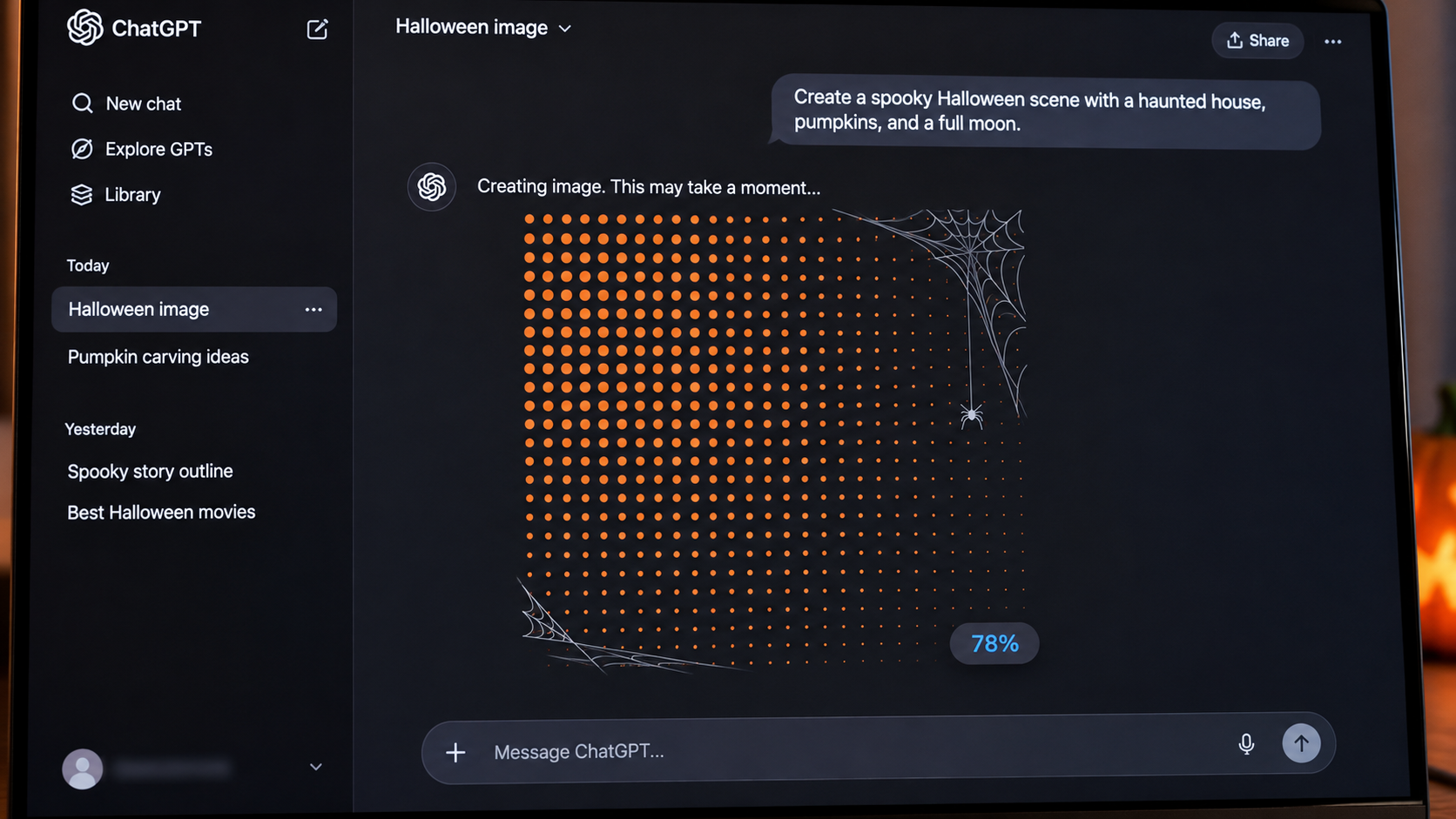
Sometimes the most memorable product update isn't a new feature. It's a small visual detail that makes an ordinary moment feel a little more human.
On Halloween 2026, we noticed a detail in ChatGPT that made us stop and smile.
While an image was being generated, the familiar waiting experience had taken on a Halloween theme. The screen was mostly white, with a field of tiny orange dots. Thin, hand-drawn-looking spiderwebs stretched into the upper-right and lower-left corners. A small spider dangled near one of the webs. Above the dotted canvas, the interface said, “Sketching it out.” Near the bottom, a tidy progress indicator showed 35%.
It wasn't a splashy takeover. There was no giant Halloween banner, loud animation, full-screen advertisement, or forced seasonal announcement. The core product experience remained recognizable. You had asked ChatGPT to make an image, and it was still making that image. The Halloween decoration simply made the in-between moment feel a little more fun.
And we loved it.
For anyone working in marketing, website design, product design, or customer experience, the screen is a useful reminder: a brand can create a memorable moment without demanding more attention from the user. Sometimes it only takes a thoughtful detail placed where people are already looking.
This isn't an argument that a spiderweb improves the AI model or that holiday illustrations should become a required feature in every app. It's an appreciation of a small product decision—and a chance to explore what it teaches about waiting, personality, trust, timing, and the design of digital experiences.
The Halloween Detail We Actually Saw
The screenshot captured on October 31, 2026, shows a ChatGPT image-generation progress screen with several specific visual elements: the status phrase “Sketching it out,” a pale background, a repeating field of orange dots, delicate gray spiderweb illustrations in opposing corners, a small hanging spider, and a rounded progress pill reading 35%.
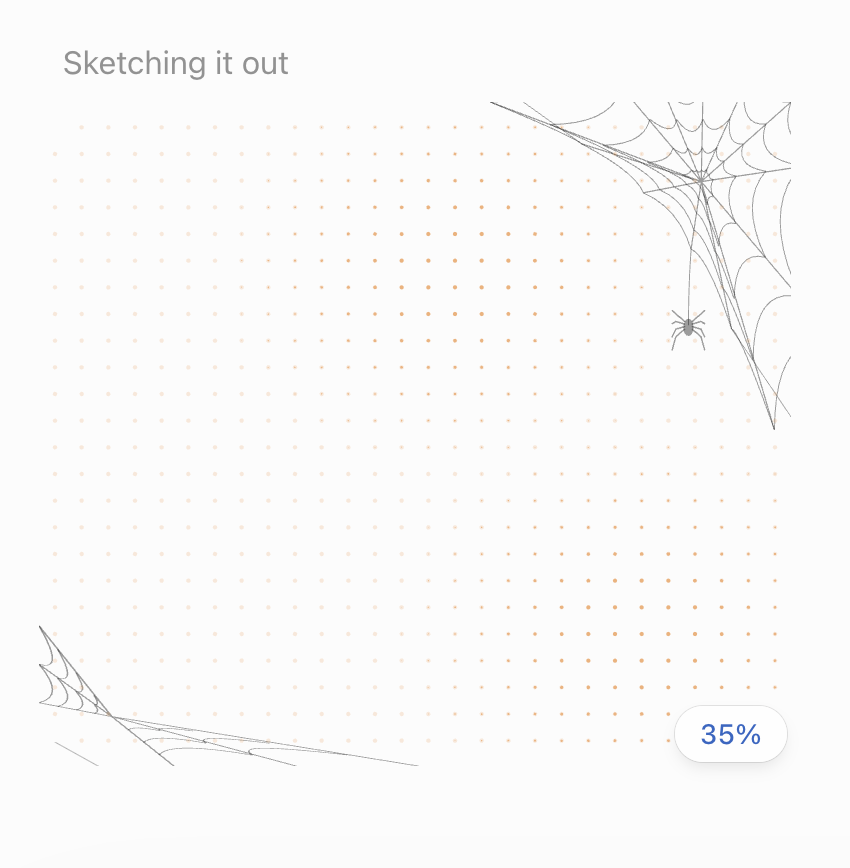
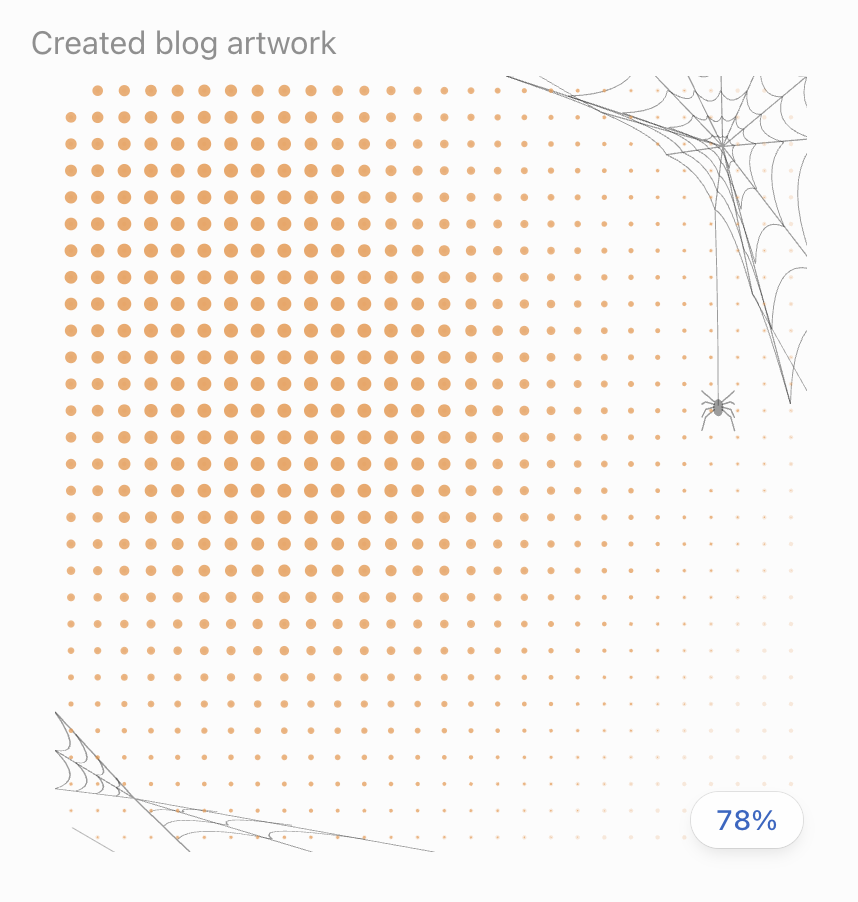
Those choices work together because they do not all compete for attention. The orange dots bring a seasonal accent to the canvas without turning the interface into a bright orange Halloween poster. The webs read immediately as spooky-season imagery, but their thin strokes keep them visually quiet. The spider adds a small touch of personality. The percentage remains legible and easy to locate.
The most important thing is what did not change: the purpose of the page. You still understand that image generation is underway. The product hasn't suddenly become a game, shopping promotion, or holiday landing page. It is still a progress screen.
It's worth being precise about the scope of that observation. This is a screenshot of one experience, not evidence that OpenAI distributed the exact same screen to every person on Halloween. OpenAI's ChatGPT release notes say image-generation loading experiences can vary by platform and rollout. The screenshot does not tell us who designed the seasonal overlay, how long it was live, how many users saw it, or how its performance was tested.
What we can say is that, in the version captured, the Halloween details were beautifully restrained. That restraint is what makes the example worth discussing.
Why a Loading Screen Is an Interesting Place for Personality
When a business wants to create a delightful brand moment, the first instinct is often to add something new: a campaign landing page, an email sequence, an animation on the homepage, a promotional modal, or a seasonal banner. Those can work when they serve a clear purpose. But they can also interrupt the very task a visitor came to complete.
A loading or progress screen is different. The user is already paused. They have given an instruction, and the system needs time to complete it. The product has an obligation to communicate what is happening, but that communication doesn't need to be personality-free.
OpenAI's Images in ChatGPT help guide notes that image generation can take some time depending on the request. Waiting is therefore not an unusual edge case in this workflow; it is a familiar part of the experience. A well-designed waiting state can make that time feel more understandable and less ambiguous.
That is consistent with longstanding user-experience research. Nielsen Norman Group's article “Progress Indicators Make a Slow System Less Insufferable” explains that progress feedback can help make waiting more tolerable by showing that the system is working and reducing uncertainty. The value comes from communication, not necessarily from increasing processing speed.
The Halloween treatment sits on top of that functional job. The status and percentage convey progress; the seasonal illustrations add a moment of surprise. Neither needs to displace the other.
A good loading screen answers the user's practical question—Is my request still being processed?—before it tries to make the user smile. The smile is an extra benefit, not a replacement for clarity.
The Best Seasonal Design Doesn't Hijack the Experience
There is a fine line between participating in a holiday and forcing every visitor into your holiday campaign.
Think about a local retailer whose website suddenly displays a full-screen animated snowstorm in December. It might look festive in a screenshot, but it could make navigation harder, obscure product images, or delay the checkout experience. Or imagine a contractor's website with a Halloween pop-up that covers the phone number when a homeowner is trying to book an urgent repair. That is technically seasonal branding, but it is poor timing.
The ChatGPT example takes a subtler route. It meets the user inside an existing moment rather than inserting an entirely new one. That gives it three advantages.
First, the holiday theme is contextual. It arrives during an image-generation wait, which already has visual space available for feedback. Second, it is recognizable without being overwhelming. A few spiderwebs and a spider tell the story. Third, the interface still appears to prioritize the user's original task.
This is the difference between adding personality to an experience and interrupting an experience to display personality.
For brands, that's a meaningful distinction. A holiday campaign can be effective without appearing on every page, covering every button, or demanding a click. Sometimes the better question is not, “Where can we put the Halloween graphic?” but, “Where would a tiny seasonal detail feel genuinely appropriate?”
The Psychology of Small, Unexpected Moments
A person opening a tool to generate an image is not necessarily expecting Halloween decorations. They might be making a product mockup, editing a family photo, experimenting with an illustration, or preparing graphics for work. When a familiar interface looks slightly different in a pleasant way, the change becomes noticeable precisely because the underlying experience remains familiar.
That is why the Halloween screen feels more like a small discovery than a formal announcement. The user doesn't have to read an explanation or opt into a theme. The imagery is immediately understood by someone familiar with Halloween symbols, and the design doesn't require the user to do anything with it.
In the UX field, these small details often fall under the broader discussion of microinteractions: narrowly focused interface responses that provide feedback and can also carry a product's personality. Nielsen Norman Group's microinteractions guide explains that such moments communicate system status and can act as vehicles for branding.
Not every decorative element is technically a microinteraction. A static spider illustration by itself is simply an illustration. But when it appears as part of a time-sensitive feedback state, it contributes to the overall interaction: the user's action triggers a waiting period, and the interface responds with visual status information.
The larger lesson is that people experience digital products through a series of moments, not just through one grand feature list. They notice whether a button responds, whether an error message is understandable, whether a page remembers their work, and whether waiting is handled thoughtfully. A seasonal detail can become part of that same sequence.
Would every user notice the spider? Probably not. Would everyone enjoy it equally? Certainly not. But the possibility of a small positive surprise is real, and its location in the user journey makes the idea more interesting than a generic holiday banner.
There Is a Branding Lesson Here, Even Without a Logo
Most marketers think about brand identity through logos, typography, colors, positioning statements, voice, and campaigns. Those elements matter. But a brand is also expressed through the choices its product makes during mundane moments.
What happens when something is loading? How does the website respond to an error? Is the checkout confirmation reassuring? Does the appointment reminder sound useful or robotic? Are the empty states blank and cold, or do they help people understand what to do next?
Those details add up to an experience that feels deliberate or neglected.
ChatGPT's Halloween treatment is particularly interesting because the brand isn't relying on a giant promotional message. The visual system is still recognizable as ChatGPT's image-generation interface, but the seasonal illustration gives it a little extra texture. It doesn't need to say “Happy Halloween from ChatGPT!” in huge lettering to signal the occasion.
For a service business, the same thinking could apply to a confirmation screen. A landscaping company might incorporate a restrained spring illustration after someone books a consultation. A bakery could add a subtle seasonal motif to an order-confirmation email. A creative studio might customize an empty-state message around a holiday, while keeping the instructions clear. A booking platform might use a soft winter palette in a nonessential decoration while preserving the standard layout.
The point is not to imitate ChatGPT's webs or color choices. It is to develop a consistent sense of where the brand can express character without compromising utility.
Holiday Overlays Can Be Small, Yet Still Worth Designing Carefully
A seasonal overlay may look like a minor visual change, but implementing one responsibly requires attention to details. Does it work on mobile? Does it alter color contrast? Can the status text still be read? Does it interfere with assistive technology? Will it disappear after the holiday? Is it easy to remove without accidentally affecting the underlying product?
The smaller a component is, the easier it can be to dismiss testing as unnecessary. Yet overlays occupy live interface space. Even an illustration that looks unobtrusive on a large desktop might cover useful information on a phone or appear awkwardly cropped in a different viewport.
There is also a distinction between decoration and interactivity. Decorative elements should generally remain decorative unless there is a clear reason for users to interact with them. If a seasonal element becomes a button, it needs the affordances, keyboard support, labeling, and feedback expected of a real control.
A thoughtful implementation keeps the holiday treatment separate from essential information. If the decoration fails to load, the product should still work. If someone uses reduced-motion settings, the experience should still make sense. If the calendar rolls over to November 1, the theme should not linger because a manual publishing step was forgotten.
In other words, playful design still benefits from professional discipline. The goal is to create delight without creating extra work for the person using the site.
A Progress Bar Should Still Tell the Truth
The 35% indicator in the screenshot is a small but important component. It gives the user an apparent sense of where the generation process stands. We cannot verify from a static screenshot how that number was calculated, whether it precisely represented processing work, or how it behaved during the rest of the request.
What matters for the design lesson is that the indicator remains visible and readable despite the seasonal graphics. This is not an excuse to replace useful status information with purely decorative animation.
A progress indicator should be designed around what the product can honestly know. If the system can estimate meaningful completion, a percentage may be appropriate. If it cannot, an indeterminate spinner or status message may be more honest. Showing a decorative percentage that jumps unpredictably or stalls without explanation can introduce the very uncertainty that progress feedback is supposed to reduce.
Nielsen Norman Group's progress-indicator research emphasizes communicating the state of the system. Seasonal flair should build on that foundation, not weaken it.
This is particularly relevant to ecommerce, lead-generation websites, and service-booking tools. A visitor waiting for a checkout to complete cares more about whether the payment went through than whether the spinner is festive. If the system is slow, be transparent. If something fails, explain the next step. If the design can provide a pleasant seasonal touch after those responsibilities are met, that's the right order.
Could This Kind of Detail Improve Brand Perception?
It is reasonable to hypothesize that a small, well-placed holiday detail could improve how some users feel about an experience. It might be noticed, remembered, or shared. It might make a routine wait more pleasant. It might signal that the team behind the product pays attention to the smaller parts of the journey.
But we should not confuse a plausible design hypothesis with measured proof.
We don't have experimental data showing that ChatGPT's Halloween treatment improved satisfaction, retention, image-generation completion rates, or brand sentiment. The screenshot alone cannot establish any of those effects. Even if people shared the image online, that would not prove a broad business impact.
As marketers, we should be comfortable liking an experience without inventing ROI numbers to justify the reaction.
The measurable question for a brand considering a similar idea would be: What behavior or perception are we hoping to influence, and can we test it without disrupting the primary task?
An ecommerce business might test whether a subtle holiday confirmation treatment affects a short satisfaction survey. A product team might monitor errors, abandonment, and accessibility feedback after a UI update. A service business might ask customers about the booking experience. Those are reasonable experiments; they are not reasons to assume every seasonal animation will increase sales.
The strongest takeaway is simpler: small interface decisions deserve consideration because users actually experience them. They are part of the product, even when they never appear in an advertising campaign.
Why Timing Matters More Than Decorations
One reason this example works as a Halloween observation is that it was encountered on October 31. The seasonal imagery was timely. A tiny spiderweb detail in mid-July might feel random; on Halloween, it feels intentional.
Seasonal context can give otherwise ordinary decorative choices more meaning. A few orange dots and illustrated webs instantly connect the interface to the day. The element doesn't need elaborate copy to explain itself.
That said, timing is not simply about the calendar. Brands should also consider what users are doing at that moment.
A seasonal graphic in a waiting state can be low-friction. A seasonal graphic obscuring a medical appointment form or payment confirmation could be an unwelcome distraction. A promotion on a holiday gift guide may be useful; the same promotion interrupting a support request may feel inconsiderate.
This is where user journey mapping meets seasonal marketing. Marketers often plan a campaign around when it runs, but they should also plan around where in the experience it appears. The right placement can make even a minimal treatment memorable. The wrong placement can make a sophisticated campaign irritating.
That is worth remembering during Halloween, Black Friday, Christmas, New Year's, Valentine's Day, and any other moment when brands feel pressure to decorate their digital properties.
A Note on the Hidden Snake Game
There is another interesting piece of context, although it is separate from the spiderweb screenshot. OpenAI's September 8, 2026 ChatGPT release notes say some users may see animated dots and a Snake game while images are generated. The company also notes that the loading experience differs across platforms and rollout stages, and that Snake is not available in Work mode.
That documentation helps explain why a waiting state can become more than a generic spinner for some users. It does notestablish that the Halloween-themed screenshot included a playable game, or that every user who saw the webs had access to one. We did not test those interactions as part of this observation.
The broader UX distinction is still useful. A passive seasonal decoration is one kind of engagement. An optional interactive mini-game during a wait is another. Both can be playful, but the second requires additional thought about accessibility, controls, distraction, and what happens when the task finishes. Neither should hide or compromise the actual progress of image generation.
What Small Businesses Can Borrow From This Without Copying the Design
You do not need an AI product, an app development team, or a large marketing budget to learn from the Halloween loading screen. Most businesses already have moments in the customer journey where a thoughtful detail could make the experience clearer or more personable.
Start by finding the spaces that currently feel generic: contact-form confirmations, appointment-booking messages, quote-request states, ecommerce order confirmations, loading screens, empty product collections, onboarding steps, and post-purchase emails. Then ask whether a seasonal accent could fit there naturally without hiding anything important.
For a Hamptons service business, that might be a discreet winter-ready message on a maintenance booking confirmation. For an Etsy seller expanding to a standalone website, it might be a seasonal thank-you note after checkout, provided it doesn't create confusion about delivery. For a school or community organization, it might be a subtle autumn illustration in an event-registration confirmation. For a restaurant, it might be a holiday motif on a reservations confirmation page, not a full-screen interruption before the reservation is made.
In each case, the design should reinforce the existing journey. It should not force the customer to make an additional decision or read a promotional message before they can finish.
The best starting point is a small, reversible experiment. Choose one surface. Set a clear start and end date. Test it across screen sizes. Make sure the main action remains obvious. Then remove it when the season ends, unless you deliberately choose a longer-lasting treatment.
That process is less exciting than announcing a brand-new seasonal microsite, but it is often much more respectful of the user.
Five Principles for Seasonal UX That People Actually Appreciate
1. Make the task unmistakable
The customer should never need to interpret the holiday theme to understand what is happening. On the ChatGPT screen, “Sketching it out” and the progress indicator continue to serve that purpose. For your website, preserve clear navigation, form labels, buttons, prices, and status messages. Seasonal graphics are supporting characters.
2. Use visual restraint
A recognizable symbol is often enough. One spider, a few webs, or a slight color change can say “Halloween” without turning every element into a costume. The more an interface is used for practical tasks, the more valuable restraint becomes.
3. Respect accessibility and motion preferences
Animated decorations should not create flashing, forced motion, or reduced readability. The W3C's Web Content Accessibility Guidelines 2.2 address moving and flashing content, while Yale's accessibility guidance on animationexplains why some users may need motion reduced or stopped. An inclusive holiday experience should not make the underlying product harder to use.
4. Be honest about status and timing
If the page is loading, say so. If payment is processing, make that clear. If a holiday offer expires, give an accurate deadline. A seasonal graphic must never be used to distract people from errors, uncertain delivery dates, unexpected charges, or unavailable services.
5. Make it easy to turn on and off
Seasonal experiences should be tested, versioned, and retired intentionally. A small reusable component is often better than rewriting an entire layout. That protects the consistency of the site and reduces the chance that a short-term idea creates a long-term maintenance problem.
Together, these principles make seasonal design feel like part of the product rather than a sticker placed over it.
A Simple Holiday UX Audit for Your Own Website
If the Halloween progress screen makes you think about your own website, start with an audit rather than a redesign. You can do this in one focused session.
First, identify your key user journeys. For a service business, these may be looking up a service, calling, completing a quote form, and scheduling a consultation. For ecommerce, they may be finding an item, comparing options, personalizing a product, checking delivery estimates, and paying.
Second, locate the in-between states. Where does your site ask people to wait? Where do they reach a confirmation screen? Where might they be uncertain whether their action succeeded? These states often receive less attention than homepages, but they shape how dependable the whole experience feels.
Third, separate function from personality. Write down what each state must communicate. A form confirmation must say the inquiry was received and explain what happens next. A checkout confirmation must distinguish a completed order from a pending payment. Only after that should you consider decoration, tone, or playful copy.
Fourth, identify one seasonal opportunity. Choose a surface where a lighthearted detail fits your audience and your brand. It might be the confirmation screen, an optional illustrated accent on a landing page, or a restrained seasonal email header. Do not add an overlay simply because you can.
Fifth, test the experience. Open it on a small phone. Use a keyboard. Check the contrast. Review screen-reader semantics where relevant. Test reduced-motion settings. Make sure the decorative asset does not change page layout unexpectedly or block an essential control.
Sixth, establish a removal date. Even beautiful holiday artwork can feel neglected when it appears weeks after the occasion has passed. A clear expiration plan is part of good digital operations.
Finally, measure the basics. Watch for usability regressions, form-completion problems, performance changes, customer feedback, and unexpected errors. If the detail also creates positive comments or shares, that's interesting evidence, but don't allow vanity engagement to overshadow whether users successfully completed their tasks.
This is not a case for decorating every corner of a website. It is a case for making small changes thoughtfully, and for appreciating the parts of digital experiences that brands too often treat as afterthoughts.
The Bigger Marketing Idea: Delight Is Often a Byproduct of Care
There is a temptation to treat delight as its own marketing tactic. Add a surprise. Make a feature playful. Hide an Easter egg. Hope people talk about it. But the best details tend to feel good because they reflect a larger pattern of attention to the user.
The Halloween loading screen is effective as a visual moment because the interface's basic responsibility remains clear. It is still an image-generation waiting state. The spiderwebs do not erase the status text. The orange dots do not bury the progress indicator. The decoration stays on the edges of the experience.
That is what gives it charm. It doesn't have to compete with the product to be noticed.
This principle applies outside of software, too. Think of thoughtful packaging, a well-written appointment reminder, a genuinely helpful follow-up email, or a website that remembers which information a returning customer needs. Those experiences are not always flashy, but they can make a company feel more attentive.
For marketers, the lesson is to look beyond campaign assets and conversion buttons. Consider the full experience. The places where people wait, hesitate, complete a task, or need reassurance are real opportunities to communicate your brand's priorities.
Sometimes the right move is a clearer label. Sometimes it's a better error message. And once in a while, on Halloween, it might be a tiny illustrated spider.
Frequently Asked Questions
Did ChatGPT add a Halloween-themed image-generation loading screen in 2026?
A screenshot captured on October 31, 2026 shows an image-generation waiting state with orange dots, spiderweb illustrations, a hanging spider, and a visible progress indicator. The image documents that particular experience. It does not verify universal availability across every account or platform.
What did the Halloween image-generation screen look like?
The observed design was light and minimal: a pale background, tiny orange dots arranged across the canvas, sketch-style spiderwebs in two corners, a small spider, the words “Sketching it out,” and a rounded progress indicator displaying 35%.
Was the Halloween artwork part of the generated image?
No. In the screenshot, the artwork is part of the interface shown while the image is being generated. It is a waiting-state treatment, not a decoration necessarily added to the user's requested final image.
Does the Halloween overlay make ChatGPT image generation faster?
There is no evidence in this observation that it changes the underlying speed. The design is relevant because it makes an existing wait visually distinctive. A progress interface can communicate system status without changing the processing time.
Did every ChatGPT user see the same Halloween screen?
We cannot establish that. OpenAI's release notes say image-generation loading experiences vary by platform and rollout. The screenshot supports describing one observed version, not a universal rollout.
What is a microinteraction?
A microinteraction is a focused moment of interface feedback associated with a user action or system-state change. Examples can include a button response, progress indicator, or confirmation message. Nielsen Norman Group explains how these interactions can provide status information and support brand expression.
Why does holiday website design matter to marketers?
Holiday design can communicate personality, relevance, and attention to detail. Its value depends on how well it fits the actual user journey. A tasteful seasonal accent may feel pleasant; a disruptive pop-up may make the task harder. More decoration is not automatically better marketing.
Are seasonal website overlays good for conversion rates?
Not necessarily. Their effect depends on placement, usefulness, audience, and execution. A seasonal component should be evaluated for usability and business outcomes rather than assumed to increase sales, form submissions, or retention.
Should a small business add Halloween graphics to its website?
Only if they fit the brand and can be implemented without obscuring essential information. A small decorative accent on a confirmation page may be appropriate. A full-screen overlay blocking booking, checkout, or contact information is much harder to justify.
Could a seasonal overlay create accessibility issues?
Yes. Fast motion, flashing, poor contrast, and inaccessible controls can create problems. Consult the WCAG 2.2 standardand test the experience with keyboard navigation, appropriate labels, and reduced-motion preferences where applicable.
What's the difference between a festive UX detail and a holiday promotion?
A festive UX detail changes the look or tone of an existing interaction. A holiday promotion attempts to influence a specific commercial action, such as using a discount or buying a seasonal product. The two can coexist, but a UX treatment does not need to ask the user to buy anything.
How can a brand test a small seasonal design change?
Start with one low-risk surface, define the user task that must remain clear, test responsiveness and accessibility, and monitor errors and completion rates. Gather feedback if practical, then compare results carefully. Don't infer measurable revenue effects from a screenshot or a few positive reactions.
Is ChatGPT's Halloween screen likely to remain after October 31?
The screenshot alone doesn't establish how long the theme was scheduled to appear. Seasonal UI treatments are often temporary, but its actual retirement date and availability would need to be confirmed separately. Businesses implementing their own seasonal designs should specify a removal date in advance.
What can website owners learn from this example?
Look for small moments where clear functional feedback and a restrained bit of personality can coexist. A good loading state, confirmation message, or seasonal accent should help users feel that the experience is intentional—without slowing them down or asking for extra attention.
A Small Halloween Moment Worth Appreciating
There's no need to invent a major product announcement to recognize a thoughtful design decision. On Halloween, an ordinary image-generation wait appeared with tiny orange dots, delicate spiderwebs, and a little dangling spider. The important words and the progress indicator stayed in place. The product still did what it was supposed to do.
That was enough to make the moment feel special.
At Ritner Digital, we pay attention to details like this because website design is not just what a page looks like when it first loads. It is how the whole experience behaves while someone uses it. The pauses, confirmations, transitions, and small interactions matter too.
We love a well-executed holiday overlay when it respects the user and adds a little character to an otherwise routine moment. This one is a great example of the principle.
If your website has rough edges, confusing customer journeys, or missed opportunities to express your brand without hurting usability, explore Ritner Digital's website design services and conversion optimization services.
Contact Ritner Digital to discuss a more thoughtful website experience.
Sources and Further Reading
OpenAI Help Center — Images in ChatGPT, for general image-generation workflow and waiting-time context.
OpenAI Help Center — ChatGPT Release Notes, especially the September 8, 2026 image-generation update and its platform/rollout caveats.
Nielsen Norman Group — Microinteractions in User Experience, on feedback, status, and branding.
Nielsen Norman Group — Progress Indicators Make a Slow System Less Insufferable, on the role of progress feedback in reducing uncertainty.
W3C — Web Content Accessibility Guidelines 2.2, on accessible interaction design, motion, and flashing content.
Yale — Animated Content and Timing, on designing motion and timed interfaces with accessibility in mind.
Featured observation: screenshot supplied by the author, captured on October 31, 2026. The description of the Halloween UI is a firsthand observation rather than a claim of universally available functionality or a measured change in product performance.