How Cleveland Businesses Can Measure SEO Leads in Google Search Console
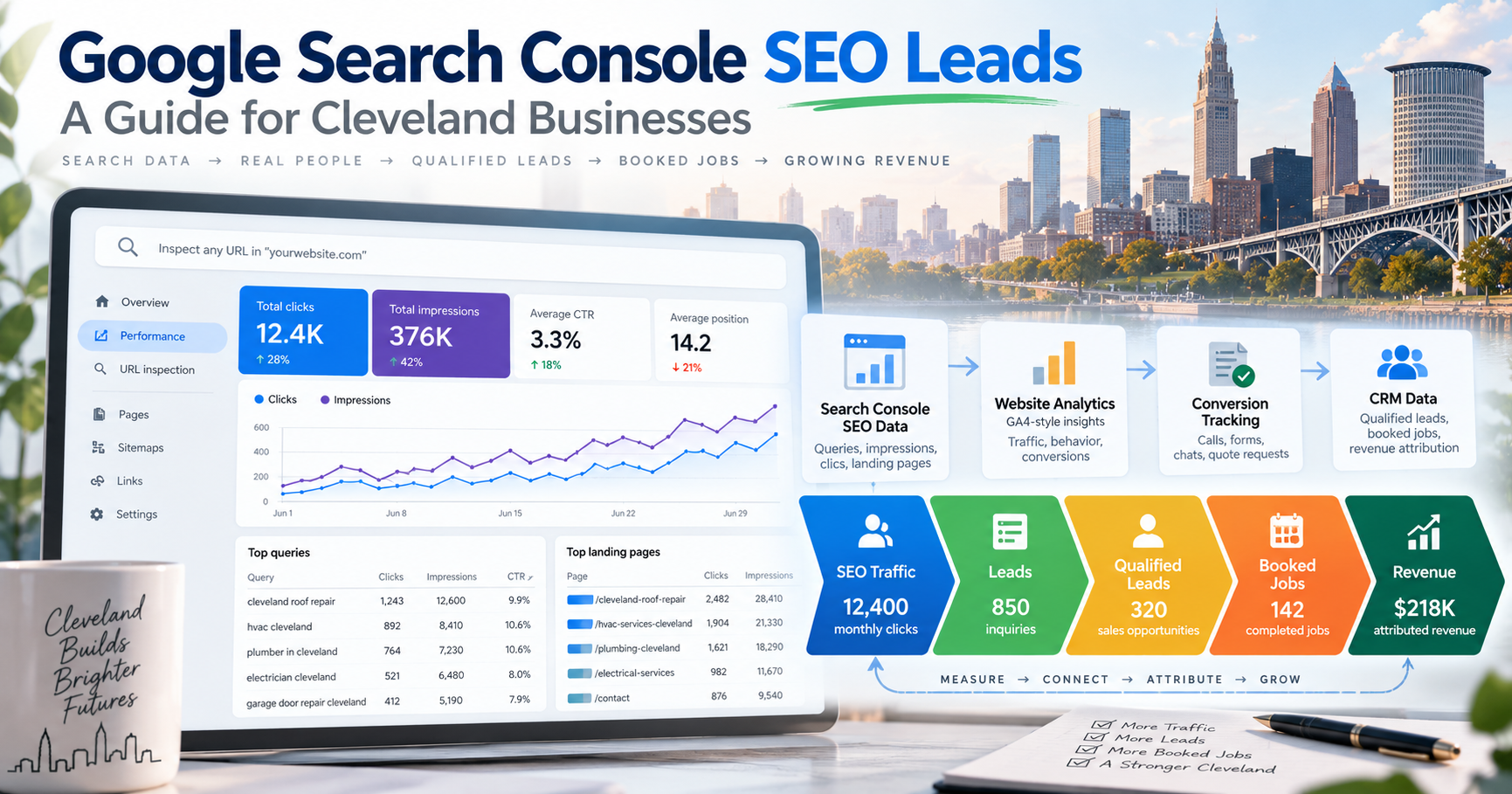
A Cleveland business can rank higher, earn more impressions, and increase organic traffic without necessarily generating more customers.
That is why SEO reporting should not stop at:
Rankings
Impressions
Clicks
Traffic
Those metrics matter.
But for most local businesses, the more important questions are:
How many leads did SEO generate?
Which Google searches produced those opportunities?
Which service pages generated the best leads?
Which Cleveland suburbs produced customers?
How many leads became appointments, sold jobs, or revenue?
Google Search Console is one of the most valuable tools for answering the first half of that equation.
But there is an important limitation:
Google Search Console does not directly tell you how many leads your website generated.
Search Console reports what happened in Google Search—such as impressions, clicks, click-through rate, search queries, landing pages, devices, and average position. (Google Search Console Help)
To measure actual leads, a Cleveland business generally needs to connect Search Console data with:
Google Analytics 4
Website form tracking
Phone tracking
Booking data
CRM records
Sales data
The result is a measurement system that connects:
Google visibility → website clicks → leads → qualified opportunities → sold business → revenue
That is the level of SEO reporting that helps business owners make decisions.
What Google Search Console Actually Measures
Google Search Console's Performance report shows how your website performs in Google Search.
Its core metrics include:
Impressions
How often a page from your website appeared in Google Search results.
Clicks
How often someone clicked from Google's search results to your website.
Click-Through Rate
Clicks divided by impressions.
Average Position
The average position of your highest-ranking result for the selected query, page, or other reporting dimension.
Google also lets businesses organize and filter this data by dimensions including:
Queries
Pages
Countries
Devices
Search appearance
Dates
Those metrics help answer questions like:
Are more Cleveland customers finding us?
Which searches are producing traffic?
Which pages are gaining visibility?
Are people clicking our results?
What Search Console cannot tell you by itself is:
What happened after the click?
That is where Analytics and lead tracking enter the picture.
Search Console Is the Beginning of SEO Lead Attribution, Not the End
Think of SEO measurement as a funnel.
A company that reports only the first two stages is measuring search activity.
A company that tracks the entire funnel is measuring SEO as a business channel.
Why This Matters for Cleveland Businesses
Consider a Cleveland roofing company.
Its Search Console report may show that organic clicks increased from:
1,400 clicks per month
to:
2,100 clicks per month.
That sounds excellent.
But what if the additional 700 clicks primarily came from informational searches such as:
how long does a roof last
what color roof should I choose
while calls for:
roof replacement Cleveland
declined?
Traffic increased.
Business performance may not have.
Now imagine another month in which traffic increases only 10%, but:
Roof replacement leads increase 35%
Storm-damage calls increase 28%
Average job value rises
Westlake and Strongsville leads improve
Close rate remains strong
That is much more commercially meaningful.
SEO should ultimately be measured against business outcomes.
Step 1: Verify Google Search Console Is Set Up Correctly
Before analyzing leads, make sure Search Console is collecting the correct website data.
Your business should ideally control its Search Console property rather than depending entirely on an outside agency.
Google recommends proving ownership of your website so Search Console can provide performance information. (Google Search Console Help)
For most companies, a Domain property is especially useful because it can include traffic across relevant protocols and subdomains.
Make sure:
Your business has owner access
The correct website is verified
HTTPS traffic is being captured
Historical data exists
No former vendor is the only verified owner
Then open:
Search Console → Performance → Search results
This becomes the foundation for your SEO analysis.
Step 2: Record Your Search Baseline
Before making major SEO changes, record your existing numbers.
Use a meaningful period such as:
Last 3 months
or:
Last 6 months
Then record:
Do not rely only on screenshots.
Export the data if possible.
Google Search Console currently retains approximately 16 months of performance data, so creating regular exports can be useful for longer-term analysis. Search Console data linked into GA4 is likewise limited by Search Console's retention window. (Google Analytics Help)
Step 3: Link Search Console to Google Analytics 4
This is one of the most important steps.
Google allows businesses to connect a Search Console property with a Google Analytics 4 web data stream.
The integration lets Analytics combine organic-search information with website behavior.
Google specifically notes that this makes it possible to examine:
Which searches lead to clicks
Which landing pages receive organic search traffic
How visitors interact with those pages
How many users interact with key events
In GA4:
Admin → Product links → Search Console Links → Link
You generally need:
Editor access in Analytics
Verified ownership of the Search Console property
Once connected, GA4 can provide reports including:
Google Organic Search Queries
and Search Console-related landing-page information.
Search Console Queries and Analytics Events Are Not the Same Dataset
This distinction is important.
Google's Search Console query report inside GA4 can display Search Console metrics such as:
Organic Google search clicks
Organic Google search impressions
Organic CTR
Organic average position
But Google notes that Search Console metrics are primarily compatible with Search Console dimensions rather than every Analytics dimension. (Google Analytics Help)
That means you should not expect a perfect report saying:
“The person who searched exactly emergency plumber Cleveland became Lead #482.”
Google deliberately limits query-level data for privacy and data-model reasons.
Instead, strong SEO attribution uses several layers of evidence.
Step 4: Define What Counts as an SEO Lead
Before measuring leads, define one.
A lead should represent a meaningful business action.
For a Cleveland contractor, that might be:
Estimate request
Contact-form submission
Phone call
Appointment request
Schedule request
For a law firm:
Consultation request
Qualified phone call
Online case inquiry
For a medical practice:
Appointment request
New-patient inquiry
For a manufacturer:
RFQ submission
Engineering inquiry
Quote request
Do not confuse meaningful leads with weak engagement events such as:
Page views
Scrolls
Video plays
Button hovers
Those may help diagnose behavior.
They usually should not be reported to the owner as “SEO leads.”
Step 5: Set Up Lead Events in GA4
Google Analytics can measure website interactions through events.
For lead-generation sites, Google provides events such as:
form_start
form_submit
Google also recommends the event:
generate_lead
for meaningful lead completion. (Google Analytics Help)
For example, a successful contact-form submission might send users to:
/thank-you/
A page_view of that confirmation page could be used to create a generate_lead event.
Then that event can be marked as a key event in GA4.
Google defines key events as actions that are especially important to the business. (Google Analytics Help)
Recommended Lead Events for a Cleveland Service Business
A practical measurement plan might look like:
Not every click should count equally.
A phone-number click is not necessarily a completed call.
A submitted contact form is usually stronger.
A booked appointment is stronger still.
Your reporting should preserve those differences.
Step 6: Measure the Lead Funnel
Google Analytics provides automatic form events in supported situations including:
form_start
and:
form_submit
Google recommends using funnel analysis to understand how many visitors:
Reach the page
Reach the form
Start the form
Submit the form
That can reveal conversion problems an SEO ranking report would completely miss.
For example:
If rankings and traffic are strong but form completion is terrible, the SEO problem may actually be a conversion problem.
Step 7: Identify Which Pages Generate Organic Clicks
Inside Search Console, open the Pages tab.
Sort by clicks.
You might see:
The blog may receive more clicks than the emergency-plumbing page.
But that does not automatically make it more valuable.
Now compare those pages with lead activity.
Step 8: Compare Search Console Landing Pages With GA4 Landing Pages
GA4 has a Landing Page report that shows the page on which a visitor first entered the website. (Google Analytics Help)
Use that report to evaluate organic landing pages.
For example:
Now the business has a much more useful picture.
The blog generates traffic.
The emergency-plumbing page generates business.
Both may be valuable—but for different reasons.
Step 9: Calculate Organic Lead Rate
A simple performance metric is:
Organic Lead Rate = Organic Leads ÷ Organic Visits × 100
For example:
38 leads ÷ 290 organic visitors = 13.1%
That tells you how effectively an organic landing page turns search visitors into leads.
You can also create a Search Console-oriented directional metric:
Lead-to-Click Ratio = Leads attributed to organic landing traffic ÷ Search Console organic clicks
But use caution.
Search Console clicks and Analytics sessions/users are different measurement systems and will not match perfectly.
The ratio can be useful directionally.
Do not treat it as a mathematically exact user-level conversion rate.
Step 10: Separate Branded and Non-Branded Search
A major analytical mistake is mixing all queries together.
Branded searches include searches such as:
ABC Plumbing
ABC Plumbing Cleveland
ABC Plumbing reviews
Those people already know the company.
Non-branded searches might include:
plumber Cleveland
emergency plumber near me
drain cleaning Cleveland
water heater repair Lakewood
Those searches better represent SEO-driven discovery.
Both matter.
But they tell different stories.
Build a Branded Query Filter
Search Console supports query filters and custom regular expressions.
Google's reporting interface uses RE2-style regular expressions for advanced matching. (Google Search Console Help)
A branded filter could include variations of:
ritner|ritner digital|ritnerdigital
For another company:
abc plumbing|abc plumber|abcplumbing
You can then compare:
Branded traffic
versus:
Non-branded traffic.
This can reveal whether SEO is expanding discovery beyond people who already knew the brand.
Step 11: Create a Commercial-Intent Query Group
Not every non-branded search is equally valuable.
Compare:
how does a sump pump work
with:
sump pump installation Cleveland
The second query has much stronger commercial intent.
Create a commercial-intent group based on patterns such as:
Cleveland
near me
company
contractor
repair
replacement
installation
quote
cost
service
attorney
plumber
roofer
HVAC
waterproofing
Your exact terms will depend on your business.
Example: Search Intent Segmentation
This segmentation helps prevent informational traffic from hiding changes in high-value demand.
Step 12: Measure Service-Specific SEO Performance
Cleveland businesses should analyze SEO by service rather than only sitewide.
Suppose an HVAC company offers:
Furnace repair
Furnace replacement
AC repair
AC installation
Heat pumps
Maintenance
Create a scorecard such as:
Now SEO can be managed according to revenue opportunity.
Step 13: Analyze Queries by Landing Page
Inside Search Console:
Open Performance
Select Pages
Click a service page
Switch to Queries
Now you can see which searches generated impressions and clicks for that page.
For a basement waterproofing page, you might find:
basement waterproofing Cleveland
basement waterproofing company
wet basement repair Cleveland
basement waterproofing near me
leaking basement wall
basement water repair
This analysis answers:
Is the page attracting the searches we actually want?
A page can gain traffic while drifting toward less valuable intent.
Step 14: Analyze Pages by Query
You can also reverse the process.
Start with a valuable search such as:
roof repair Cleveland
Then click the query and switch to Pages.
This shows which URL or URLs receive impressions for that query.
If several pages compete for the same term, investigate.
For example:
Homepage
Roof repair page
Cleveland location page
Storm damage article
That does not automatically mean there is a problem.
But it may reveal unclear site architecture or overlapping intent.
Step 15: Track Cleveland and Suburb Search Demand
Local businesses should analyze geographic modifiers.
Useful query segments might include:
Cleveland
cleveland
West Side
lakewood|westlake|rocky river|north olmsted
South / Southwest
parma|strongsville|independence
East Side
beachwood|cleveland heights|solon
You can compare clicks and impressions from these query groups over time.
For example:
That can inform future location-page and market-expansion decisions.
Search Query Geography Is Not the Same as User Location
Be careful with interpretation.
A search containing:
plumber Westlake
does not necessarily mean the searcher was physically standing in Westlake.
Likewise, Search Console's country dimension is far broader than Cleveland-level location analysis.
Use geographic modifiers as evidence of search intent, not precise user location.
For local rank tracking, geographic grid tracking and Google Business Profile performance data may provide additional information.
Step 16: Measure Mobile Separately
Local SEO is highly mobile.
Inside Search Console, compare:
Mobile
Desktop
Tablet
You may discover:
If mobile produces most leads but conversion rates are weak, investigate:
Click-to-call buttons
Form usability
Page speed
Sticky CTAs
Navigation
Autofill
Input fields
Search Console can reveal the visibility and click pattern.
Analytics can reveal whether the mobile traffic converted.
Step 17: Measure Click-Through Rate by High-Value Query
Rankings alone can hide opportunities.
Suppose:
roof replacement Cleveland
has:
8,000 impressions
200 clicks
2.5% CTR
Average position 4.8
That query may deserve attention even though the page already ranks on page one.
Improving:
Title
Snippet
Relevance
Brand recognition
Offer clarity
may generate additional clicks without moving from position 5 to position 1.
Google specifically recommends looking for high-impression queries with weaker CTR and reviewing whether the title and snippet appropriately answer the searcher's need. (Google Search Console Help)
Step 18: Measure Lead Quality, Not Just Lead Quantity
Not all leads are equal.
Suppose two pages generate:
Page A
50 leads
Page B
22 leads
Page A looks better.
But now add qualification data:
Page B is far more valuable.
This is why Search Console plus form tracking is still incomplete.
Your CRM must continue the funnel.
Step 19: Connect SEO Leads to a CRM
Your CRM should ideally record:
Original lead source
Landing page
Service requested
Location
Lead status
Qualified / unqualified
Appointment status
Sold / lost
Revenue
For example:
Now the SEO report can move beyond traffic.
Step 20: Calculate Qualified Lead Rate
A useful formula is:
Qualified Lead Rate = Qualified Organic Leads ÷ Total Organic Leads × 100
For example:
42 organic leads
34 qualified
34 ÷ 42 = 81% qualified lead rate
That tells you whether SEO is attracting appropriate prospects.
A campaign that doubles low-quality leads may increase workload without increasing revenue.
Step 21: Calculate Booking or Close Rate
For appointment-driven companies:
Booking Rate = Booked Appointments ÷ Leads × 100
For sales-driven businesses:
Close Rate = Sold Customers ÷ Qualified Leads × 100
Example:
34 qualified roofing leads
21 sold jobs
21 ÷ 34 = 61.8% close rate
Now you can compare performance between services.
Step 22: Calculate SEO Revenue
Eventually, SEO attribution should reach revenue.
Suppose organic search produced:
38 basement waterproofing leads
27 qualified inspections
12 sold jobs
$8,500 average sold project
Estimated attributed revenue:
12 × $8,500 = $102,000
That tells a much stronger story than:
“Organic traffic increased 18%.”
Create an SEO Revenue Funnel
A useful monthly funnel might look like:
Not every business will have perfect attribution.
The objective is continuous improvement.
Step 23: Distinguish Google Search From Google Maps Leads
This is particularly important for Cleveland local SEO.
Google Search Console reports website performance in Google Search.
It does not represent every action that happens directly on your Google Business Profile.
Customers may:
Call from the profile
Request directions
Visit your website
Interact with Maps
Those actions may require separate Business Profile performance reporting.
So your local SEO dashboard might contain:
Organic Website Search
Search Console + GA4
Google Maps / Business Profile
Business Profile performance
Lead Outcomes
Call tracking + CRM
Do not incorrectly label all local leads as “Search Console leads.”
Step 24: Understand Search Console Query Privacy Limits
You will not see every Google search query.
Google intentionally omits some queries to protect privacy.
Its current documentation notes that anonymized queries are excluded from query tables even though those clicks may still be included in overall chart totals. (Google Search Console Help)
That means:
Total clicks may be greater than the sum of visible query clicks.
This is normal.
Do not assume your tracking is broken.
Search Console Also Truncates Query Data
Google also explains that Search Console stores and shows only its most important data rows.
Not every long-tail query appears in the interface.
The standard table can display up to 1,000 rows, and some rare queries may be omitted even though they contribute to chart totals. (Google Search Console Help)
Larger websites may benefit from:
Search Console API
Bulk exports
BigQuery
Looker Studio
for deeper reporting.
Step 25: Use the Search Console API or BigQuery for Advanced Analysis
For larger Cleveland businesses, franchises, manufacturers, health systems, law firms, or multi-location companies, manually exporting Search Console data may become limiting.
Google's Search Console data can be analyzed programmatically.
Google's bulk export examples show that query and URL data can be analyzed for:
Clicks
Impressions
CTR
Average position
Device
Country
URL
Search type
This allows businesses to build custom groups such as:
Brand vs. non-brand
Service categories
Suburb groups
High-commercial-intent terms
Informational searches
Mobile vs. desktop
That can produce far more useful reporting than a simple ranking dashboard.
Search Console Data Is Not Real Time
Google Search Console is not the tool to use when you need second-by-second lead information.
Google notes that Search Console data linked into GA4 may become available about 48 hours after collection. (Google Analytics Help)
For immediate lead monitoring, use:
CRM notifications
Form systems
Call tracking
GA4 Realtime
Use Search Console for trend and search-performance analysis.
Use Search Console Insights for Faster Trend Analysis
Google's newer Search Console Insights report provides a simplified overview of:
Clicks
Impressions
Top content
Trending content
Top queries
Trending queries
Countries
This is helpful for quickly detecting:
Which pages suddenly gained search demand?
Which queries are trending up?
Which pages are losing visibility?
For detailed lead analysis, however, use the full Performance report and Analytics.
Build a Monthly SEO Lead Report
A Cleveland business does not need a 40-page SEO report.
A useful monthly dashboard can fit into a few sections.
1. Search Visibility
Impressions
Clicks
CTR
Average position
2. Commercial Search Performance
Non-branded clicks
Commercial-intent clicks
Top service queries
Top location queries
3. Lead Generation
Organic form leads
Organic phone leads
Bookings
Total leads
4. Lead Quality
Qualified leads
Qualification rate
Appointments
5. Sales
Sold customers
Close rate
Revenue
6. SEO Opportunities
High-impression / low-CTR queries
Pages near page one
Service pages gaining demand
Suburbs gaining impressions
Declining pages
That is enough to support real decisions.
Example: Cleveland Plumbing SEO Report
Imagine a plumbing company has the following results:
This shows improvement across the funnel.
Now break it down by service.
Now management can see where SEO is actually producing business.
What Should a Cleveland SEO Agency Report?
At minimum, an SEO company should be able to explain:
What changed in search visibility?
Which pages changed?
Which queries changed?
Which services improved?
Which markets improved?
How many organic leads were generated?
How many were qualified?
What happened to booked business or revenue?
If the report contains only:
Keyword positions
Domain authority
Backlink counts
Impressions
it is incomplete.
Those metrics can be useful.
They are not business outcomes.
Red Flag: Reporting Every Organic Form Submission as an SEO Win
Attribution needs discipline.
Suppose someone:
Finds the company through Google
Returns through Facebook
Comes back directly
Submits a form
Which channel deserves credit?
There is no universally perfect answer.
GA4 offers attribution reporting to help businesses understand the paths customers take before completing key events. (Google Analytics Help)
That is why SEO reporting should not pretend attribution is perfectly simple.
Use a documented model consistently.
Red Flag: Calling All Organic Traffic a Lead
A website visit is not a lead.
An impression is not a lead.
A click is not a lead.
A ranking is not a lead.
A visitor becomes a lead when they take a meaningful action that indicates potential business interest.
This distinction sounds basic.
Many SEO reports still blur it.
Red Flag: Ignoring Qualified Lead Data
An SEO campaign that generates:
100 leads
sounds excellent.
But if:
80 are outside the service area
10 want a service you do not offer
7 are spam
3 are legitimate
then the campaign is not performing well.
Your CRM should send quality information back into your SEO analysis.
Red Flag: Measuring Rankings Without Search Demand
Ranking #1 for a query nobody searches is not impressive.
Search Console helps because it shows actual impression demand.
A query with:
0 impressions
should not receive the same attention as one producing:
10,000 monthly impressions.
Red Flag: Measuring Traffic Without Revenue Opportunity
The goal should not necessarily be:
More traffic.
It should often be:
More valuable traffic.
A Cleveland law firm may prefer:
200 additional visitors searching for:
car accident lawyer Cleveland
over:
5,000 visitors reading a broad national legal-information article.
Volume and value are not the same thing.
A Practical SEO Measurement Framework
Use this hierarchy:
Every level matters.
But higher levels get closer to business value.
Frequently Asked Questions
Can Google Search Console track leads?
Not directly.
Search Console measures Google Search performance such as impressions, clicks, CTR, queries, landing pages, devices, and average position.
Use GA4, form tracking, call tracking, and CRM data to measure actual leads.
Can I see which keyword generated a specific lead?
Usually not with certainty.
Search Console provides query-level performance in aggregate, while GA4 measures website behavior.
Privacy and data-model limitations mean you generally cannot tie every individual lead to the exact organic query that person searched.
Can I connect Search Console to GA4?
Yes.
Google provides a direct Search Console integration for GA4. (Google Analytics Help)
What events should I track for SEO leads?
Common examples include:
generate_lead
form_submit
phone_click
appointment_request
quote_request
booking_complete
Your exact events should reflect your sales process.
What is generate_lead in GA4?
generate_lead is a recommended Analytics event for recording when a user generates a lead.
Google recommends using recommended events where appropriate. (Google Analytics Help)
What is a GA4 key event?
A key event is an event that represents an especially important business action.
For many local companies, a successful lead submission should be treated as a key event.
Does Search Console show Google Maps calls?
Not as website search clicks.
Direct Google Business Profile actions should be measured through Business Profile performance and other appropriate tracking systems.
How long does Search Console keep data?
Search Console performance data is generally available for the most recent 16 months. (Google Analytics Help)
If you need longer historical reporting, export and store your data.
Why don't all Search Console query clicks add up to total clicks?
Google hides some search queries for privacy and limits the query rows reported.
The total chart can therefore include clicks from queries that are not visible in the query table. (Google Search Console Help)
Can I filter Cleveland searches in Search Console?
Yes.
You can filter queries containing geographic terms such as:
Cleveland
Lakewood
Parma
Westlake
Strongsville
Beachwood
Regular expressions can also group multiple terms.
Should I track branded and non-branded searches separately?
Yes.
Branded searches show demand from people who already know the company.
Non-branded searches are often more useful for measuring SEO discovery and market expansion.
Should I track SEO by service?
Yes.
A business should know whether SEO is generating visibility and leads for its highest-value services.
Should I track SEO by suburb?
For regional Cleveland businesses, geographic segmentation can be extremely useful.
It can reveal which markets are producing search demand, leads, and revenue.
What is the best SEO metric?
There is no single metric.
For a lead-generation company, a useful hierarchy is:
qualified organic leads → sold customers → revenue
Search Console metrics explain how that business outcome began.
Why do Search Console and GA4 numbers not match?
The systems measure different things.
Search Console counts interactions with Google Search results.
Analytics measures activity once users interact with your website.
Different attribution rules, privacy systems, cookies, data processing, and measurement definitions can create discrepancies.
How often should SEO leads be reviewed?
Monthly reporting works well for many companies.
High-volume companies may monitor weekly.
Avoid making major strategy decisions based on one or two days of Search Console movement.
Can Search Console show whether SEO is working?
Yes—but only part of the picture.
Search Console can show whether visibility, clicks, queries, and landing pages are improving.
You need Analytics, CRM, and sales data to determine whether those improvements created meaningful business results.
SEO Reporting Should End With Business Results
Google Search Console is one of the best tools available for understanding how customers discover a website through Google.
It tells Cleveland businesses:
What people search
Which pages appear
How often those pages appear
How many people click
Which queries are gaining visibility
Which pages are improving
Which devices customers use
But SEO does not stop when someone clicks.
The real measurement system should continue:
Impression → Click → Visit → Lead → Qualified Lead → Appointment → Customer → Revenue
That is the difference between reporting SEO activity and measuring SEO performance.
If your Cleveland SEO reports end with rankings and traffic, build the rest of the funnel.
Connect Search Console to GA4.
Track meaningful lead events.
Record which landing pages generate leads.
Separate branded and non-branded demand.
Segment by services and Cleveland-area markets.
Push qualified lead and revenue information into your reporting.
Then use Search Console for what it does exceptionally well:
showing which searches and pages started the opportunity.
Sources
Google Search Console Help — Performance Report. Official documentation for clicks, impressions, CTR, average position, queries, pages, devices, dates, search appearance, and other Search performance dimensions. (Google Search Console)
Google Search Console Help — How Are You Performing on Google? Google's guidance for analyzing queries, pages, countries, click-through rates, devices, and search-performance trends. (Google Search Console)
Google Search Console Help — Performance Dimensions and Data Groupings. Current documentation explaining query reporting, anonymized queries, data truncation, filters, and reporting dimensions. (Google Search Console)
Google Search Console Help — Troubleshooting Data Discrepancies. Google's explanation of table limits, anonymized queries, aggregation differences, and reasons chart and table totals may differ. (Google Search Console)
Google Search Console Help — Search Console Insights. Current documentation for the Insights experience, including top and trending content, queries, clicks, impressions, and countries. (Google Search Console)
Google Search Console Help — Query Guidelines and Sample Queries. Documentation and examples for analyzing Search Console bulk-export data by query, URL, clicks, impressions, CTR, position, device, and search type. (Google Search Console)
Google Analytics Help — Connect Search Console to Google Analytics. Google's official instructions for linking a Search Console property with a GA4 web data stream and analyzing organic search alongside website behavior and key events. (Google Analytics)
Google Analytics Help — Queries Report. Documentation explaining the Search Console query report inside GA4, available dimensions, clicks, impressions, CTR, average position, data delay, and 16-month Search Console retention. (Google Analytics)
Google Analytics Help — Landing Page Report. Official documentation for evaluating the first page visitors reach and analyzing landing-page performance. (Google Analytics)
Google Analytics Help — Generate More Leads on Your Website. Google's lead-generation tutorial explaining website lead forms, event measurement, and form interaction tracking. (Google Analytics)
Google Analytics Help — Report on Your Lead Generation Form. Official instructions for analyzing form views, starts, submissions, and lead-generation funnels. (Google Analytics)
Google Analytics Help — Set Up a Key Event. Google's instructions for creating a generate_lead event and marking meaningful lead activity as a key event. (Google Analytics)
Google Analytics Help — Measure Key Events. Google's guidance for treating important actions such as lead submissions as key events and analyzing their performance. (Google Analytics)
Measure SEO From Search Query to Revenue
Ritner Digital helps Cleveland businesses build SEO reporting that goes beyond rankings and traffic. That includes Search Console analysis, GA4 lead tracking, service-page performance, local-market segmentation, conversion measurement, and reporting designed to connect organic search with qualified leads and revenue.