What Is a Meta Description? The Complete Guide for 2026
You have probably seen the term meta description in your CMS, in an SEO audit, or in a conversation with a marketing agency. You may have even been told your meta descriptions need work without being given a clear explanation of what they actually are, why they matter, or what a good one looks like.
This is that explanation.
The Plain-English Definition
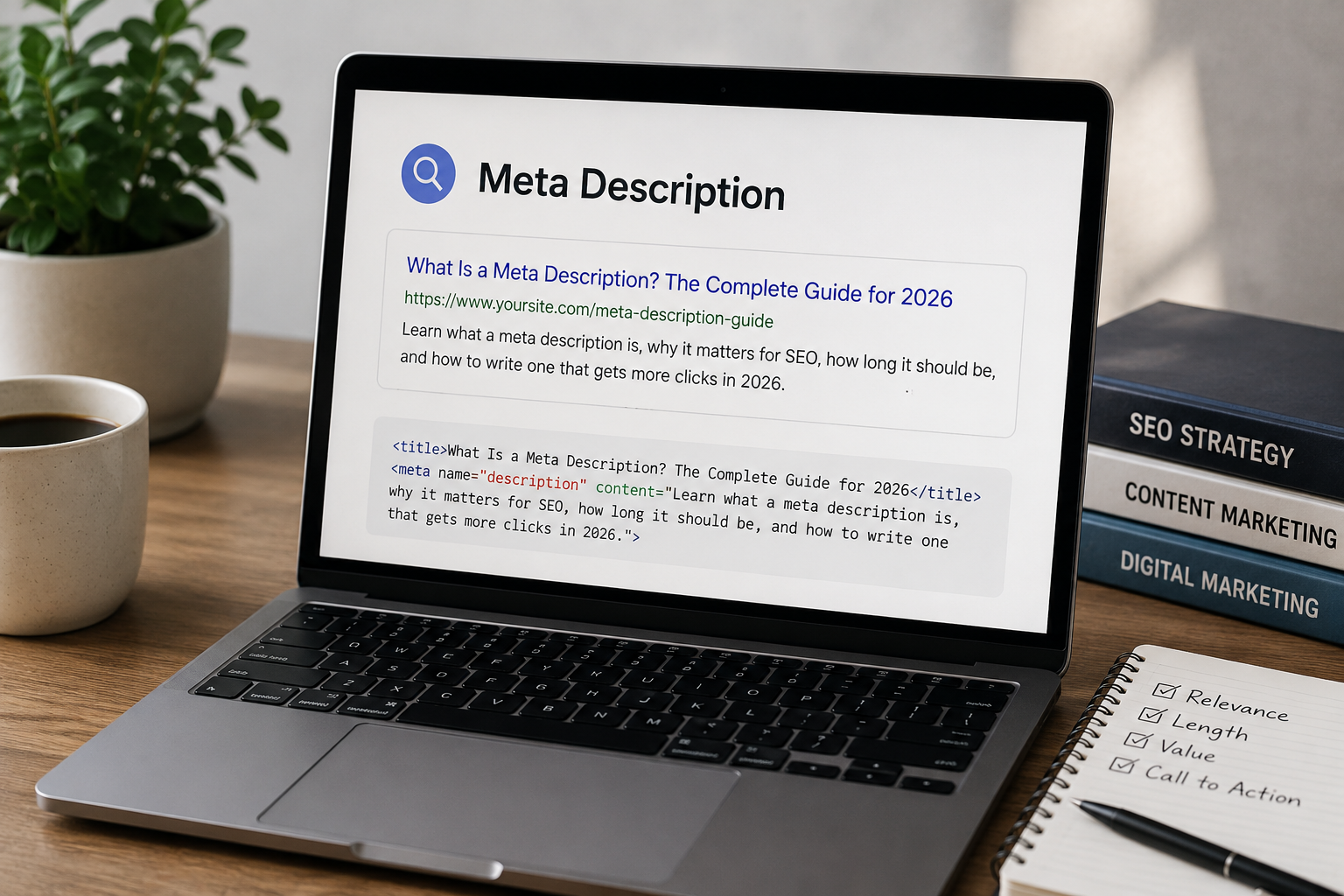
A meta description is a short piece of text — typically between 150 and 160 characters — that summarizes the content of a webpage. It lives in the HTML of your page, invisible to visitors reading your content, but visible in one very important place: the search results page.
When someone searches Google and sees a list of results, each result typically shows three things. The title of the page in blue. The URL in green. And below both of those, two to three lines of descriptive text that explain what the page is about. That text is the meta description.
Here is what it looks like in the HTML of a webpage:
html
<meta name="description" content="Your meta description text goes here. This is what appears in Google search results below your page title.">And here is what it looks like in a Google search result:
Ritner Digital | AI Search & SEO Agency www.ritnerdigital.com We help businesses build search visibility that earns organic traffic, AI citations, and compounding brand authority. Here's how.
The italicized text in that example is the meta description.
Does Google Always Use the Meta Description You Write?
No — and this is one of the most common points of confusion around meta descriptions. Google will often rewrite or replace your meta description with text it pulls from elsewhere on the page if it determines that text better matches what the user searched for.
Research consistently shows that Google rewrites meta descriptions somewhere between 60 and 70 percent of the time, particularly for queries where the user's search intent differs from the meta description you have written.
This does not mean writing meta descriptions is pointless. It means two things. First, your meta description has the best chance of being used as-written when it directly and specifically matches the likely query someone used to find the page. Second, even when Google rewrites your description, a well-written meta description sets the standard for what Google should be pulling from your page — it signals to Google what the most useful summary of the page looks like, which influences the quality of what Google substitutes even when it chooses not to use your version verbatim.
Do Meta Descriptions Affect Rankings?
This is one of the most frequently asked questions about meta descriptions, and the answer is clear: meta descriptions are not a direct ranking factor. Google has confirmed this publicly. Having a well-written meta description will not cause your page to rank higher. Having a weak or missing meta description will not cause your page to rank lower.
What meta descriptions do affect — significantly — is click-through rate. And click-through rate matters for your organic performance in at least two ways.
First, directly. More clicks from the same number of impressions means more traffic from the same ranking position. A page that ranks position four for a high-volume keyword and earns a three percent click-through rate is generating meaningfully more traffic than a page at the same position earning a one percent click-through rate. The meta description is one of the primary variables determining which of those two scenarios plays out.
Second, there is a reasonable case that sustained click-through rate improvement signals to Google that a page is meeting user intent well — which can contribute to ranking stability and gradual position improvement over time. This is less direct than the first effect, but it is a real one.
The practical bottom line: meta descriptions will not rank you, but they will determine how much of your potential traffic you actually capture from the rankings you already have.
What Makes a Good Meta Description
The meta descriptions that earn the most clicks share consistent characteristics. Understanding them makes writing them significantly easier.
It matches what the user is actually looking for. The most important thing a meta description can do is immediately confirm to the searcher that your page contains what they searched for. If someone searches "how to write a meta description" and your meta description begins with "A meta description is a piece of HTML that summarizes your page," you have answered a question they did not ask. If it begins with "How to write meta descriptions that earn more clicks — with examples," you have confirmed they are in the right place.
It includes the primary keyword naturally. Google bolds keywords in search results that match the user's query. A meta description that includes the keyword the user searched for will visually stand out in search results relative to competing results that do not. This is not about keyword stuffing — it is about natural inclusion of the term that confirms relevance.
It communicates a specific benefit or outcome. Generic meta descriptions — "Learn more about our services" or "Find out how we can help your business" — give the searcher no specific reason to click rather than choosing a competing result. The best meta descriptions tell the searcher specifically what they will get: the answer to their question, the tool they need, the comparison they are looking for, or the outcome they can expect.
It fits within the character limit. Google typically displays approximately 155 to 160 characters of a meta description before truncating with an ellipsis. A meta description that gets cut off mid-sentence looks unprofessional and may lose the most important information if it was placed at the end. Write the most important content first, and keep the total under 160 characters.
It has a clear direction without being overtly salesy. The searcher has not clicked yet. They are evaluating whether to. A meta description that reads like an advertisement — all exclamation points and calls to action — feels mismatched with the research mode most searchers are in. The best meta descriptions read like a confident, specific answer to the question the searcher is implicitly asking.
Meta Description Length: The Practical Guide
The standard guidance is 150 to 160 characters. This reflects the approximate display limit Google uses on desktop search results.
A few practical notes on length. Character count varies slightly depending on the characters used — wide characters like capital M or W take up more display space than narrow characters like i or l, so a 160-character description that uses many wide characters may still get truncated. Most SEO tools show you a pixel-width preview that accounts for this.
Mobile search results sometimes display slightly shorter descriptions than desktop. If your traffic is predominantly mobile — as it is for many consumer-facing businesses — writing to 130 to 145 characters gives you more consistent display across device types.
Descriptions shorter than 120 characters are often expanded by Google with additional text from the page, which reduces your control over what appears. Descriptions significantly longer than 160 characters will be truncated, which loses your carefully crafted ending and often cuts the description at an awkward point.
What Happens if You Do Not Write a Meta Description
If you leave the meta description field blank, Google will automatically generate one by pulling text from your page — typically from the first paragraph of body content, or from whatever passage on the page it determines best matches the likely search query.
This auto-generated description is not always bad. Google has gotten reasonably good at finding relevant text. But it has limitations.
Auto-generated descriptions tend to pull text that was written for readers already on the page, not for searchers evaluating whether to click. The opening paragraph of a blog post, for example, is written to set context for someone already engaged with the content — it is rarely written to convince a skeptical searcher that this page is worth their time.
Auto-generated descriptions also have no consistent tone, no strategic keyword placement, and no deliberate benefit statement. They are functional but unoptimized. Writing your own gives you control over one of the few elements of your search result appearance that you can directly influence.
Meta Descriptions and AI Search
In traditional search, the meta description affects whether someone clicks through to your page. In AI search — ChatGPT, Perplexity, Google AI Overviews — the meta description plays a supporting role in a different way.
AI systems do not display meta descriptions to users the way Google's blue-link results do. But meta descriptions do contribute to how AI systems understand what a page is about. A well-written meta description that clearly summarizes the page's content and positions it within a specific topic helps AI crawlers quickly classify the page's relevance to specific queries.
More importantly, the clarity discipline that produces a good meta description — being specific, leading with the most important information, matching user intent precisely — is the same discipline that makes content AI-citable. A page whose meta description confidently declares exactly what the page answers is a page that AI systems can classify and cite with confidence.
As we have covered in our work on entity authority, AI systems reward content that is unambiguous about its own purpose and scope. The meta description is one small but real signal in that direction.
Common Meta Description Mistakes to Avoid
Duplicate meta descriptions across multiple pages. Every page on your site should have a unique meta description that accurately describes that specific page's content. Duplicate descriptions — the same text on every page, or the same text on multiple pages covering similar topics — confuse both search engines and users, and miss the opportunity to match each page's description to the specific intent its content addresses.
Keyword stuffing. A meta description that reads "SEO services, SEO agency, best SEO company, SEO for small business" communicates nothing useful to the searcher and looks like spam. Keywords should appear naturally as part of a description that makes sense to a human reader.
Writing for the algorithm rather than the searcher. The meta description is one of the few SEO elements that a human being actually reads before deciding to engage with your content. Write it accordingly. The person reading your search result is deciding in two to three seconds whether your page is worth their time. Make the case clearly and specifically.
Passive or vague language. "Information about our services can be found here" gives the searcher nothing to act on. "We manage SEO and AI search visibility for B2B companies — with public data to show the results" gives them a specific reason to click if they are in the market for that.
Treating the meta description as an afterthought. Many CMS workflows make the meta description the last field before publishing. The result is that it gets written quickly, without reference to the page's content, in thirty seconds at the end of a longer content production process. This shows. The meta descriptions that perform best are written with the same care as the headline — because both are what the searcher sees before they decide whether to read anything else.
Quick Reference: Meta Description Checklist
Before publishing any page, run through these five checks.
One: Is the description unique to this page — not copied from another page or left as a template default?
Two: Is it between 150 and 160 characters, with the most important content in the first 130 characters in case of truncation on mobile?
Three: Does it include the primary keyword naturally, without forcing it?
Four: Does it clearly communicate what specific benefit or answer the searcher will find on this page?
Five: Does it read like something a confident, helpful human would say — not like ad copy and not like a keyword list?
If yes to all five, the meta description is doing its job. If no to any of them, it is worth spending another sixty seconds to fix before the page goes live.
Need help with on-page SEO foundations, content strategy, or AI search visibility? That is what we do. Start the conversation here. →
Frequently Asked Questions
Do meta descriptions affect SEO rankings?
No — Google has confirmed publicly that meta descriptions are not a direct ranking factor. Having a well-written meta description will not cause your page to rank higher, and having a missing or weak one will not cause your page to rank lower. What meta descriptions do affect significantly is click-through rate — the percentage of people who see your page in search results and choose to click it. A page ranking in position four with a compelling, specific meta description can generate more traffic than a page ranking in position two with a vague or generic one. That click-through rate improvement is the primary commercial value of investing in meta descriptions, and it is a real and measurable one.
How long should a meta description be?
The standard guidance is 150 to 160 characters, which reflects the approximate display limit Google uses on desktop search results. In practice, writing to 130 to 145 characters gives you more consistent display across both desktop and mobile, since mobile results sometimes truncate slightly earlier. The most important rule is to front-load your description — put the most critical information in the first 120 characters so that even if Google truncates your description, the essential message survives. Descriptions shorter than 120 characters often get expanded by Google with text pulled from elsewhere on the page, reducing your control. Descriptions significantly longer than 160 characters will be cut off mid-sentence, which is worse than a shorter, complete description.
Why does Google sometimes show different text than my meta description?
Google rewrites or replaces meta descriptions somewhere between 60 and 70 percent of the time, typically when it determines that other text on your page better matches the specific query the user searched. The rewrite is more likely when your meta description is generic, when it does not contain the keywords the user searched for, or when it was written for a broad audience rather than for the specific intent of a particular query. This does not mean your meta description is irrelevant — it sets the quality standard for what Google should pull from your page when it does substitute its own text, and pages with well-written meta descriptions tend to get more useful auto-generated descriptions even when Google does not use the original. The best way to reduce rewrites is to write descriptions that directly and specifically match the most likely query for each page.
Should every page on my website have a unique meta description?
Yes, every indexable page should have a unique meta description that accurately describes that specific page's content and intent. Duplicate meta descriptions — the same text copied across multiple pages, or template defaults applied to every page — miss the opportunity to match each description to the specific intent each page addresses. They also signal to search engines that the pages may be treating their content as interchangeable, which is not the impression you want to create. For large sites with hundreds or thousands of pages, writing unique meta descriptions for every page is not always practical in the short term. In that case, prioritize the pages that generate the most impressions and clicks — your highest-traffic landing pages, your core service or product pages, and your best-performing blog content — and work through the rest systematically over time.
What is the ideal format for writing a meta description?
The format that performs consistently well follows a simple structure: confirm relevance to the query, communicate a specific benefit or outcome, and optionally include a soft direction toward action. In practice this looks like: state what the page covers in terms that match the likely search query, then tell the searcher specifically what they will get or learn or be able to do after reading it. Avoid starting with your company name — the searcher already knows which domain the result is from. Avoid vague language like "learn more" or "find out how" without saying what specifically they will learn or find out. Include the primary keyword naturally, because Google bolds it in results and it visually confirms relevance. Keep the whole thing under 160 characters and front-load the most important content.
Does leaving the meta description blank hurt my SEO?
It does not hurt your rankings — meta descriptions are not a ranking factor. But it does reduce your control over a commercially important element of your search result appearance. When you leave the meta description blank, Google generates one automatically by pulling text from your page — usually from the first paragraph of body content or from whatever passage it determines best matches the likely search query. Auto-generated descriptions are functional but unoptimized. They are written for readers already on the page, not for searchers evaluating whether to click. They have no strategic keyword placement, no deliberate benefit statement, and no consistent tone. Writing your own gives you control over one of the primary variables determining your click-through rate, which directly affects how much traffic you capture from the rankings you already have.
Should my meta description include a call to action?
Optionally, and with restraint. A soft directional phrase — something like "here is what to look for" or "this guide covers the full framework" — can be effective because it tells the searcher specifically what experience they are clicking into. Hard sales language — "buy now," "sign up today," "get your free quote" — tends to feel mismatched with the research mode most searchers are in when reading results. The searcher has not clicked yet. They are evaluating whether to. A description that reads like an advertisement often creates friction rather than reducing it. The exception is commercial intent pages — pricing pages, product pages, booking pages — where the searcher's intent is already transactional and a direct call to action aligns with what they are looking for. Match the tone of the call to action to the intent behind the likely query, and it will help. Impose a call to action on a query where the searcher is still in research mode, and it will hurt.
How do meta descriptions relate to AI search and GEO?
The relationship is indirect but real. AI systems — ChatGPT, Perplexity, Google AI Overviews — do not display meta descriptions to users the way traditional search results do. But a well-written meta description contributes to how AI crawlers understand what a page is about. A meta description that clearly and specifically declares what question the page answers helps AI systems classify the page's relevance to specific queries with more confidence. The deeper connection is that the clarity discipline required to write a good meta description — being specific, leading with the most important information, matching user intent precisely — is the same discipline that makes content AI-citable. A page whose meta description confidently states exactly what it answers is a page that AI systems can categorize and cite more confidently than a page whose description is vague or generic. Writing good meta descriptions is not a GEO tactic specifically, but it reflects the same content philosophy that effective GEO requires.
My CMS auto-generates meta descriptions. Should I override them?
Almost always yes, particularly for your most important pages. Auto-generated meta descriptions are typically pulled from the opening paragraph of your content, which is written to set context for a reader already on the page — not to convince a skeptical searcher to click. The result is usually a functional but generic description that misses the opportunity to communicate a specific benefit and match the precise intent of likely search queries. Most CMS platforms — WordPress, Webflow, Squarespace, Shopify — allow you to override the auto-generated description with a custom one at the page level, either through built-in settings or through an SEO plugin like Yoast or RankMath for WordPress. The pages worth prioritizing for manual override are your homepage, your core service or product pages, and any blog posts or landing pages generating significant impressions in Google Search Console. For the rest of your site, auto-generated descriptions are acceptable as a temporary baseline while you work through the inventory systematically.
How do I know if my current meta descriptions are working?
Google Search Console is the primary diagnostic tool. Pull your Performance report, filter by page, and look at the click-through rate for each page alongside its average position. A page that ranks in position two or three with a click-through rate below two percent almost certainly has a meta description problem — at those positions, a compelling description should be pulling four to seven percent or higher depending on the query type. Compare your click-through rates against position benchmarks: position one should see somewhere between fifteen and twenty-five percent CTR on most queries, position two or three around eight to twelve percent, and pages beyond position five below three to five percent. Significant underperformance against those benchmarks, particularly on pages that have been in stable positions for several months, is the clearest signal that meta description optimization would produce meaningful traffic lift without requiring any ranking improvement at all.