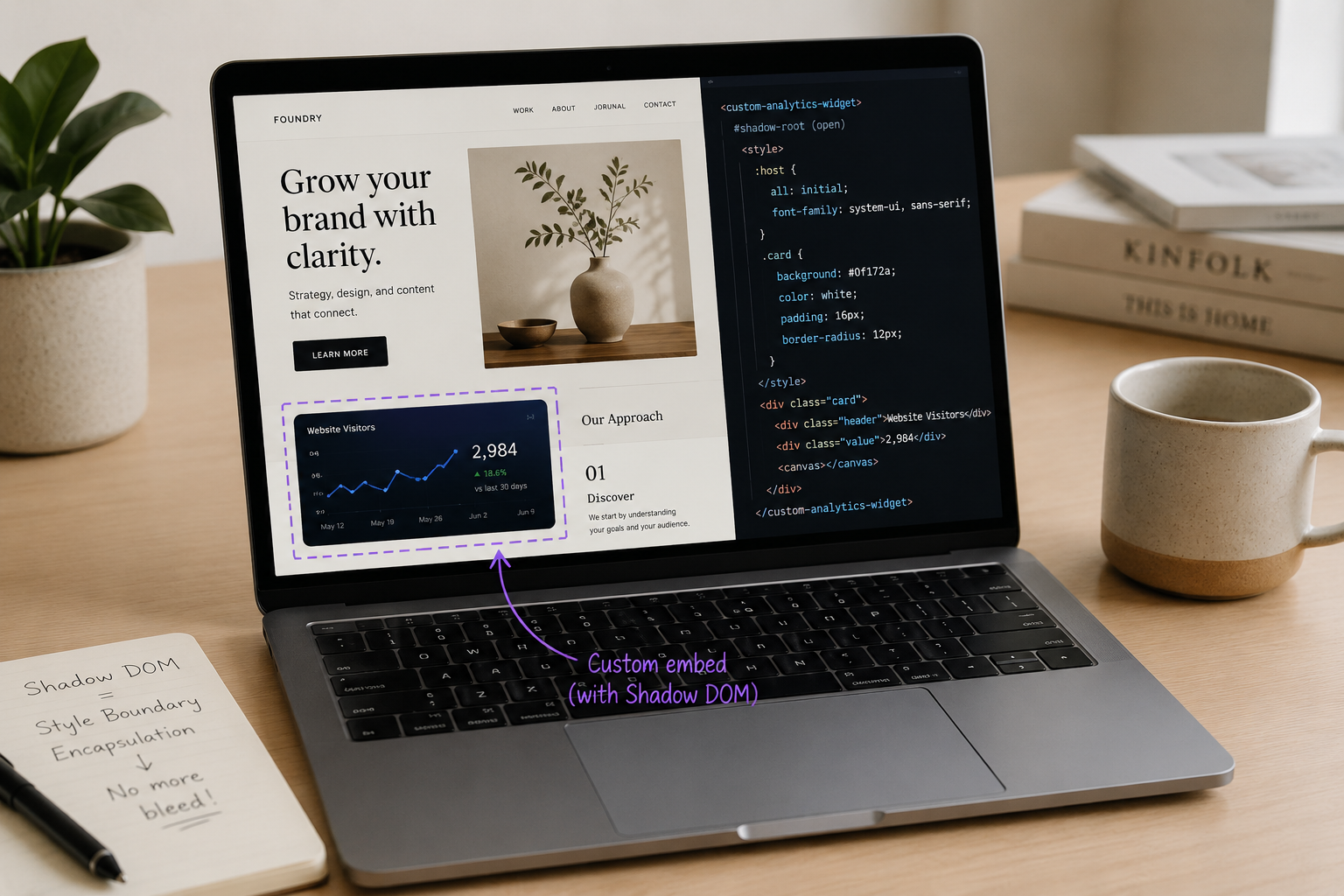
If you've ever pasted a snippet of code into your Squarespace site — a chart, a calculator, a booking widget, a custom card — and watched your page layout suddenly shift, break, or swallow the code whole, you've run into one of the most common frustrations in no-code web building. The good news is there's a clean, browser-native fix, and it's been quietly powering reliable embeds for years. It's called the Shadow DOM.
This guide explains what it is in plain English, why embeds break without it, and how it makes dropping custom components into Squarespace (or any site) safe and predictable. No computer-science degree required.
The core problem: CSS is global
Every web page is built from two layers. There's HTML — the structure and content, the actual text, images, and tables. And there's CSS — the styling rules that decide colors, sizes, spacing, and where everything sits.
The thing almost nobody realizes until it bites them: by default, CSS is global. A styling rule written in one place can reach across the entire page and affect elements anywhere on it. There's no natural wall between "my site's styles" and "the styles inside the thing I just pasted in."
This has a name. When styling from one part of a page spills into another and causes unexpected visual chaos, developers call it CSS bleeding — where styles from one part of an application leak into another, causing unexpected styling issues. It isn't a bug in your site or in the snippet. It's simply how the web was designed: one big shared space where everyone's rules apply to everyone. OpenReplay
For a page where one person controls all the code, that's fine. But the moment you paste in a component from somewhere else, that shared space becomes a liability. Your platform has its own styling. The embed has its own styling. When they meet, they can silently overwrite each other.
Why this hits Squarespace embeds specifically
Squarespace lets you add custom HTML, CSS, and JavaScript through a Code Block — a genuinely useful feature for anything the platform doesn't offer natively. But Squarespace itself is upfront about the risk. Their documentation warns that some coding changes will conflict with your site's underlying code, and you may have difficulty styling these changes, and that adding custom code is an advanced modification that falls outside the scope of Squarespace support. Squarespace ForumSquarespace Forum
That warning is well-earned. The Squarespace community forums are full of people hitting this exact wall. One recent post describes it perfectly: after adding custom code inside a Code Block, the user found that once the page was published, some elements either disappeared completely or shifted out of place — even though the code appeared correctly in the editor preview. Another reported that their code blocks would simply "break" whatever page they were on, spontaneously, without any changes to the code or custom CSS. Squarespace Help CenterSquarespace Help Center
The cause is almost always the same: a styling rule inside the pasted code was written broadly enough to escape its container and hit the surrounding Squarespace elements — or a Squarespace rule reached into the pasted code and distorted it. In one forum case, a developer traced a user's "black box" glitch to a single overly-broad CSS selector that made form fields break outside of their container. One rule in the wrong scope, and the layout falls apart. Squarespace Forum
If you've experienced this, you now know it wasn't your fault, and it wasn't necessarily bad code. It was the absence of a boundary. That boundary is what the Shadow DOM provides.
So what is the Shadow DOM?
The Shadow DOM is a web standard — a native browser feature, not a plugin, app, or framework — that lets you attach a separate, sealed-off styling-and-structure environment to a single element on your page.
Here's the plain-English picture. Imagine your web page is an open-plan office. Sound carries; everyone hears everyone. That's global CSS — every rule echoes across the whole floor. The Shadow DOM is like building a soundproof roominside that office. What happens in the room stays in the room. Conversations outside can't be heard inside, and conversations inside can't be heard outside.
Technically, the Shadow DOM lets you attach a hidden, separate Document Object Model to an element. The element it's attached to is the shadow host, and the sealed tree inside it is the shadow tree. The key property is called encapsulation: the styles and scripts inside a Shadow DOM are scoped exclusively to that DOM and do not interfere with the rest of the page. OpenReplayOpenReplay
Crucially, it works in both directions. Your page's styles can't reach in, and the embed's styles can't leak out. As one 2026 guide puts it: CSS selectors in the page don't reach into shadow DOM, and shadow styles don't leak out. That two-way seal is the whole point. It isn't a naming trick that merely lowers the odds of a conflict — it's a hard boundary the browser itself enforces. Squarespace Forum
The Shadow DOM is one part of a broader standard called Web Components. Together with related features, it brought scoped CSS to the web for the first time — a real way to say "these styles belong to this one component and nothing else." OpenReplay
Why encapsulation solves the embed problem
Once there's a genuine boundary, an entire category of headaches disappears. The benefits the technical literature points to map almost perfectly onto what a site owner actually wants.
No more style conflicts. This is the headline. Because styles are scoped, styles within the Shadow DOM won't interfere with styles in the main DOM, and vice versa. A pasted chart can't recolor your headings; your theme can't shrink its text or knock its layout askew. Imperva
True reusability. A sealed component can be dropped into any project without worrying about unintended style inheritance or breaking the global CSS. The same widget can go on three different sites with three different themes and look identical on all of them, because it carries its own environment with it. Imperva
Easier maintenance, fewer bugs. With everything self-contained, you can update individual components without affecting other parts of the page, and the isolation reduces bugs caused by external interference. JSGuidesDEV Community
There's even a safety angle: because a shadow tree is a stand-alone environment, it isolates components and reduces the risk of third-party scripts or external styles interfering with their functionality. JSGuides
In short, encapsulation turns "paste this and pray" into "paste this and move on."
Shadow DOM vs. iframes: which should you use?
If you know a little web development, you might ask: iframes already isolate content — why not just use one? It's a fair question. Iframes are a legitimate tool, and for some jobs they're the right one. But for most content embeds, the Shadow DOM is the better fit.
An iframe is essentially a whole separate web page loaded inside a window on your page. That gives total isolation, but it's heavy. Iframes need a fixed height declared up front, which makes them awkward to keep responsive across phones, tablets, and desktops; they don't flow naturally with your surrounding content; and they can be clumsier for accessibility and for search engines trying to read what's inside.
The Shadow DOM delivers the same style isolation while letting the component stay a native part of your page — resizing fluidly, flowing inline with your text, and remaining readable to assistive technology and search crawlers. You get the wall without the walled-off web page.
A rough rule of thumb: reach for an iframe when you're embedding an entire external application or something that must be fully sandboxed for security (a third-party checkout, say). Reach for the Shadow DOM when you want a self-contained component that still behaves like a natural, responsive piece of your own page — which describes most charts, cards, and content widgets.
Is it safe to rely on?
For any "modern" web technique, the reasonable worry is browser support — will it work for every visitor, or just the ones on the newest browser? For the Shadow DOM, that's a settled question. A 2026 technical review states plainly that as of 2026, Shadow DOM works everywhere that matters — Chrome, Firefox, Safari, Edge, and even mobile browsers have solid support, and adds bluntly that the "but what about old browsers" excuse is long dead. PleasureislandcondosPleasureislandcondos
It's worth being honest about the one real tradeoff, too. The Shadow DOM's strength — outside CSS can't get in — is also its main limitation: if you want to restyle a sealed component from your page, you can't do it casually. As one styling guide notes, the encapsulation can make it difficult for users of the component to customize its appearance. The modern fix is for whoever builds the component to deliberately expose specific styling "hooks" — using CSS custom properties or the ::part() selector as an intentional public styling interface. (An older approach called /deep/ once let outside CSS force its way in, but it was deprecated precisely because it undermined the encapsulation principles of the Shadow DOM.) ImpervaSquarespace Forum
For most Squarespace embeds, that "limitation" is actually the feature. You usually want the component locked so it looks the same everywhere and can't be broken by your theme. If you later need a custom color or font, the right move is to expose a deliberate hook for it — not to leave the whole thing open to accidental interference. That's exactly what the standard encourages: decide what the outside world should be allowed to control before you write the internals. Squarespace Forum
How to use it in a Squarespace Code Block
You don't need to be a developer to benefit from this, but here's the shape of how it works, so the concept is concrete.
A Shadow-DOM embed is a small, self-contained package: a single mount element on the page, plus a short script that attaches a shadow root to it and injects the component's own HTML and its own scoped CSS inside that sealed boundary. You paste the whole package into a Squarespace Code Block (available on Core plans and above, which is also where JavaScript and iframes are supported), and it renders as an isolated island on your page.
A few practical tips if you're working with these:
Paste the entire snippet together — the mount element and its script are a pair; don't split them across blocks.
Give each embed a unique ID if you're placing several on one page, so they don't collide.
Check the live/published view, not just the editor. Squarespace sometimes doesn't run Code Block scripts inside the editing canvas, so an embed that looks blank while editing may render perfectly once published. (Squarespace's own docs mention that logged-in editing and features like Ajax loading can interfere with how custom code appears.)
A well-built Shadow-DOM embed brings its own fonts and colors and won't inherit your site's font — that's intentional. It's the price and the point of not bleeding.
The result is an embed you can paste once and forget about: no layout shifts, no disappearing sections, no mysterious spacing, no "it looked fine in preview but broke when published."
The takeaway
The flashiest thing about any embed is what it shows — the chart, the number, the interactive widget. But the thing that actually determines whether you can use it is whether it survives contact with your website. The Shadow DOM is the quiet technology that makes that survival reliable: a browser-enforced boundary that keeps your page and a pasted component from ever going to war.
If you build on Squarespace and you've been burned by a Code Block that broke your layout, this is the concept worth knowing. Ask for embeds that use it, or use it yourself, and "paste and pray" becomes "paste and done."
At Ritner Digital, we build websites, content, and embeds engineered to actually work on your site — not just in a demo. If you want SEO, GEO, and web work backed by that kind of care, get in touch with Ritner Digital. We'd love to show you what careful, built-to-last digital marketing looks like for your business.
Frequently Asked Questions
What is the Shadow DOM in simple terms?
The Shadow DOM is a built-in browser feature that gives one piece of a web page its own private, sealed-off styling and structure. Picture a soundproof room built inside an open-plan office: what happens inside stays inside, and noise from outside can't get in. Technically, it lets you attach a hidden, separate Document Object Model to an element, and the styles inside it are scoped only to that element so they don't interfere with the rest of the page. It's a native web standard — not a plugin or app you install — which is why it works reliably without adding anything extra to your site. OpenReplay
Why do embedded widgets break my Squarespace layout?
Because CSS is global by default, so a styling rule inside pasted code can escape its container and hit your surrounding page — or your theme's rules can reach into the pasted code and distort it. Squarespace warns about this directly, noting that some coding changes will conflict with your site's underlying code, and that custom code falls outside the scope of their support. Real examples fill their forums: one user found that after adding custom code, elements disappeared completely or shifted out of place once the page was published, even though everything looked fine in the editor. It's usually not broken code — it's the absence of a boundary between the embed and your page. Squarespace ForumSquarespace Help Center
What does "CSS bleed" mean?
CSS bleed (or CSS leaking) is the technical name for styles from one part of a page spilling into another and causing unexpected visual problems — styles from one part of an application leaking into another and causing unexpected styling issues. It isn't a malfunction; it's a side effect of the web being built as one big shared styling space where, by default, any rule can affect any element. The Shadow DOM exists specifically to stop this by giving a component its own sealed boundary. OpenReplay
Does the Shadow DOM work in all browsers?
Yes. This is a settled question — a 2026 technical review states that Shadow DOM works everywhere that matters: Chrome, Firefox, Safari, Edge, and even mobile browsers have solid support, adding that the "but what about old browsers" excuse is long dead. Visitors on different devices and browsers will all see the embed render correctly. PleasureislandcondosPleasureislandcondos
Should I use a Shadow DOM embed or an iframe?
Both isolate content, but they suit different jobs. An iframe is essentially a whole separate web page loaded in a window — total isolation, but heavy: it needs a fixed height declared up front, doesn't flow naturally with your content, and can be clumsier for accessibility and search engines. The Shadow DOM gives the same style isolation while letting the component stay a native, responsive part of your page. A rough rule of thumb: use an iframe for an entire external application or anything that must be fully sandboxed for security (like a third-party checkout), and use the Shadow DOMfor self-contained components like charts, cards, and content widgets that should still behave like a natural piece of your own page.
Can I customize a component that uses the Shadow DOM?
Yes, but it has to be intentional. The same sealing that stops your theme from breaking a component also means you can't casually restyle it from outside — the encapsulation can make it difficult for users of the component to customize its appearance. The modern approach is for whoever builds the component to deliberately expose specific styling "hooks," using CSS custom properties or the ::part() selector as an intentional public interface. So customization is available; it's just on purpose rather than by accident — which, for an embed you want to look consistent everywhere, is exactly what you want. Imperva
Is the Shadow DOM a security risk, or the same as "shadow IT"?
No on both counts. Despite the similar name, it has nothing to do with "shadow IT" (unauthorized software inside an organization). The Shadow DOM is a legitimate, standardized browser technology for isolating web components, and if anything it improves safety on the page: because a shadow tree is a self-contained environment, it isolates components and reduces the risk of third-party scripts or external styles interfering with their functionality. JSGuides
Do I need to be a developer to use Shadow DOM embeds on Squarespace?
Not to use one — you just paste the whole snippet into a Code Block (available on Core plans and above, where JavaScript is supported) and it renders as an isolated island on your page. A few practical tips help: paste the mount element and its script together rather than splitting them, give each embed a unique ID if you're placing several on one page, and check the published view rather than only the editor, since Squarespace sometimes doesn't run Code Block scripts inside the editing canvas. Building one from scratch does take some coding knowledge, but dropping a well-made one into your site does not.