How a Marketer Would Actually Build Their Own AI Visibility Tracker (And Why It's Harder Than It Sounds)
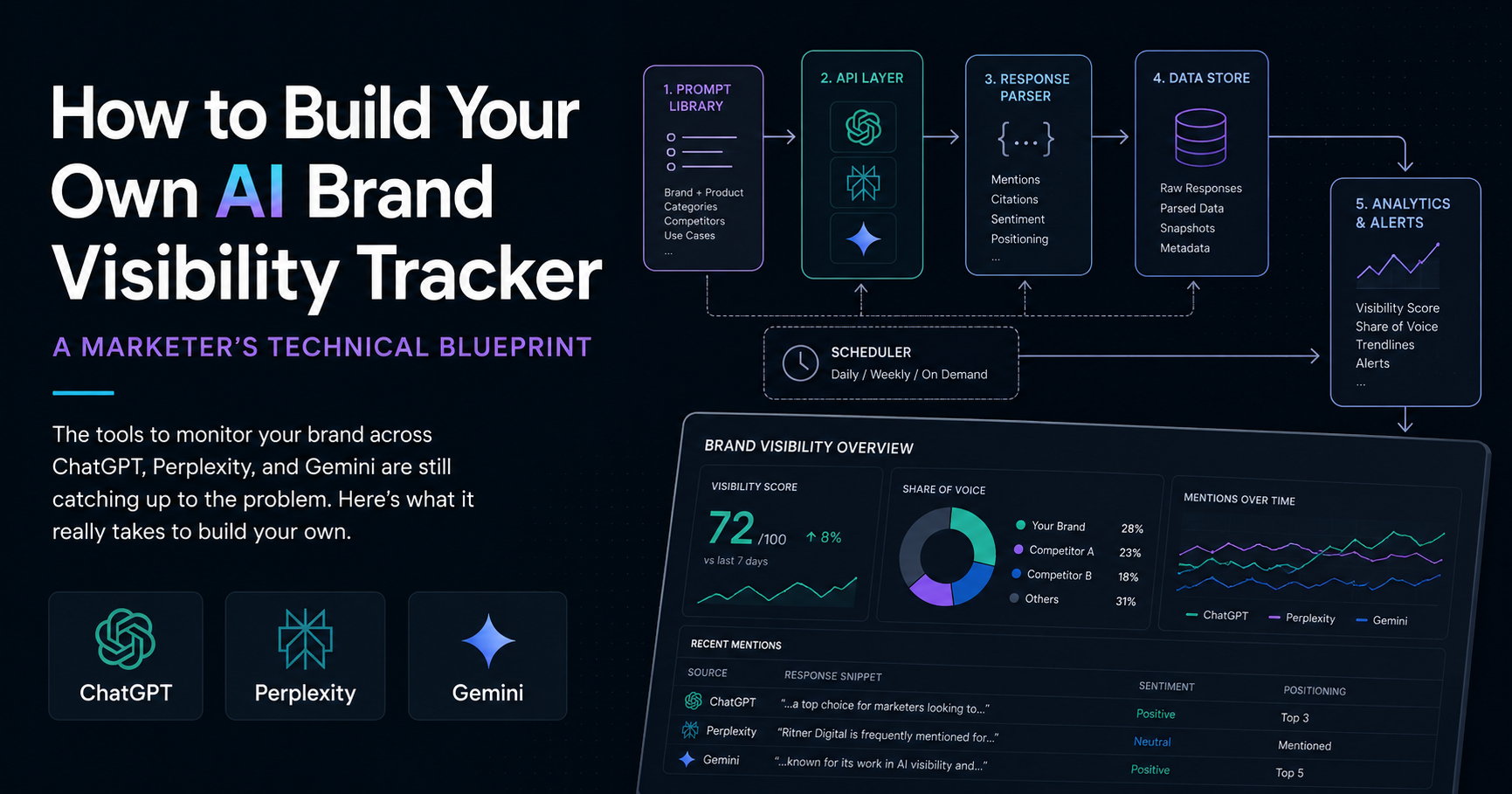
The last blog we wrote on this topic ended with a practical truth: manually typing prompts into ChatGPT to check if your brand shows up is not a strategy. It's a habit masquerading as one.
The natural follow-up question — and we've heard it more than once — is: fine, so why doesn't someone just build a better tool?
It's a fair question. The space is genuinely underserved. There's no all-in-one tool that handles both programmatic citation data and day-to-day workflow monitoring with equal depth in 2026. Most of the existing platforms cover parts of the problem, charge enterprise pricing to do it, and still require significant manual setup on your end. cloro
So what would it look like if a technically-capable marketer — or a small agency with a developer on staff — decided to build their own? What are the actual components, what do the APIs look like, what does it cost, and where does it get complicated?
This is that breakdown. It's honest about the difficulty. It's also genuinely useful if you want to understand how this problem can be solved — and why it hasn't been fully solved yet.
The Core Architecture: What You're Actually Building
At its most basic, an AI visibility tracker is doing four things in sequence:
Running structured prompts against multiple AI platforms via their APIs
Parsing the responses to detect brand mentions, competitor mentions, and cited sources
Storing the results over time so you can track trends
Surfacing the data in a format that's actually useful — a dashboard, a spreadsheet, a weekly email report, whatever fits your workflow
None of those four steps is technically impossible. Each one has gotchas. And the combination of all four, running reliably at scale, on a schedule, across multiple platforms, is where the real complexity lives.
Step One: The Prompt Library
Before you write a single line of code, you need to decide what questions you're going to ask — and this is more strategic than it sounds.
Your prompt library needs to reflect how real buyers actually search, not how you'd describe your own brand. That means category-level queries ("best digital marketing agencies in Philadelphia"), problem-based queries ("who can help me with B2B content strategy"), comparison queries ("compare [your brand] vs [competitor]"), and feature-specific queries ("agencies that specialize in short-form video marketing").
The useful metric is what percentage of relevant prompts mention your brand across multiple runs — a 40% visibility rate across 200 prompt runs is meaningful data. That means you probably need at minimum 30 to 50 core prompts to get statistically meaningful data, and you need to run each of them multiple times because AI responses are non-deterministic. The same question asked five times may produce five meaningfully different answers. Getpassionfruit
A reasonable starting prompt library for a single brand probably looks like:
10 to 15 category-level discovery queries
10 comparison queries against your top 3 to 4 competitors
10 problem-based queries that map to your service areas
5 to 10 branded queries (what people ask when they already know your name but want more information)
That's 35 to 50 prompts, run 3 to 5 times each, across 3 to 4 platforms. You're looking at 400 to 1,000 API calls per monitoring cycle before you've written your first line of parsing logic.
Step Two: The APIs
Here's where the platform-by-platform reality gets interesting.
OpenAI (ChatGPT)
The OpenAI API is the most mature and most documented. You can query GPT-4 programmatically to detect brand mentions using the Chat Completions endpoint with a predefined prompt matrix. The basic structure is straightforward — you send a system prompt, a user prompt, and parse the response. Pricing is per token, so costs scale with response length and query volume. Dakotaq
The meaningful limitation is that ChatGPT's API responses don't always match what users see in the consumer interface. The web-browsing version of ChatGPT can pull live results; the API, by default, draws from training data unless you enable specific tools. This matters for brand monitoring because a brand that's been actively publishing content recently might show up differently in consumer ChatGPT than in a raw API call.
Perplexity
Perplexity launched its Search API in September 2025, providing developers with programmatic access to the company's search infrastructure, covering hundreds of billions of webpages through a single interface. For brand monitoring purposes, Perplexity is actually the most valuable platform to query programmatically — because every response includes citations, and those citations tell you exactly which pages the AI is treating as authoritative in your category. VKTR
The Sonar family includes multiple tiers — Sonar for fast responses, Sonar Pro for longer context, Sonar Reasoning for chain-of-thought with citations, and Sonar Deep Research for multi-step research queries. Every response comes with inline web citations. For a visibility tracker, Sonar with citations enabled is the right starting point. Pricing is approximately $1 per million tokens at the base tier, with search costs on top. IACrea
Google Gemini
The Gemini API is available through Google AI Studio and Google Cloud's Vertex AI. It's well-documented and relatively affordable. The limitation for brand monitoring purposes is that Gemini's API responses don't always reflect what shows up in Google's AI Overviews in actual search results — those are a separate surface with different triggering logic. You can monitor Gemini responses via API, but you'll need a separate approach for AI Overview tracking, which typically involves SERP scraping or a dedicated tool.
The platforms you can't easily reach
It's worth being direct about the gaps. Google AI Overviews — the summary boxes that appear at the top of Google search results — are not accessible via a clean API. Monitoring them requires either scraping SERP results programmatically (which has its own reliability issues and terms-of-service considerations) or using a third-party tool that's already built that infrastructure. No existing SaaS tool offered the exact combination of surfaces and custom scoring that some teams need, which is why building a custom solution became the only viable path forward for some organizations. Search Engine Land
Step Three: Parsing the Responses
This is where most DIY projects hit their first serious wall.
You've got a ChatGPT response that's three paragraphs of natural language. You need to extract: whether your brand was mentioned, where in the response it appeared, what context it was mentioned in (recommended, compared, criticized, described), whether any competitors were mentioned alongside it, and whether any URLs were cited as sources.
None of that is a simple string match. Your brand name might appear as an acronym, a partial match, a misspelling, or embedded in a sentence that's actually describing something else. The simplest approach — checking whether your brand name appears anywhere in the response — will give you false positives and miss edge cases.
AI citation frequency is calculated using the formula: brand mentions divided by total responses, multiplied by 100. This gives you a percentage that's easy to track over time and compare across brands. Start with 20 to 30 core prompts covering direct mentions, comparisons, and problem-solving queries. Dakotaq
A more robust parsing approach uses a second API call — essentially asking another AI model to analyze the response and return structured data. You send the raw response to a lightweight model and ask it to return a JSON object: was Brand X mentioned, what was the sentiment, what position did it occupy in the list, what competitors appeared, what URLs were cited? This adds API cost but dramatically improves accuracy.
The data schema you're building toward looks something like this for each prompt run:
Prompt text
Platform queried
Timestamp
Raw response
Brand mentioned: yes/no
Mention position: first, second, third, not mentioned
Sentiment: positive, neutral, negative, mixed
Competitors mentioned: list
URLs cited: list
Run number (since you're running each prompt multiple times)
Once you have clean structured data coming out of every query, the analysis becomes tractable.
Step Four: Storage and Scheduling
A one-time run gives you a snapshot. The value of this tool is trend data over time — are you getting mentioned more or less than last month, are specific competitors gaining ground, did a content push improve your citation rate on particular queries?
That means you need a database and a scheduler. For a lightweight DIY version, a Postgres database and a simple cron job running weekly is entirely sufficient. For something more robust — with multiple brands, multiple geographies, daily cadence — you're looking at a more thoughtful infrastructure design.
A weekly cadence is a good balance between data freshness and cost management. For high-priority monitoring, daily cadence may be justified. At 500 prompts per week across three platforms, you're looking at meaningful but manageable API costs — likely in the range of $50 to $150 per month at current pricing, depending on response length and platform mix. GetMentioned
The scheduling logic also needs to handle failures gracefully. API calls time out. Rate limits get hit. A prompt library that runs clean one week might produce errors the next if a platform has an outage or changes its response format. Your tool needs to log failures, retry intelligently, and alert you when data is missing rather than silently producing incomplete reports.
Step Five: Making the Output Actually Useful
Data sitting in a database is not a marketing tool. You need to surface it in a way that produces actionable insight without requiring someone to write SQL queries every week.
The minimum viable output for an internal tool is a weekly summary that answers:
What is our current visibility rate across each platform?
How does that compare to the previous four weeks?
Which competitors are outperforming us on which query types?
Which of our pages are being cited as sources — and which queries cite us most often?
Where are the biggest gaps between our category presence and our competitors?
A simple dashboard built in something like Metabase against your Postgres database can get you most of the way there without building a custom front end. A weekly automated email report with key metrics is even simpler and often more likely to actually get read.
The more sophisticated version connects visibility data to content performance — which blog posts correspond to citation spikes, which content gaps correspond to visibility gaps — and starts to produce editorial recommendations. That's where the real strategic value lives, but it's also meaningfully more complex to build.
What This Actually Costs to Build and Run
If you have a developer who can spend two to three weeks on it, a self-hosted version of this tool is achievable. The ongoing API costs at moderate scale — 30 to 50 prompts, run 3 to 5 times each, across three platforms, weekly — land somewhere in the $75 to $200 per month range depending on model selection and response length.
With 84% of developers now using AI coding tools and a quarter of Y Combinator's Winter 2025 startups being built with 95% AI-generated code, this kind of internal tooling has become a viable build even for teams without dedicated engineering resources. Search Engine Land
The hidden cost is ongoing maintenance. AI platform APIs change. Rate limits get adjusted. Response formats shift. A tool that works perfectly in month one may need meaningful updates by month three. If your team can absorb that maintenance burden, building internally makes sense. If it can't, a third-party tool — even an imperfect one — may deliver more reliable data for less total effort.
The Honest Assessment
Building your own AI visibility tracker is genuinely feasible for a technically capable team. The APIs exist, the data schema is straightforward, and the core logic isn't conceptually difficult.
What makes it hard is the combination of requirements: multi-platform coverage, non-deterministic responses that require repeated runs to be meaningful, parsing logic that needs to handle natural language reliably, scheduling and failure handling that runs consistently without babysitting, and output that's actually legible to a marketing team that just wants to know if their brand is showing up.
Each of those is solvable. Solving all of them together, reliably, at a cadence that produces useful trend data, is a meaningful engineering project — not a weekend script.
The brands and agencies that invest in solving it now — whether by building internally or by adopting the tools that are emerging — will have a structural data advantage over those who keep checking manually. And in a channel that's only going to get more important, that advantage compounds.
Want help thinking through your AI visibility strategy — whether that means building something custom or finding the right tools for your situation?
Frequently Asked Questions
Do I need to be a developer to build something like this, or can a marketer figure it out?
You don't need to be a professional developer, but you do need to be comfortable working with APIs, running scripts, and setting up basic database infrastructure — or have someone on your team who is. With 84% of developers now using AI coding tools and a quarter of Y Combinator's Winter 2025 startups being built with 95% AI-generated code, this kind of internal tooling has become viable even for teams without dedicated engineering resources. A marketer with some technical fluency and access to an AI coding assistant can realistically get a basic version running. A marketer with no coding background attempting this solo will likely hit walls quickly. The honest answer is: know what you're getting into before you start, and have a clear plan for who maintains it after it's built. Search Engine Land
Which AI platform should I prioritize if I can only monitor one to start?
Start with Perplexity. It's the most transparent of the major platforms for monitoring purposes because every response includes explicit citations — you can see exactly which pages it's pulling from when it answers questions in your category. Perplexity is the best platform for understanding the relationship between your content and AI mentions because it shows exactly which pages it cited. That citation data tells you both where you stand and what you need to fix — which makes it the most actionable starting point. Once you have Perplexity dialed in, adding ChatGPT via the OpenAI API is the natural next step given its user volume. GetMentioned
How many prompts do I actually need to get meaningful data?
More than most people assume. Because AI responses are non-deterministic — the same question can produce different answers across multiple runs — you need enough prompts, run enough times, to produce statistically reliable visibility rates rather than anecdotal snapshots. A reasonable starting point is 30 to 50 core prompts covering category queries, comparison queries, problem-based queries, and branded queries. Run each prompt three to five times and track the rate across those runs — a 40% visibility rate across 200 prompt runs is meaningful data, while being mentioned once in a single response tells you almost nothing. That puts your minimum viable monitoring cycle somewhere between 90 and 250 API calls per platform, per week. Getpassionfruit
How do I handle the fact that ChatGPT's API responses don't always match what users actually see?
This is a real limitation and worth understanding clearly. The ChatGPT API, by default, draws from training data rather than live web results — which means a brand that's been actively publishing new content may appear differently in a consumer ChatGPT session (which can browse the web) than in a raw API call. There's no perfect workaround for this in a DIY build. The practical approach is to treat your API-based ChatGPT monitoring as a signal of how the model's training data characterizes your brand, while using Perplexity — which does crawl the live web — as your real-time content visibility indicator. Together they give you a more complete picture than either alone.
What's the most technically difficult part of building this?
The parsing layer. Running API calls and storing responses is relatively straightforward. Reliably extracting structured meaning from natural language responses at scale — detecting brand mentions, identifying sentiment, noting competitor positioning, capturing citation URLs — is where most DIY projects run into trouble. A simple string match for your brand name will generate false positives and miss edge cases. The more reliable approach is using a secondary AI model call to analyze each response and return structured JSON, but that adds cost and complexity. Weekly monitoring with 500 or more prompts provides a good balance between data freshness and cost, but you need consistent prompt structure and parsing logic to make that data comparable over time. Dakotaq
What does it realistically cost to run this on an ongoing basis?
At moderate scale — 30 to 50 prompts, run three to five times each, across three platforms, on a weekly cadence — you're looking at roughly $75 to $200 per month in API costs depending on which models you use and how long your responses are. Perplexity's Sonar model starts at approximately $1 per million tokens. A customer support chatbot handling around 500 queries per day on Perplexity's standard Sonar tier runs approximately $120 per month in combined token and search costs — which gives you a useful ballpark for query volume to cost. OpenAI's API pricing varies by model, with smaller models significantly cheaper than GPT-4 class responses. The bigger cost question is developer time for initial build and ongoing maintenance, which is typically far larger than the API bill. IACrea
How do I monitor Google AI Overviews if there's no clean API for them?
This is one of the genuine gaps in the DIY approach. Google AI Overviews were appearing in nearly 16% of all Google searches by late 2025, which makes them significant enough to matter — but there's no official API that gives you programmatic access to what those overviews say about your brand. Your options are: use a third-party SERP scraping library and accept the reliability and terms-of-service risks that come with it, use one of the emerging commercial tools that has already built that infrastructure, or simply exclude AI Overviews from your DIY build and focus on the platforms that do have accessible APIs. For most brands starting out, the latter is the pragmatic call. Search Engine Land
How do I know if the tool is actually working correctly?
Validate it against manual checks at the start. Before you trust the automated output, run the same prompts manually in each platform's consumer interface and compare what you get against what your tool reports. They won't match perfectly — especially for ChatGPT, given the API vs. consumer interface difference — but they should be directionally consistent. If your tool is reporting zero brand mentions across all prompts and you're manually finding your brand mentioned regularly, something is broken in the parsing logic. Set up monitoring on the tool itself: log every API call, flag runs where response length is anomalously short (a sign of an API error returning a truncated response), and alert yourself when a full prompt set fails to complete. Compare platforms separately and benchmark against three to five direct competitors — your absolute visibility rate matters less than your relative position. Getpassionfruit
When does building make more sense than buying an existing tool?
Building makes sense when your monitoring requirements are specific enough that no existing tool covers them — custom scoring criteria, industry-specific prompt libraries, integration with internal data systems, or geographic targeting that commercial tools don't support at your price point. No existing SaaS tool offered the exact combination of surfaces and custom scoring that some teams need, which is why building a custom solution became the only viable path forward for certain organizations. Buying makes more sense when your needs are fairly standard, you don't have reliable developer capacity for ongoing maintenance, and the commercial tool pricing is reasonable relative to the engineering time a build would require. For most small and mid-size teams, starting with an existing tool and building custom layers on top of it — rather than building from scratch — tends to be the most practical path. Search Engine Land