Why Microsoft Clarity's "Submit Form" and "Contact Us" Numbers Can Be Inflated (And What They're Actually Counting)
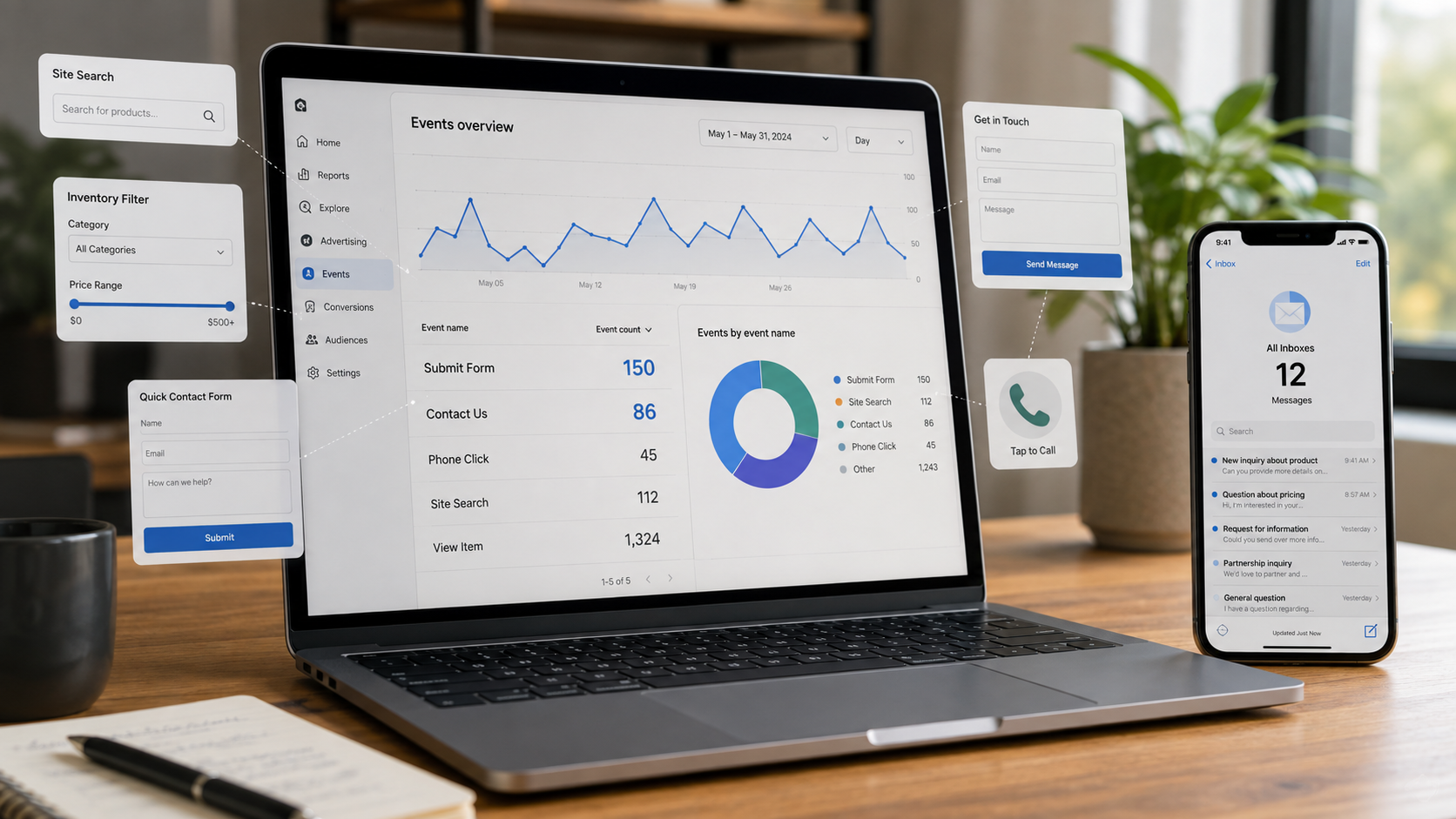
Here's a conversation that has ended more than a few agency-client relationships:
Agency: "Great month! Clarity shows 150 form submissions on your website." Client: "...We received 12."
Both dashboards are telling the truth. Nobody is lying. And yet the client now believes the agency is either incompetent or inventing numbers, the agency believes the client isn't checking their inbox, and the relationship starts bleeding trust over a discrepancy that is, at its root, a definitions problem.
We know this scenario intimately, because we've lived both sides of it in the same month — once investigating it for a dealership client, and once auditing our own website, where Clarity reported 7 "Contact us" sessions in a period when our actual form backend recorded exactly one real submission. We use Microsoft Clarity daily and recommend it constantly; it's one of the best free tools in web analytics. But its auto-detected "Submit form" and "Contact us" smart events are interaction counters wearing conversion-metric names, and if you quote them as lead counts — to a client, to your boss, or to yourself — you will eventually get burned.
This article explains exactly why the numbers inflate, mechanically, with Microsoft's own documentation as the source; shows you real reconciled numbers from the field; and covers how to get Clarity data you can actually defend in a meeting.
First: What Smart Events Are (And Why They're Genuinely Clever)
If you're new to it, Microsoft Clarity is a free behavior-analytics tool — session recordings, heatmaps, and frustration signals like rage clicks and dead clicks. In 2024–2025, Clarity added smart events: automatically detected user actions that require zero setup. Per Microsoft's own announcement, Clarity detects key actions — form submissions, contact attempts, purchases, sign-ups — "without you lifting a finger. No coding, no setup." If your site has ten different Contact Us buttons scattered around, Clarity automatically compiles them into a single "Contact Us" event.
Per the official documentation, Clarity currently auto-detects nine event types — things like Purchase, Add to Cart, Submit Form, and Contact Us — labeled "Defined by Clarity" in your settings, and editable without code.
This is genuinely useful engineering. The problem isn't the feature. The problem is the names. "Submit form" sounds like "a lead was submitted." "Contact us" sounds like "someone contacted us." Neither is what's being counted — and Microsoft's own guidance quietly concedes the gap: Clarity's smart events guide notes that auto-detection "relies on inference" and that "for mission-critical actions, explicit tracking is better."
So what are they actually counting? Let's open the hood.
Why "Submit Form" Inflates: Five Mechanical Reasons
1. It fires on any browser form submission — and your site has more forms than you think
This is the big one. As detailed in DumbData's deep technical breakdown of Clarity event tracking, the Submit Form auto event doesn't just fire on buttons labeled "Submit" — it executes on any click that triggers the browser's native submit event. And in HTML terms, a shocking amount of your website is technically a form:
Your site search box? A form.
Your inventory or product filters (choose body type, sort by price, apply)? Very often a form.
A newsletter signup block in the footer? A form.
Login boxes, calculators, quiz widgets, coupon fields, appointment date-pickers? Forms, forms, forms.
Every one of those interactions can register as a "Submit form" session. On a car dealership site we analyzed, the single most-visited page was the inventory search — thousands of sessions of shoppers filtering trucks by body type and price. A meaningful share of the site's ~120 weekly "Submit form" sessions were, on inspection of the actual recordings, people using the inventory filters. Genuine shopping behavior, genuinely worth knowing about — and zero of them a lead.
2. It counts attempts, not completions
A visitor fills out your contact form, typos their email, hits submit, gets a validation error, clicks submit twice more, and gives up. Clarity's count: one "Submit form" session. Your inbox's count: zero. The event fires on the action, with no knowledge of whether the form accepted it. Failed attempts and successful submissions are indistinguishable in the topline number.
3. It's client-side only — delivery is invisible
Even a successfully accepted submission has a journey left: the form plugin has to process it, generate a notification, and land it in a monitored inbox or CRM. Clarity sees none of that. It's a browser-side observer; everything after the click happens on servers it can't see. A site whose form notifications silently broke three weeks ago will show identical Clarity numbers to a perfectly healthy one. (This cuts both ways, and we'll come back to why it makes Clarity more valuable, not less.)
4. Detection evolves underneath you
Auto events are inferred from interaction signals, and the inference updates over time — Microsoft refines what patterns count. In practice, we've watched a site's smart-event list change between months: a "Search" event appearing in one month's data that didn't exist the prior month, meaning the detection boundaries had shifted. That makes month-over-month comparisons of auto-event counts shakier than they look — some of any change may be Clarity counting differently, not users behaving differently. As Root & Branch's analysis puts it, it's "advisable not to rely solely on Auto Events" for interaction analysis because "they may not always accurately reflect user interactions or the completion of intended actions."
5. Sessions, not events — and not deduplicated humans
The dashboard figure is sessions containing the event. One determined visitor across three sessions is three. A returning tester (you, checking your own form) is in there too. It's a fine unit for trends; it's not a count of unique interested humans.
Why "Contact Us" Inflates: It's Counting Intent, Not Inquiries
The Contact Us auto event has its own expansive trigger set. Per the same DumbData analysis, it fires not only on clicks of contact-us buttons and links, but also on clicks that send an email (mailto: links) and clicks that start a phone call (tel: links).
Read that again from a lead-counting perspective. A visitor who:
Clicks "Contact" in your navigation to look at the page → counted
Taps your phone number but hangs up before it rings → counted
Clicks your email link, watches their mail app open, and closes it → counted
Actually calls and books an appointment → counted identically to all of the above
"Contact us" is measuring contact intent — people orienting toward reaching you — which is legitimately valuable top-of-funnel information. It is not measuring inquiries received. On our own site, the month Clarity showed 7 Contact Us sessions, our form backend showed one real submission. The other six weren't fake; they were lookers, phone-tappers, and one visitor whose submission genuinely failed (more on that one below, because it's the most important session of the bunch).
The Real Numbers: What Reconciliation Actually Looks Like
Theory is nice; receipts are better. Two field examples, anonymized:
A dealership client: Clarity reported ~150 "Submit form" sessions in one month and ~390 the next. Watching the actual recordings revealed a large share were inventory-filter interactions — real shopping behavior on the most-trafficked page, mislabeled as form fills by the auto-detection. The honest translation of those numbers wasn't "150 leads"; it was "150 sessions of active engagement with inventory and forms" — a genuinely positive signal, as long as it's labeled truthfully. Quoted as leads to a client who received a fraction of that in their inbox, the same number becomes a credibility bomb.
Our own site: 7 Contact Us sessions → 1 verified submission in the backend. A one-in-seven ratio between intent signals and completed inquiries — on a site whose form we test regularly and know works.
The pattern to internalize: the gap between Clarity's smart events and your inbox isn't an error — it's the funnel.Intent at the top, completion at the bottom, and friction in between. The number is only wrong when you use the top-of-funnel figure with the bottom-of-funnel name.
Why This Matters More Than a Semantics Debate
Because trust dies in that gap. When a business owner hears "150 form fills" and finds 12, they don't conclude "interesting attribution nuance." They conclude someone's lying, and every future report gets read through that lens. We've written before about the questions that expose weak agency reporting — "can I verify your numbers myself?" is on the list precisely because of scenarios like this one.
And because inflated topline numbers can mask real failures. Here's the counterintuitive part: the same recordings that expose the inflation are the best tool that exists for catching silent lead loss. In one of those six non-converting Contact Us sessions on our own site, the recording showed a visitor — referred, incidentally, by ChatGPT — spend four minutes carefully filling out the contact form, click submit repeatedly with no visible success, then linger reading FAQs before leaving. A real, motivated prospect lost to a submission failure. Without the recording, that session is just another number in the inflated 7. With it, it's an actionable diagnosis. If your intake paths have a leak — a broken notification, a chat widget nobody's staffing, a form dying inside the Facebook in-app browser — Clarity recordings are how you find it, which is exactly the methodology behind our dealership lead-drop diagnostic.
The tool isn't the problem. The tool is fantastic. The number-quoting is the problem.
How to Get Clarity Numbers You Can Actually Defend
Five practices, in ascending order of effort:
1. Rename the metric honestly, starting today. In every report, "Submit form" becomes "form + on-site interactions" and "Contact us" becomes "contact-page activity" or "contact intent." Free, instant, and it inoculates you against the reconciliation ambush. This is a reporting-hygiene habit anyone can adopt, including owners running their own dashboards.
2. Make your inbox/CRM the system of record for "leads." Clarity measures behavior; your form backend, inbox, and CRM measure received inquiries. Report both layers, labeled as layers: "X contact interactions on-site; Y inquiries received." The delta between them is itself a metric worth watching — if it widens suddenly, something in the pipeline broke.
3. Watch a sample of recordings before quoting anything. Ten recordings from a smart event takes fifteen minutes and tells you what the event is actually catching on your site. We've never done this exercise without learning something — sometimes "it's all filter clicks," sometimes "there's a failing form," always something.
4. Edit the smart events. Per Microsoft's docs, Clarity-defined events are editable without code — you can refine which buttons and interactions trigger them, or build user-defined events scoped to a specific URL (e.g., an event that only counts activity on /contact-us/). Fifteen minutes of settings work removes the loudest noise sources.
5. For numbers that matter, use explicit tracking. Clarity's client API supports custom events — one line of code like window.clarity("event", "lead_form_success") fired only on your form's genuine success state (the thank-you page or success callback). Now you have a Clarity event that means exactly what it says, sitting alongside the fuzzy auto events. Even Clarity's own guide endorses this: for mission-critical actions, explicit beats inferred.
And whichever layer you're reading, run the periodic ground-truth test: submit your own form, note the timestamp, and confirm it arrives where a human will see it. It's the cheapest audit in marketing and it catches the failures no dashboard reports. (This discipline — reading your own numbers the way you'd audit someone else's — is the same one we applied to our own Facebook analytics, flops included.)
Frequently Asked Questions
Is Microsoft Clarity's "Submit form" count wrong?
No — it's accurately counting what it's designed to count: sessions where a browser-level form submission occurred, on any form. It becomes "wrong" only when read as a count of completed lead submissions, which involves site search boxes, filters, newsletter blocks, and failed attempts it can't distinguish from real inquiries.
Why does Clarity show more form submissions than I actually received?
Four compounding reasons: it counts every form on the site (search and filters included), it counts attempts whether or not they succeeded, it can't see whether accepted submissions were ever delivered to your inbox, and its auto-detection boundaries shift over time. Your inbox count and Clarity's count are measuring different points in the funnel — a gap is expected; a suddenly widening gap is a warning.
Does the "Contact us" smart event count phone calls and emails?
It counts clicks on tel: and mailto: links — the tap that starts a call or opens a mail app — plus clicks on contact buttons and links. It cannot know whether the call connected, the email was sent, or the visitor just looked at your contact page. Treat it as contact intent, not inquiries received.
Should I stop using Clarity because of this?
The opposite — Clarity is one of the most valuable free tools available, especially its session recordings, which are the single best instrument for catching silently broken forms, unstaffed chat widgets, and UX failures that no counter-based analytics will ever surface. Keep the tool; fix the vocabulary. Use auto events for trends and as entry points into recordings, and use your form backend or CRM as the system of record for lead counts.
How do I track real form completions in Clarity?
Two no-regret options: build a user-defined smart event scoped to your form's thank-you/success page URL, or (better) fire a custom API event — window.clarity("event", "your_event_name") — from the form's success callback, per Clarity's API documentation. Either gives you a count that means "the form actually completed," which the auto events can never guarantee.
My agency reports Clarity form fills as leads. Is that a red flag?
It's a vocabulary problem at minimum and a competence signal at worst. The generous read: they haven't reconciled the events against your inbox. The fix is one question — "walk me through how this number reconciles with the inquiries I actually received" — and how they answer tells you most of what you need to know about the rest of their reporting.
Want Your Numbers Reconciled Properly?
If you've got a Clarity dashboard saying one thing and an inbox saying another — or an agency report you can't quite make add up — we'll reconcile it: what the events are really catching, whether your intake paths leak, and a reporting setup where every number means what it says. We've run this exact audit on client sites and on our own, and we publish how we do it because measurement you can't verify isn't measurement.
Get your numbers straightened out → Contact Ritner Digital
Ritner Digital is a South Jersey digital marketing practice specializing in SEO and AI search optimization for dealerships, law firms, contractors, and local service businesses across Gloucester, Camden, and Burlington counties.