Migrating from Batch-and-Blast Email to a Customer Journey Platform — And Who Actually Handles the Data Migration
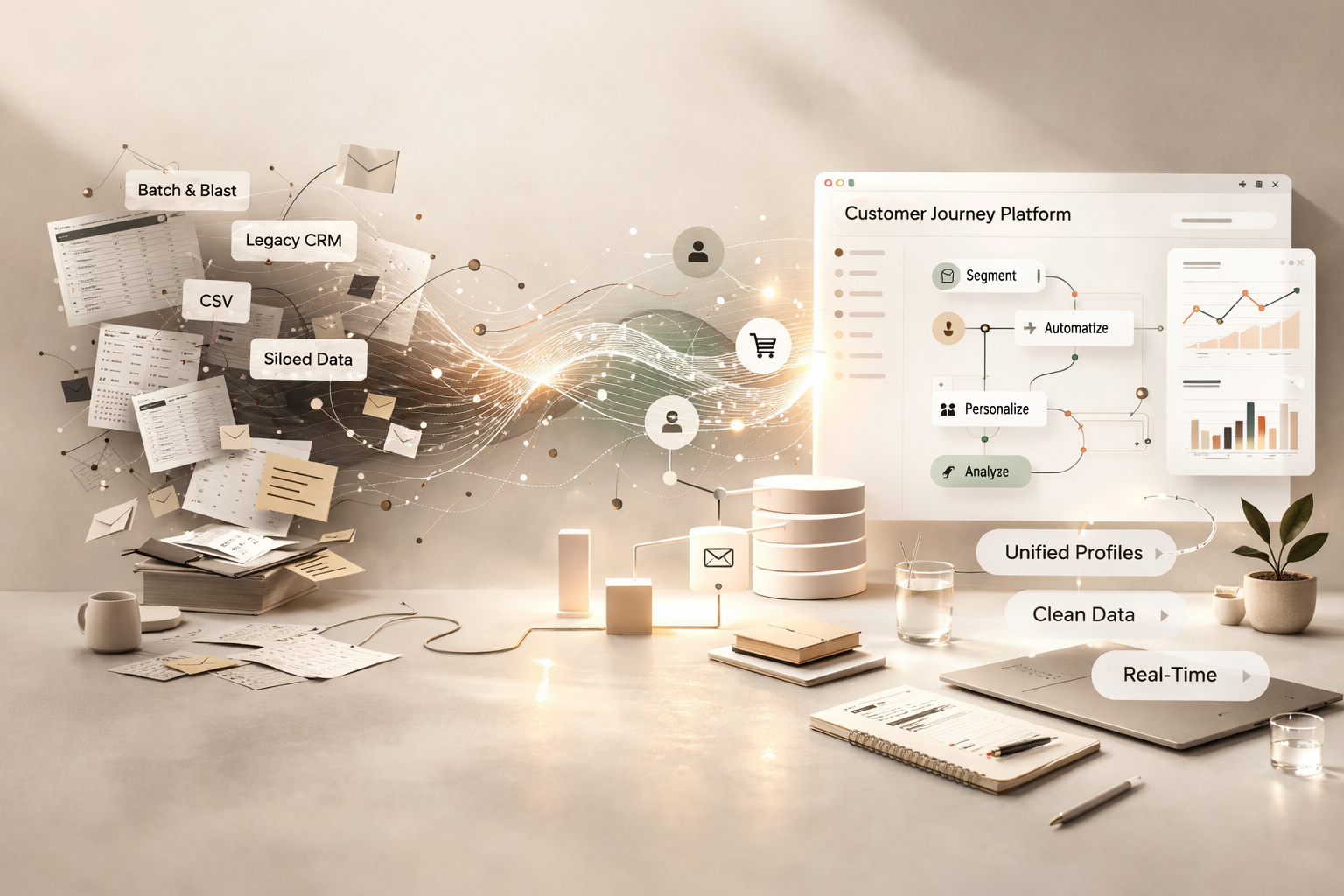
You've outgrown your email tool. Maybe it's Constant Contact. Maybe it's an old Mailchimp setup you never built out. Maybe it's a platform nobody on the current team even chose — it was just there when they got hired, and everyone's been hitting "send to all" ever since.
Now you're ready for something real. A customer journey platform — Klaviyo, ActiveCampaign, HubSpot, Dotdigital, Customer.io, whatever fits your business — where emails are triggered by behavior, segmented by lifecycle stage, and personalized beyond a first name in the subject line.
The strategy part is exciting. The data migration part is where things go sideways.
Because the gap between a batch-and-blast tool and a journey platform isn't just a feature gap. It's a data architecture gap. And if nobody bridges that gap properly during migration, you end up with a shiny new platform running the same lazy emails you were already sending — just with a more expensive subscription.
Why This Migration Is Harder Than It Looks
Batch-and-blast tools are flat by design. You have a list of contacts. Maybe a few columns of data — name, email, signup date, perhaps a location field. You write an email, pick the list, and send it. That's the entire workflow.
Customer journey platforms are built around a completely different model. They expect rich contact profiles with behavioral data, purchase history, engagement scoring, preference fields, lifecycle tags, and event-based triggers. The automations, branching logic, and segmentation that make these platforms powerful all depend on structured, clean, well-mapped data feeding into them.
Here's the problem: your batch-and-blast tool doesn't have most of that data. And the data it does have is usually messy, incomplete, or organized in ways that don't translate to a journey-based architecture.
This creates a set of migration challenges that go well beyond moving a CSV from point A to point B.
Your lists are probably a mess
Most batch-and-blast accounts accumulate lists like junk drawers. A list for the 2021 holiday campaign. A list called "Master — DO NOT DELETE." A list someone named "test 2" three years ago that somehow has 4,000 contacts in it. Duplicate contacts across multiple lists. No consistent tagging. No suppression hygiene.
A customer journey platform doesn't want twelve overlapping lists. It wants one clean, unified contact database with structured properties that automations can act on. Getting from one to the other takes deliberate mapping and cleanup — not just an import.
You have no engagement data worth keeping
Batch-and-blast tools track opens and clicks at the campaign level, but they rarely store that data in a way that's exportable or useful for segmentation in a new platform. You can't just bring over "engaged vs. unengaged" as a segment — you need to define what engagement means in the new system and either migrate the raw data to support it or rebuild engagement scoring from scratch after cutover.
Suppression data is scattered or incomplete
Unsubscribes, bounces, and spam complaints may live in different places depending on your current tool. Some platforms purge hard bounces automatically. Others keep them in a suppression list you've never looked at. If this data doesn't migrate cleanly, your first sends from the new platform go out to addresses that should never receive another email from you — and your deliverability takes an immediate hit.
There's no field mapping to speak of
Your old tool might store a contact's company name in a field called "Company." Your new platform might call it "organization" or "account_name" or require it as a custom property. Multiply that by every data field you have — name, phone, address, source, interests, custom fields — and you've got a mapping exercise that needs to be done carefully before anything gets imported.
Automations don't exist yet — but the data to power them needs to
This is the part people miss entirely. You're not just migrating what you had. You're migrating into a system that expects data you've never collected. If you want a post-purchase flow, you need purchase data synced. If you want a re-engagement sequence, you need engagement history. If you want lifecycle-based journeys, you need lifecycle stage definitions and the data fields to support them. The migration is the moment to get that foundation right.
What the Data Migration Actually Involves
A proper migration from a batch-and-blast tool to a customer journey platform isn't a one-step import. It's a project with a clear sequence.
Contact Audit & Deduplication
We start by pulling everything out of your current platform and auditing it. How many contacts do you actually have? How many are duplicates? How many haven't opened an email in over a year? How many are on suppression lists? The goal is to understand the true size and quality of your database before it touches the new platform.
List Consolidation & Tagging Strategy
All those scattered lists get consolidated into a single contact database with a clear tagging and property structure. Contacts that were on your "2023 Webinar Attendees" list might get a tag for event attendance and a custom property for the specific event. Contacts from your "VIP Customers" list might get a lifecycle stage property. The structure is designed around what your new platform's automations and segments will need.
Data Cleaning & Standardization
Names get standardized (no more "JOHN" in all caps or "john smith" with no capitalization). Phone numbers get formatted consistently. Empty fields get flagged. Junk data gets removed. This is the unsexy work that determines whether your personalization and segmentation actually function once the new platform is live.
Field Mapping & Custom Properties
Every data field in your old platform gets mapped to its equivalent in the new one. Where fields don't exist yet, we create custom properties. Where data types differ (your old tool stored dates as text strings, your new platform needs ISO format), we transform the data before import. This mapping document becomes the reference for the entire migration.
Suppression Migration
Unsubscribes, hard bounces, spam complaints, and manually removed contacts all get migrated into the new platform's suppression system before any marketing sends go out. This protects your sender reputation and keeps you compliant from day one.
Integration Setup
Your customer journey platform is only as good as the data feeding it. If you're running Shopify, WooCommerce, a CRM, a booking system, or any other tool that generates customer data, those integrations need to be connected and tested during migration — not after. The behavioral data that powers journey automations starts flowing the moment these connections go live.
Segment & Automation Foundation
With clean data imported and integrations connected, we build the initial segments and automation triggers your platform needs. This isn't the full automation buildout — that's a separate phase — but it's the structural foundation. Entry criteria for welcome flows. Engagement-based segments for re-engagement campaigns. Lifecycle stage definitions. Purchase-based triggers. The data architecture that makes all of it possible.
Warm-Up & Deliverability Monitoring
New platform means new sending infrastructure. Even if your domain and authentication (SPF, DKIM, DMARC) carry over, inbox providers need to build trust with the new IP or sending service. We run a controlled warm-up — starting with your most engaged contacts, gradually scaling volume, and monitoring bounce rates, complaint rates, and inbox placement throughout.
Who Actually Does This Work?
This is the real question behind the search. You've decided to make the move. You know it's complicated. So who handles it?
Your new platform's onboarding team
Most customer journey platforms offer some level of onboarding support — especially on mid-tier and enterprise plans. Klaviyo, ActiveCampaign, HubSpot, and Dotdigital all have onboarding programs. The quality varies. Some are genuinely hands-on. Others are a series of prerecorded videos and a shared Slack channel. Almost none of them will clean your data for you, consolidate your lists, or rebuild segmentation logic from your old platform. They'll help you learn their tool. They won't do the migration for you.
A freelancer or VA
For simple migrations — small list, minimal segmentation, no automations to preserve — a skilled freelancer can handle the CSV work and basic setup. But if your migration involves data transformation, integration setup, field mapping across systems, or suppression hygiene, you need someone who understands both the source platform and the destination platform at an architectural level. That's rarely a generalist VA.
A full-service digital marketing agency
This is where we come in. At Ritner Digital, data migration isn't a side offering — it's a core part of how we onboard email clients. We've migrated businesses off Constant Contact, legacy Mailchimp setups, Dotdigital, Campaign Monitor, Sendinblue (now Brevo), and platforms most people have never heard of. We handle the full scope: audit, cleanup, architecture, field mapping, suppression, integration, segment buildout, warm-up, and post-migration validation.
The difference between us and a platform onboarding team is that we're not just setting up the new tool. We're making sure everything you built in the old one — every contact, every data point, every suppression record — arrives intact, structured, and ready to power the customer journeys you're building next.
What to Ask Before You Hire Someone for This
If you're evaluating migration help — whether it's an agency, a freelancer, or a platform's onboarding team — these are the questions that separate someone who can do this from someone who'll hand you a CSV and call it done.
Do you audit the existing platform before quoting? If they quote a flat fee without seeing your account, they're guessing.
How do you handle suppression data? If they don't ask about unsubscribes, bounces, and complaints unprompted, that's a red flag.
Do you build the segment and automation foundation, or just import contacts? Importing contacts without structure is not a migration. It's a copy-paste.
How do you handle the warm-up period? If there's no plan for deliverability monitoring in the first 30 days, your sender reputation is at risk.
Will you map fields between platforms, or do I need to do that myself? Field mapping is where most DIY migrations fall apart. Your partner should own this.
Ritner Digital Handles the Entire Migration
We're a full-stack marketing agency based in Philadelphia, and email platform migration is one of the things we do best. We don't just move your contacts — we rebuild the data foundation so your new customer journey platform can actually do what it was designed to do.
Audit. Cleanup. Architecture. Import. Suppression. Integrations. Segments. Warm-up. Validation. One team, one process, nothing lost in the handoff.
If you're making the jump from batch-and-blast to a real customer journey platform and you need someone to handle the data migration properly, that's exactly what we're here for.
Get Your Free Migration Audit →
Frequently Asked Questions
How long does a batch-and-blast to customer journey platform migration take?
It depends on the size of your database, the number of lists and data fields involved, and how many integrations need to be connected. Simple migrations can wrap in one to two weeks. Complex accounts with years of accumulated lists, poor data hygiene, and multiple system integrations typically take three to six weeks. We scope the timeline during your free audit.
Do I need to pick my new platform before the migration starts?
Ideally, yes — but we can help with platform selection if you're still deciding. We'll evaluate your business needs, integration requirements, budget, and team size to recommend the right fit. The platform choice influences the data architecture, so it's best to finalize before the heavy migration work begins.
Will I lose my open and click data from the old platform?
Most batch-and-blast tools don't export granular engagement data in a way that new platforms can import natively. We preserve what we can — typically last open date, last click date, and send counts — as custom fields so your new segments have historical context. Full campaign-level reporting from the old platform should be exported and archived separately before you cancel that account.
What if my contact list hasn't been cleaned in years?
That's more common than you'd think, and it's actually a good reason to migrate now rather than later. The migration process includes a full audit and cleanup — removing duplicates, flagging invalid addresses, segmenting by engagement, and suppressing contacts who should no longer receive email. You'll arrive in the new platform with a healthier list than you've had in years.
Can I keep sending from my old platform while the migration happens?
Yes, and we recommend it. We run a parallel period where your current tool stays live while we build, import, test, and warm up the new platform. Once everything is validated, we cut over. There's no gap in your email program.
What about my existing email templates?
We rebuild your core templates inside the new platform's editor, matching design and layout while updating personalization tokens, merge tags, and dynamic content blocks. If your old templates were basic (which is common with batch-and-blast tools), this is also a good opportunity to upgrade the design and structure for the more advanced features your new platform supports.
Do you handle the integrations with our other tools?
Yes. Whether it's Shopify, WooCommerce, HubSpot CRM, Salesforce, a booking platform, or a custom API — we connect and test every integration that feeds data into your new email platform. These connections are what make behavior-based automations possible, so they need to be live and validated before any journeys launch.
How much does this cost?
Every migration is different, so we don't do flat-rate pricing. The cost depends on the number of contacts, data fields, integrations, and the complexity of the work involved. We scope everything during a free audit and give you a clear proposal with no surprise billing.
Do I have to be in Philadelphia to work with you?
No. We're based in Philly, but nearly all of our migration work is done remotely. We work with businesses anywhere.
How do I get started?
Get your free migration audit → We'll review what you're working with, evaluate the data, and give you a clear plan for getting to your new platform without losing anything that matters.
Related Reads
〰️
Related Reads 〰️

Best Dotdigital Consultancy for Mailchimp Migration — Without Losing Your Segments
Dotdigital segments don't export as segments — they export as flat CSVs with no logic attached. If your migration isn't handled properly, you lose the targeting, automations, and personalization you spent years building. Here's how Ritner Digital approaches Dotdigital-to-Mailchimp migrations the right way.
Email Flows That Actually Drive Revenue: The 5 Automations Every Ecommerce Brand Needs in 2026
Most ecommerce brands are still sending campaigns. The smart ones are building revenue engines. In this post, we break down the five essential email automations that convert subscribers, recover lost sales, increase LTV, and drive predictable revenue in 2026.

It’s Not Just Hiring a Marketing Agency — It’s Trusting Someone With Your Campaign Architecture
Most companies think they’re hiring an agency to run campaigns. In reality, they’re trusting someone with their campaign architecture—from data integrity and personalization to suppression logic and automation rules. Here’s why that distinction matters.